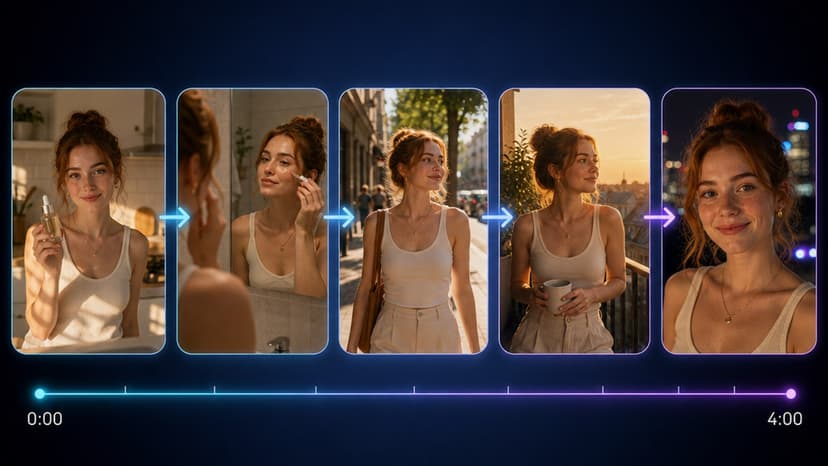
FLUX Kontext Character Consistency Review 2026
FLUX Kontext Pro edits and transforms images from a reference. Compare it with the Seedance 2.0, Kling 3.0 and Veo 3.1 video models on reference support and clip length before you buy credits.
TL;DR
FLUX Kontext Pro is an image model (text-to-image and image-to-image editing) that keeps a character consistent by working from a reference image; it does not generate video. For motion, Seedance 2.0 (4–15 seconds) and Veo 3.1 (4–8 seconds) offer reference-to-video, and Kling 3.0 offers text- and image-to-video at 3–15 seconds. Costs are quoted before you generate.
The field holds roughly 12 production-grade video models in 2026
Two sentences capture the split: most tools handle single-shot motion well yet drift on repeated characters across scenes, while the few that keep identity stable rely on explicit reference pipelines. The axis that separates them is reference-frame adherence how closely face and clothing match the reference from shot to shot.
Landscape of available options
Seedance 2.0, Veo 3.1 and Wan 2.7 offer reference-to-video modes, and Kling 3.0 animates from a start image. Sora 2 was retired on 2026-09-24. FLUX Kontext Pro works on still images, editing and transforming them from a reference. Users reach these controls after sign-up at /auth/register and credit purchase.
Dimension that matters most
Reference adherence beats raw motion quality for series work. Repeat the same face across several cuts and most models drift. FLUX Kontext Pro tackles this on the image side: it edits from a single reference image, so you can make consistent stills of a character before animating them.
Reference pipeline details
Upload one clear face shot. Describe the change you want (pose, scene or outfit) and generate a still. To add motion, send the result to an image-to-video or reference-to-video model.
Head-to-head on reference adherence
A quick comparison shows what each model offers for reference-driven work.
| Model | Output | Max clip length | Reference input | Credit cost |
|---|---|---|---|---|
| FLUX Kontext Pro | Image | n/a | Image-to-image editing | quoted in-app |
| Seedance 2.0 | Video | 15s | Reference-to-video | quoted in-app |
| Kling 3.0 | Video | 15s | Image-to-video (start frame) | quoted in-app |
| Veo 3.1 | Video | 8s | Reference-to-video | quoted in-app |
Clip lengths and modes come from the Flixly model catalog; costs are quoted in-app before you generate.
Clear picks per use case
Pick Reference to Video when you need multi-character scenes locked to one face set. Pick Image to Video when single-shot motion matters more than identity. Pick Video to Video if you already hold a consistent source clip and want style shifts only.
How to run a consistency test
Create an account. Load a clear character reference image into the Reference to Video tool. Enter a prompt that spans three scenes. Generate with a reference-to-video model such as Seedance 2.0, Veo 3.1 or Wan 2.7. Review the start, middle and end of the clip for edge drift.
Credit math for series work
The app quotes the cost of each shot before you run it, so a 12-shot episode is priced up front.
Limits observed in May 2026
Rapid head turns and extreme lighting changes from day to night are still the most common causes of identity drift. The model does not support audio-driven lip sync; use Lip Sync Video as a follow-up pass.
When to choose the alternative routes
Text to Video works for one-off clips that never repeat characters. Motion Poster suits static hero images turned into short loops without identity needs. Shorts Generator fits vertical 9:16 work where a single face appears once.
Pick Reference to Video if your workflow repeats the same cast across episodes. Pick Image to Video if each generation stands alone.
Frequently Asked Questions
What is FLUX Kontext?▾
FLUX Kontext Pro is a FLUX image model for advanced image editing and transformation. It supports text-to-image and image-to-image, so you can keep facial features, clothing and poses consistent by editing from a reference image. Available on Flixly, with the cost quoted before you generate.
How good is FLUX Kontext character consistency?▾
Because it edits from a reference image instead of generating from scratch, it holds a character well across repeated edits. Results vary with pose and lighting, so test with your own reference. Ideal for comics and ads.
FLUX Kontext vs FLUX 2 Pro?▾
Both are FLUX image models on Flixly. FLUX Kontext Pro does text-to-image and image-to-image editing; FLUX 2 Pro Edit is image-to-image only, at 1K or 2K. Costs for each are quoted before you generate, so test both on your character.
How to use FLUX Kontext on Flixly?▾
Go to AI Image Generator, upload reference, add multi-turn prompts. Each image's cost is quoted up front. Integrate with Image to Video for motion.
FLUX Kontext cost on Flixly?▾
Cost per image is quoted before you generate. Flixly sells credit packs rather than monthly plans.
Best models for character consistency 2026?▾
There is no single score to rank them. For stills, FLUX Kontext Pro and GPT-Image 2.0 Edit edit from a source image; for video, Seedance 2.0, Veo 3.1 and Wan 2.7 offer reference-to-video, and Kling O3 Reference is built to keep each character the same from every angle. Test on Flixly for direct comparison.
Multi-turn AI with FLUX Kontext examples?▾
Generate base character, then refine poses/scenes over several turns. Works for comics, avatars, product shots. See Flixly workflows.