Extend AI Video Clips Without Losing Quality
Short AI clips often end before your message lands. Learn how to continue a clip from its last frame with Image to Video or First to Last Frame in Flixly, and keep motion and lighting consistent across the join.
TL;DR
Flixly doesn't have a one-click extend button for video. Instead, export the last frame of your clip, feed it to Image to Video (or First to Last Frame with Seedance 2.0), prompt the same action and lighting, and generate a continuation up to the model's maximum length (15 seconds for Seedance 2.0, Kling 3.0 and Wan 2.7). Join the clips in an editor. For longer multi-shot videos, use the Long Video Generator.
Short clips break viewer attention
A short output from text-to-video can leave a social post feeling unfinished, and viewers may scroll away before the message lands. Continuing the clip you already like is often the better move.
Standard editing tools create visible cuts
Slowing footage down or looping it on a timeline makes the extra seconds obvious: motion stutters, actions repeat, and the join is easy to spot. A generated continuation adds genuinely new motion instead.
Continue the clip from its last frame
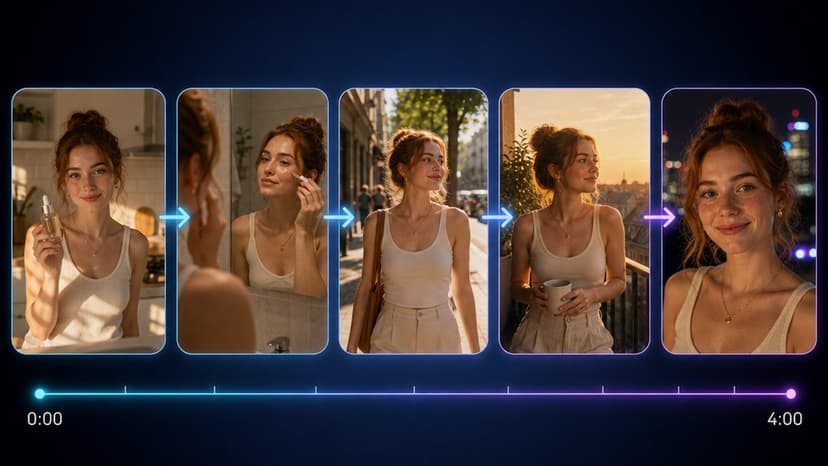
Flixly doesn't have a one-click extend button for video, but you can get the same result. Export the final frame of your clip as an image and upload it to Image to Video. Describe the action already in progress and pick a model that supports image-to-video, such as Seedance 2.0, Kling 3.0 or Wan 2.7. The model starts from that exact frame, so character position, framing and lighting carry over.
Worked example
Start with a short Kling 3.0 clip of a person walking down a city street at 720p. Export the last frame. In Image to Video, upload it, choose Kling 3.0 at the same resolution and aspect ratio, and prompt "continue the same walk down the city street, steady camera, same lighting". Choose a duration, check the credit quote, and generate. Join the new clip to the original in your editor and scrub through the join to check for jumps in motion or color.
Model comparison for extension tasks
| Model | Image to Video | First to Last Frame | Durations | Resolutions |
|---|---|---|---|---|
| Seedance 2.0 | Yes | Yes | 4-15s | 480p, 720p, 1080p, 4k |
| Kling 3.0 | Yes | No | 3-15s | 720p, 1080p, 4k |
| Veo 3.1 | Yes | No | 4s, 6s, 8s | 720p, 1080p, 4k |
| Wan 2.7 | Yes | No | 2-15s | 720p, 1080p |
Credit cost for each is quoted in-app and depends on duration and resolution.
Edge cases that still need manual checks
Dialogue is the hardest case: a continuation won't match an existing voice track. Generate the extra footage, then use Lip Sync with your audio to realign the mouth movement. Fast camera moves and busy scenes are more likely to drift, so keep continuations short for those shots and compare a couple of models.
First-to-last frame for precise control
If you know where the shot needs to end, use First to Last Frame with Seedance 2.0 or Seedance 2.0 Fast. Upload the last frame of your clip as the first frame and your desired end pose as the last frame. The model generates the motion between them, locking both the start and the end. It works best when the two frames share the same background and lighting.
When the scene needs more than one shot
If you need a longer piece rather than a single continuous take, the Long Video Generator is built for multi-shot videos. For a single consistent character across new shots, Reference to Video mode with a model such as Seedance 2.0 or Wan 2.7 helps keep the subject recognisable.
Limits you hit at scale
Each generation is capped by the model's maximum duration, so long extensions mean chaining several continuations, and every chain step is another chance for drift. Match resolution and aspect ratio across segments and review each join. Credit cost scales with duration and resolution, and the app quotes it before you run the job.
Next step
Open Image to Video, upload the last frame of your short clip, and generate your first continuation.
Frequently Asked Questions
Does Flixly have a dedicated video extension tool?▾
No. You extend a clip by generating a continuation from its last frame with Image to Video or First to Last Frame, then joining the two clips. For longer sequences built from several shots, use the Long Video Generator.
How long can each continuation be?▾
It depends on the model. Seedance 2.0, Kling 3.0 and Wan 2.7 offer durations up to 15 seconds per generation, while Veo 3.1 offers 4, 6 or 8 seconds. Longer clips give motion more time to drift, so shorter continuations are easier to keep consistent.
Does a 1080p continuation cost more credits than 720p?▾
Generally yes, higher resolution and longer duration cost more for the same model. The app quotes the exact amount before you run it.
Can I extend clips that contain text overlays?▾
AI models often redraw or warp on-screen text. It is usually cleaner to generate the footage without text, extend it, and add the text in an editor afterwards.
What happens if the prompt contradicts the original clip action?▾
The start frame and the prompt pull in different directions, which can produce an awkward change of motion near the join. Describe the action that is already happening in the last frame.