
FLUX 3 Max and Kling 4.0 Now Make 4K Video on Flixly
FLUX 3 Max from Black Forest Labs and Kling 4.0 from Kling AI now render 4K video on Flixly, and FLUX 3 Max adds a 2K tier. We gave both the same prompt at 4K: see the clips, full-resolution crops, times and which to pick.
TL;DR
FLUX 3 Max and Kling 4.0 can now render 4K video on Flixly, about 3840 pixels wide, and FLUX 3 Max also offers 2K. FLUX 3 Max generates at 720p and upscales, finishing a 5-second 4K clip in under a minute. Kling 4.0 renders at 4K from the start and runs up to 30 seconds, but takes a few minutes. Choose 4K under Resolution in the AI Video Generator.
FLUX 3 Max and Kling 4.0 now make 4K video on Flixly: pick 4K in the resolution setting and get a 3840-pixel-wide clip from a prompt, an image or keyframes. FLUX 3 Max also gains a 2K tier. Both are in the AI Video Generator, and we gave both the same prompt so you can compare them below.
What is new: 4K on FLUX 3 Max and Kling 4.0
Black Forest Labs' FLUX 3 Video generates at resolutions from HD (720p) to UHD (4K), and FLUX 3 Max is its fast version. Kling AI's Kling 4.0 now renders native 4K as well. On Flixly:
| FLUX 3 Max | Kling 4.0 | |
|---|---|---|
| Resolutions | 720p, 1080p, 2K or 4K | 720p, 1080p or 4K |
| 4K frame | About 3840×2160, depending on the aspect ratio | 3840×2160 at 16:9 |
| Length | 5 to 20 seconds | 3 to 30 seconds |
| Start from | Text, a start image, start and end frames, or a keyframe timeline | Text, reference images and characters, or start and end frames |
| How 4K is made | Generated at 720p and upscaled to 2K or 4K | Rendered at 4K |
| Typical 4K wait | Under a minute for 5 seconds | Three to four minutes for 5 seconds |
4K costs more per second than 1080p on both models, and Flixly shows the credit amount before you generate. The FLUX 3 Max and Kling 4.0 model pages list the current rates.
Real examples: the same prompt on both models
Both clips below were made on Flixly at 4K, 5 seconds, from text alone. Each is the first result we got. The players show a 1080p copy so the page loads quickly; the stills under each clip are full-resolution crops from the 4K file. Times run from pressing Generate to the finished video.
Slow aerial push-in toward a white lighthouse on a rocky headland at golden hour, waves breaking below, gulls drifting past, crisp fine detail
FLUX 3 Max at 4K
4K, 5 seconds, auto aspect ratio: 3840×2176, 24 fps, with generated sound. It took 53 seconds.

Kling 4.0 at 4K
4K, 5 seconds, 16:9: 3840×2160, 24 fps, with native sound. It took 212 seconds.
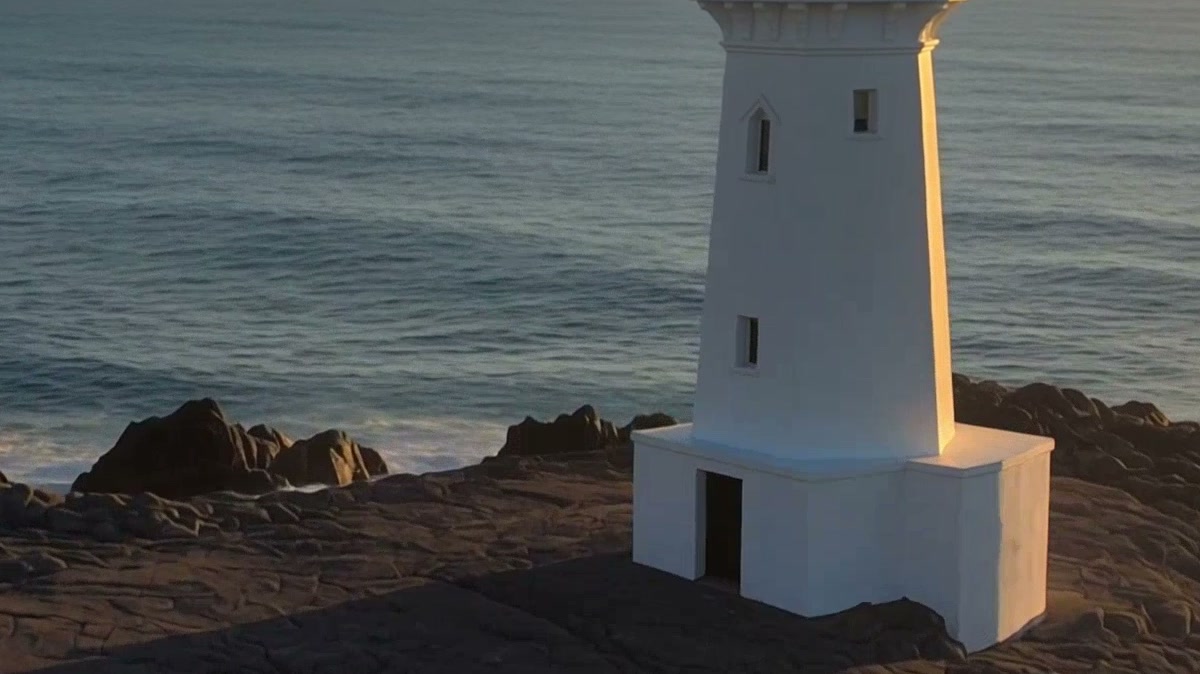
FLUX 3 Max came back four times faster and framed a wider headland with the keeper's cottage. Kling 4.0 took longer and rendered at 4K from the start. Both followed the prompt, and both clips play with sound.
How to make a 4K video on Flixly
- Open the AI Video Generator and pick FLUX 3 Max or Kling 4.0.
- Write your prompt, or switch to Image or Start + end to begin from your own frames.
- Under Resolution, choose 4K (or 2K on FLUX 3 Max).
- Set the length, check the credit amount next to the button, and press Generate.
Use 1080p while you explore an idea, then render the final take at 4K. For quick drafts, Kling 4.0 Flash runs at 720p.
Which one should I pick for 4K?
Pick FLUX 3 Max when speed matters, or when you need keyframes or a 2K middle step: its 4K is upscaled from a 720p generation and arrives in under a minute. Pick Kling 4.0 when you want native 4K detail, longer clips of up to 30 seconds or reference characters, and can wait a few minutes.
Frequently Asked Questions
Can FLUX 3 Max make 4K video?▾
Yes. FLUX 3 Max offers 720p, 1080p, 2K and 4K on Flixly. FLUX 3 Max generates at 720p and upscales to 2K or 4K, so a 5-second 4K clip usually arrives in under a minute, at about 3840 by 2160 depending on the aspect ratio.
Can Kling 4.0 make 4K video?▾
Yes. Kling 4.0 now renders native 4K on Flixly, 3840 by 2160 at 16:9, from text, reference images or start and end frames. A 5-second Kling 4.0 4K clip took about three and a half minutes in our test and came back with sound.
Is FLUX 3 Max or Kling 4.0 better for 4K?▾
FLUX 3 Max is faster and supports keyframe timelines and a 2K tier. Kling 4.0 renders at 4K from the start, takes reference characters and runs up to 30 seconds. In our same-prompt test both followed the prompt; FLUX 3 Max finished four times sooner.
How do I make a 4K video on Flixly?▾
Open the AI Video Generator, pick FLUX 3 Max or Kling 4.0, write a prompt or add your frames, and choose 4K under Resolution. Flixly shows the credit amount before you press Generate, and both FLUX 3 Max and Kling 4.0 deliver a video file you can download.
Does 4K cost more than 1080p?▾
Yes. On both FLUX 3 Max and Kling 4.0, 4K costs more per second than 1080p, and the FLUX 3 Max 2K tier sits in between. Flixly shows the exact credit amount before you generate, so you can draft at 1080p and render the final take at 4K.
Do I need a subscription for 4K video on Flixly?▾
No. FLUX 3 Max and Kling 4.0 run on Flixly credits, which never expire, with no subscription. The 4K options are available to every account in the AI Video Generator.