
Hyper3D Low Poly Is Live on Flixly: Game-Ready 3D Models on Budget
Hyper3D Low Poly is live on Flixly. Describe an object or upload a photo and get a lightweight, game-ready GLB with the face count you set, quad or triangle topology, PBR textures up to 4K and an optional skeleton. See five real models made on Flixly, down to 651 triangles.
TL;DR
Hyper3D Low Poly, from the makers of Rodin, is now in Flixly's 3D Generator. It turns a text prompt or one to four photos into a low-poly GLB close to the face count you set, from 200 to 10,000, with quad, triangle or n-gon topology, shaded or PBR textures at 2K or 4K, and optional auto-rigging. Our examples finished in 29 to 47 seconds.
Hyper3D Low Poly is live on Flixly: describe an object or upload a photo and get a game-ready, low-poly 3D model with a polygon budget you set, from 200 to 10,000 faces. Pick quads or triangles, shaded or PBR textures at 2K or 4K, and add a skeleton with one switch. It is in the 3D Generator, and every model downloads as GLB.
What is Hyper3D Low Poly?
Hyper3D Low Poly is a 3D model from Hyper3D, the team behind the Rodin 3D generator. Instead of a dense scan that has to be cleaned up before it can go into a game, it builds a lightweight mesh close to the face count you ask for, with the detail baked into the textures. On Flixly:
| Hyper3D Low Poly on Flixly | |
|---|---|
| Inputs | A text prompt, or one to four photos of an object |
| Face count | 200 to 10,000 (default 4,000) |
| Topology | Quad, Raw (triangles) or NGon |
| Material | Shaded, PBR, Hybrid or None (geometry only) |
| Textures | Basic (2K) or High (4K) |
| Auto-rig | Optional skeleton with human, quadruped, bird, dragon and kaiju templates |
| Output | GLB, previewed in the browser |
| Typical time | About 30 to 50 seconds |
Flixly shows the credit amount before you generate, and auto-rigging adds to it. The Hyper3D Low Poly model page lists the current rates.
Real examples, made on Flixly
Every model below was made in the 3D Generator on Flixly with the settings shown, the first result each time. Times run from pressing Generate to the finished file. The videos are turntables rendered from the delivered GLB files; the wireframe and skeleton pictures are drawn from the same files.
From text: a ceramic owl
Text tab, defaults: 4,000 faces, Quad, Shaded, Basic. It came back with 3,760 triangles and a 2K texture in 37 seconds.
A small ceramic owl figurine with big round eyes and carved wing feathers, matte white glaze
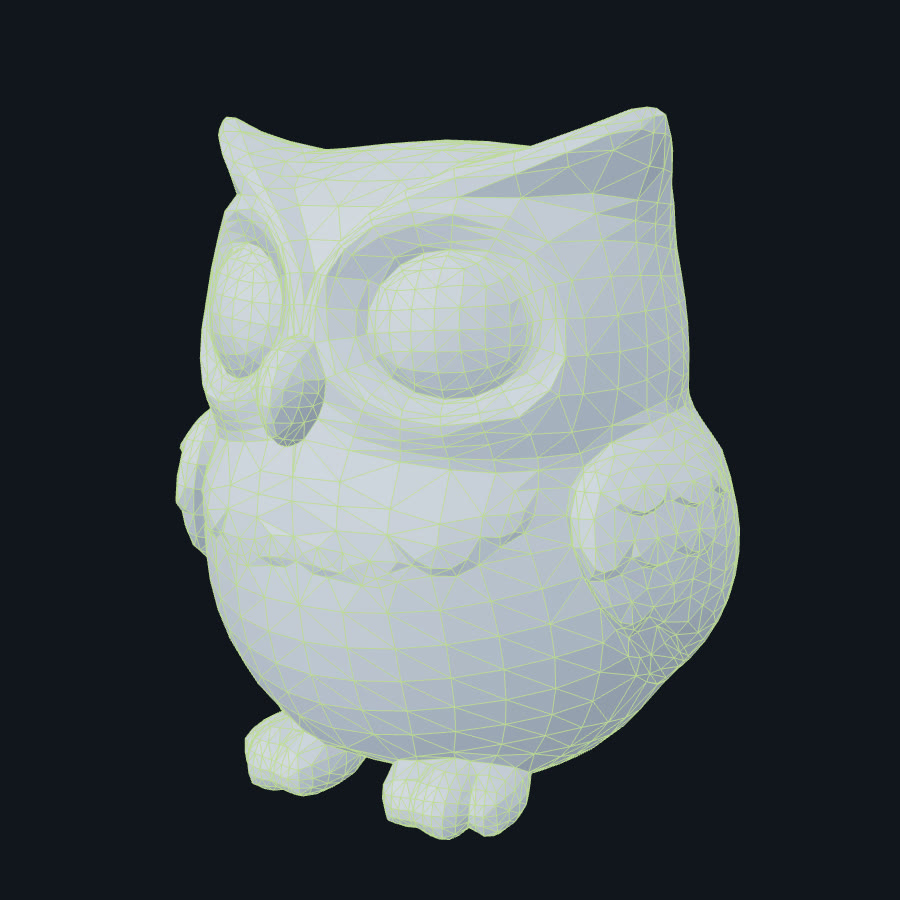
The wireframe shows how light the mesh is: the carved feathers and the eye rims are mostly in the texture, not in extra polygons.
From text: a PBR treasure chest at 4K
Text tab, 4,000 faces, Quad, PBR, High. It came back with 3,786 triangles and three 4K PBR maps (colour, metal and roughness, normal) in 41 seconds.
A stylized wooden treasure chest with iron bands, a domed lid and a brass lock plate, game asset
From a photo: an explorer character
This input photo was made on Flixly with Nano Banana 2 in 21 seconds:
Full-body stylized game character: a cheerful young explorer with a green jacket, brown backpack, cargo shorts and hiking boots, standing straight in an A-pose with arms slightly away from the body and feet apart, facing the camera. The whole figure is in frame, plain light grey background, soft even studio lighting, clean 3D render style.
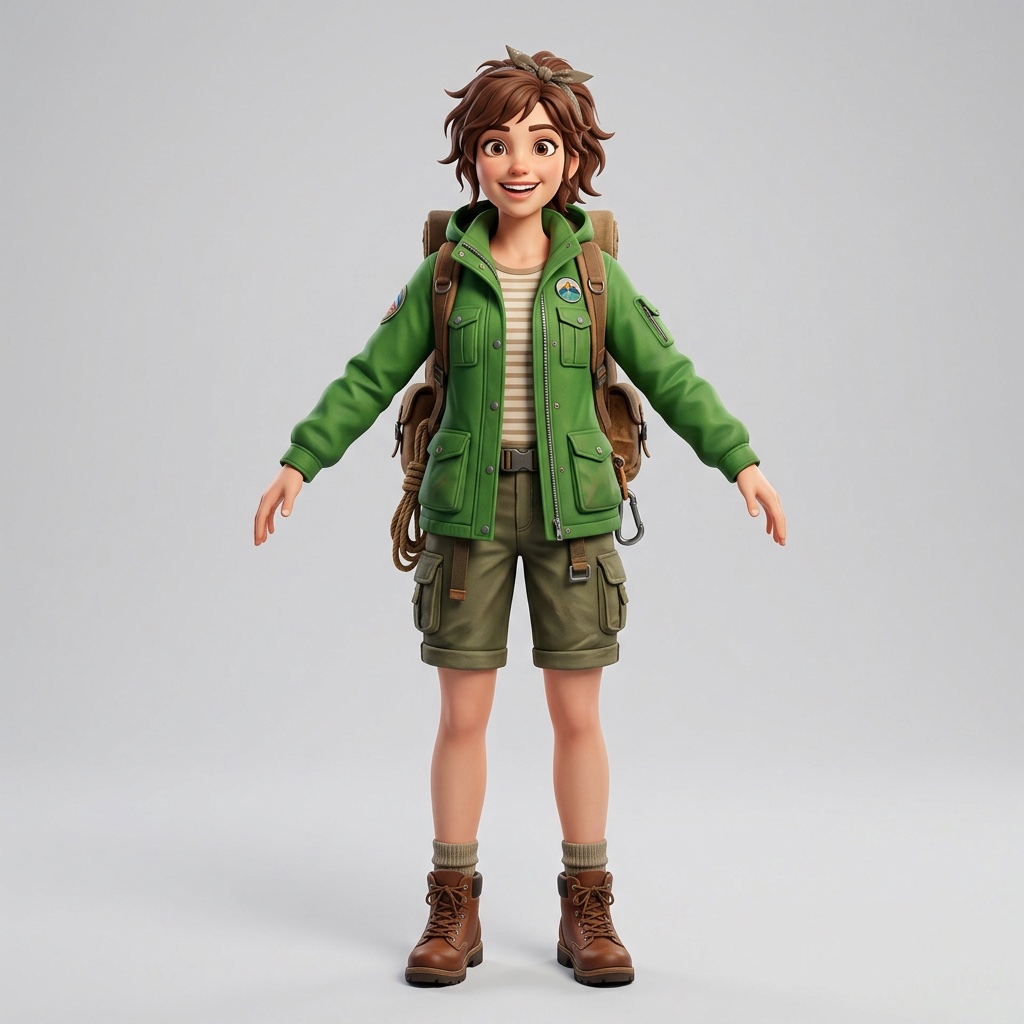
Image tab, one view, defaults. It came back with 4,094 triangles in 41 seconds.
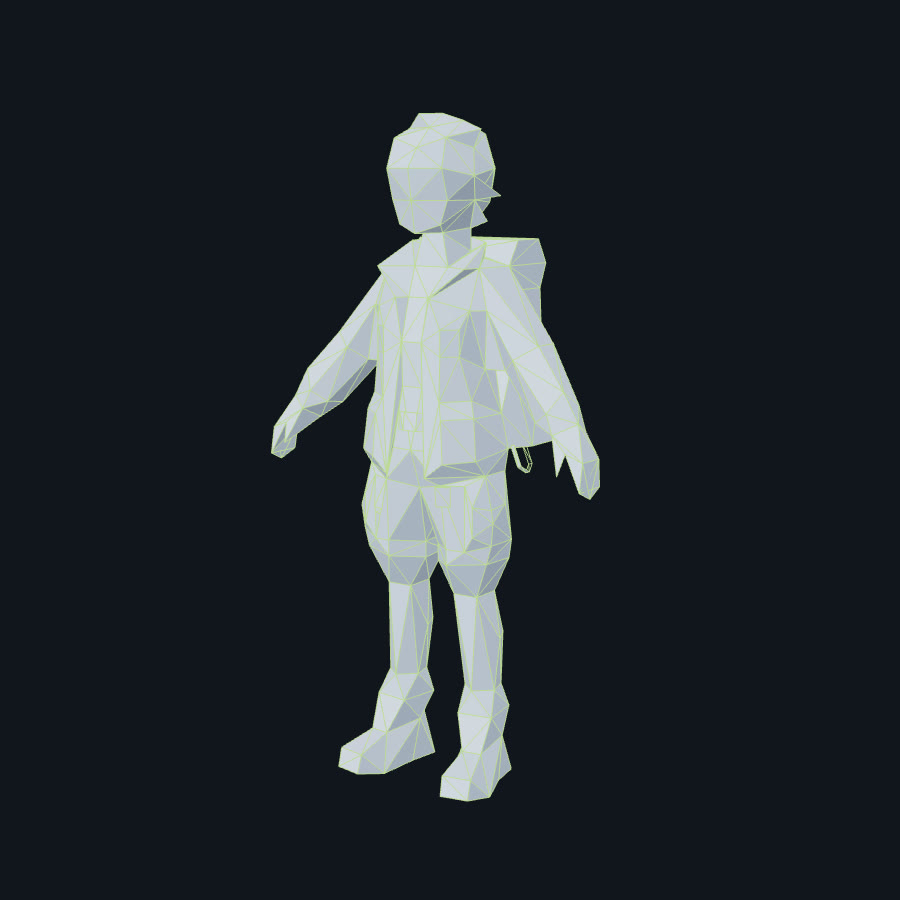
The same photo on a tight budget: 800 faces
Image tab, 800 faces, Raw (triangles). It came back with 651 triangles in 29 seconds: few enough for a mobile game or a crowd of background characters, with the jacket, backpack and boots still carried by the texture.
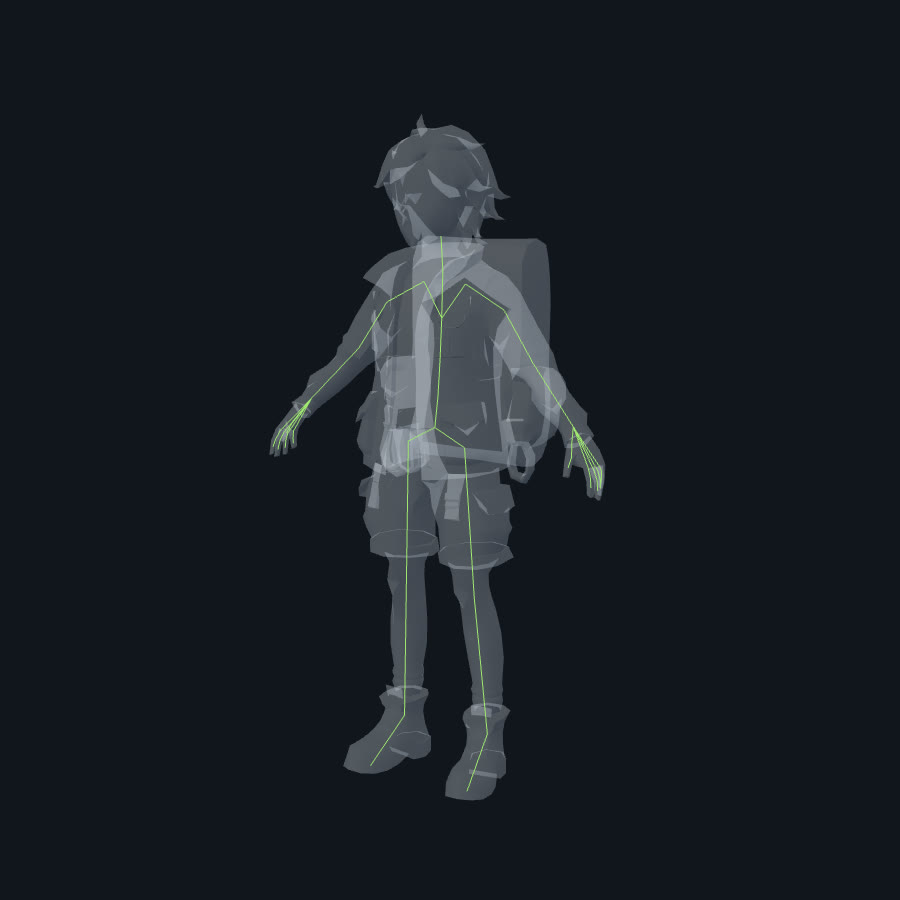
Auto-rig: a skeleton in one switch
Image tab, the same photo, 4,000 faces, Auto-rig on with the human skeleton. It came back with 4,064 triangles and a 52-joint skeleton in 47 seconds, ready to import into a game engine or animation tool and animate.
How to make a low-poly 3D model with Hyper3D Low Poly
- Open the 3D Generator and choose the Image or Text tab.
- Upload one to four photos of a single object, or describe it in a prompt.
- Pick Hyper3D Low Poly as the model.
- Set the Face count: around 500 to 1,500 for mobile and background props, 4,000 for a hero prop, up to 10,000 for close-ups.
- Choose Topology, Material (PBR for game engines) and Textures (High for 4K).
- Turn on Auto-rig for characters and pick a skeleton under Advanced options, then press Generate.
The face count is a target: our examples landed a little under it each time.
Which 3D model should I use?
Pick Hyper3D Low Poly when the polygon count matters: game assets, mobile, AR and anything that has to run in real time. For the most detailed meshes from one photo, see Meshy 7.1, and for game-ready characters with walk and run clips, see Idol Max and its launch post.
Frequently Asked Questions
What is Hyper3D Low Poly?▾
Hyper3D Low Poly is a 3D model from Hyper3D, the team behind Rodin. It turns a text prompt or photos of an object into a lightweight, game-ready mesh close to a face count you choose, with the detail baked into the textures. On Flixly, Hyper3D Low Poly delivers GLB files.
How many polygons does a Hyper3D Low Poly model have?▾
You choose a target from 200 to 10,000 faces, and Hyper3D Low Poly lands close to it. In our examples, a 4,000-face target gave 3,760 to 4,094 triangles and an 800-face target gave 651 triangles.
Can Hyper3D Low Poly make a model from a photo?▾
Yes. Use the Image tab of the 3D Generator and upload one to four photos of a single object from different angles. Hyper3D Low Poly uses the photos for both the shape and the textures, and an optional details box covers materials the photos do not show clearly.
Does Hyper3D Low Poly support PBR textures and rigging?▾
Yes. Choose PBR for colour, metal and roughness, and normal maps at 2K or 4K. Turn on Auto-rig and Hyper3D Low Poly adds a skeleton from a human, quadruped, bird, dragon or kaiju template; our rigged explorer came back with 52 joints.
What file format does Hyper3D Low Poly export on Flixly?▾
Hyper3D Low Poly models download from Flixly as GLB, with the textures embedded, and preview in the browser before you download. GLB imports directly into Blender, Unity, Unreal Engine, Godot and most web 3D viewers.
Do I need a subscription to use Hyper3D Low Poly?▾
No. Hyper3D Low Poly runs on Flixly credits, which never expire, with no subscription. Flixly shows the Hyper3D Low Poly credit amount before you generate, and auto-rigging adds to it.