Kandinsky 6.0 on Flixly: Pro, Lite and VSR Video Upscaling
Kandinsky Lab's Kandinsky 6.0 is on Flixly. Pro makes cinematic, high-fidelity clips and Lite makes fast, low-cost drafts, both with synchronized sound and built-in upscaling to 1080p or 4K. Kandinsky 6.0 VSR sharpens any video up to 4x.
TL;DR
Kandinsky 6.0 from Kandinsky Lab is live on Flixly in four models. Pro makes cinematic, high-fidelity 5-second clips and Lite makes fast, low-cost drafts, both from a prompt or an image, with synchronized sound and optional upscaling to 1080p or 4K. Kandinsky 6.0 VSR and VSR Lite upscale any video 2x, 2.25x or 4x in the Video Upscaler.
Kandinsky 6.0 is the newest video family from Kandinsky Lab, and it is now on Flixly: Pro for cinematic, high-fidelity clips, Lite for fast, low-cost drafts, and VSR for sharpening any video to a higher resolution. Pro and Lite make 5-second clips with synchronized sound from a prompt or an image. Open the Video Generator with Kandinsky 6.0 Pro to try it.
See Kandinsky 6.0 in action
The clips below were made on Flixly with the settings shown and include the sound the model generated. The Pro and Lite clips are unedited apart from web compression; the VSR comparison puts two crops side by side.
Kandinsky 6.0 Pro
Text-to-video, 480p, 16:9:
A hot air balloon rises slowly over misty green valleys at sunrise, its burner roaring in short bursts, birds calling below. Slow aerial drift alongside the balloon, golden light breaking through the mist. Cinematic.
Kandinsky 6.0 Lite
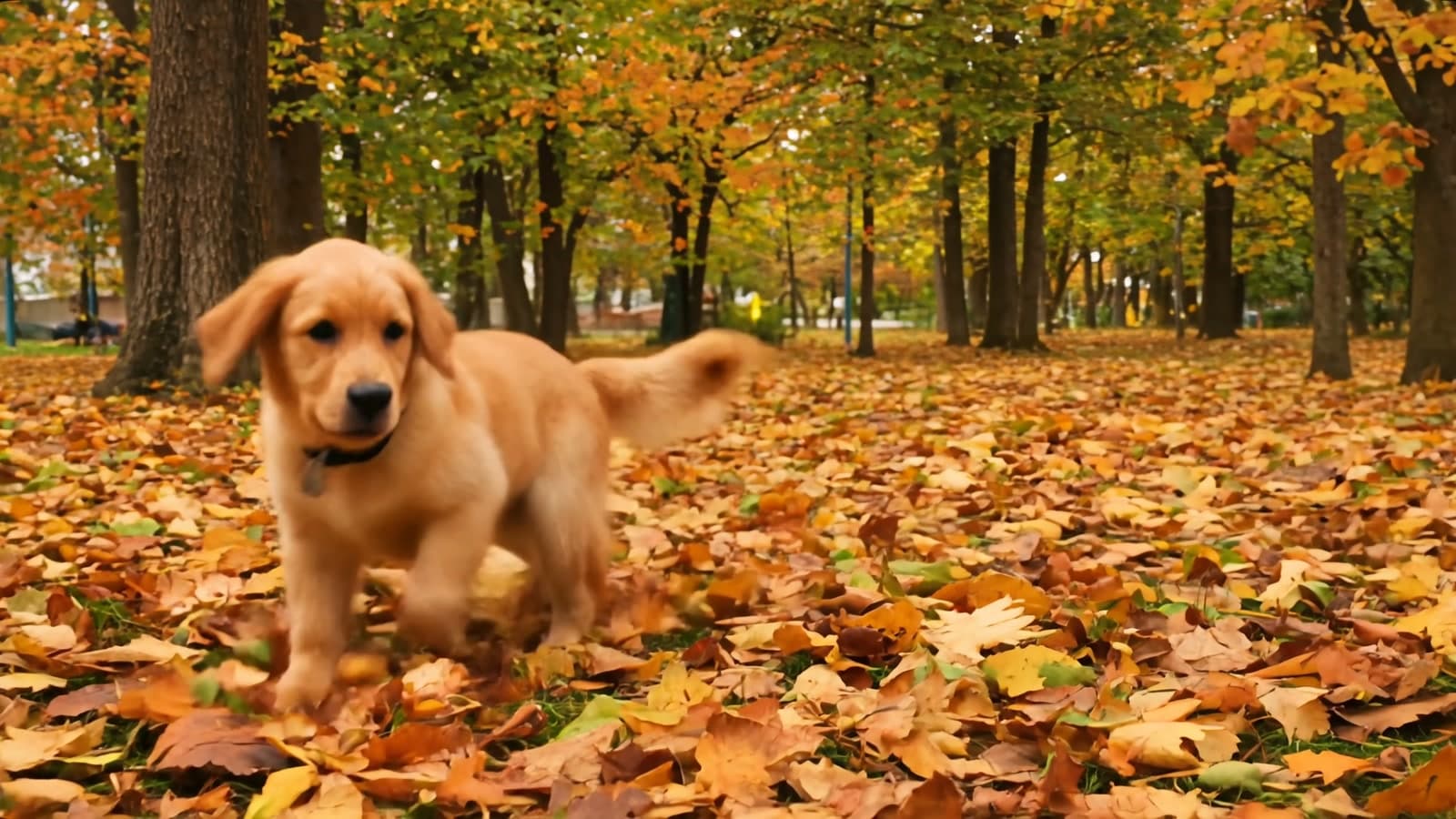
Text-to-video, 1080p with the built-in upscaling, 16:9:
A golden retriever puppy bounds through a big pile of autumn leaves in a sunny park, leaves crunching and flying into the air, birds chirping nearby. Low tracking shot, warm afternoon light.
Kandinsky 6.0 VSR
Here is a 480p Kandinsky 6.0 Pro clip of a lighthouse keeper in a storm, upscaled 4x with Kandinsky 6.0 VSR. Each half shows the same crop of the same frame at the same size: on the left, the original 480p clip simply enlarged; on the right, the VSR result.
What is Kandinsky 6.0?
Kandinsky 6.0 is a video generation family from Kandinsky Lab. On Flixly it comes as four models:
- Kandinsky 6.0 Pro is the flagship. It aims for cinematic motion, rich detail and close prompt adherence, and it is the one to use for a final shot.
- Kandinsky 6.0 Lite is built for speed and cost. Use it to try ideas, compare prompts and find the shot before you spend more on Pro.
- Kandinsky 6.0 VSR is video super-resolution. It upscales a clip 2x, 2.25x or 4x and restores fine detail while keeping frames stable from one to the next, without flicker.
- Kandinsky 6.0 VSR Lite is the faster, lower-cost version of VSR, for previews and large batches.
Pro and Lite both generate sound in the same pass as the picture: footsteps, weather, voices in the room, music in the background. Describe the sound in your prompt and it follows along.
Kandinsky 6.0 at a glance
| Spec | Kandinsky 6.0 Pro and Lite on Flixly |
|---|---|
| Creator | Kandinsky Lab |
| Modes | Text-to-video and image-to-video |
| Length | 5 seconds per clip |
| Resolution | 480p, or upscaled to 1080p or 4K with the built-in super-resolution |
| Aspect ratio | 16:9, 9:16, 1:1, 4:3, 3:4, or Auto (keeps your image's shape) |
| Audio | Synchronized sound generated with the video, on by default |
| Prompt help | Optional prompt expansion that turns a short idea into a detailed scene and sound description |
| Where to use | Video Generator |
| Model pages | Kandinsky 6.0 Pro, Kandinsky 6.0 Lite |
| Spec | Kandinsky 6.0 VSR and VSR Lite on Flixly |
|---|---|
| Input | Any video, generated or filmed |
| Scale factor | 2x, 2.25x (turns 480p into 1080p) or 4x |
| Length | Upscales the first 5 seconds of a clip |
| Where to use | Video Upscaler |
| Model pages | Kandinsky 6.0 VSR, Kandinsky 6.0 VSR Lite |
How to make a video with Kandinsky 6.0
- Open the Video Generator and pick Kandinsky 6.0 Pro or Kandinsky 6.0 Lite.
- Choose Text to start from a prompt, or Image to animate a picture you upload.
- Describe the scene: who or what is in it, what happens, how the camera moves, and what you should hear.
- Pick a resolution. 480p is native and the quickest; 1080p and 4K add the built-in upscaling.
- Pick an aspect ratio, or keep Auto to match your image.
- Leave Generate audio on for sound, or switch it off for a silent clip.
- Check the estimate and generate.
How to upscale a video with Kandinsky 6.0 VSR
- Open the Video Upscaler and upload a clip, or send one from your history.
- Pick Kandinsky 6.0 VSR for the best detail, or Kandinsky 6.0 VSR Lite for a quicker, cheaper pass.
- Choose a scale factor: 2.25x takes a 480p clip to 1080p, and 4x goes further.
- Check the estimate and upscale. VSR works on the first 5 seconds of a clip, so trim longer videos to the part you want first.
Pro or Lite?
Start with Lite. It is the quick, inexpensive way to test a prompt, an image or a camera move, and its 480p drafts come back fast. When you have the shot you want, generate it with Pro for the extra fidelity and motion quality. Pro takes noticeably longer to render than Lite, so it pays to settle the idea first.
If you already like a Lite or Pro take at 480p, you do not need to generate it again to get a sharper version: run it through Kandinsky 6.0 VSR instead.
How to write a Kandinsky 6.0 prompt
- Lead with the subject and the action. "A golden retriever puppy bounds through a pile of autumn leaves" is a clearer start than a list of adjectives.
- Say how the camera moves. "Low tracking shot", "slow push-in" or "static wide shot" keeps the motion intentional.
- Describe the light and the mood. Time of day, weather and colour ("golden light breaking through the mist") shape the whole frame.
- Write the sound. Name what we should hear: rain on glass, crunching leaves, a crowd murmuring, distant thunder.
- Keep it to one beat. Five seconds fits one clear moment. Save a second action for the next clip.
- Try prompt expansion for short ideas. Under Advanced options, Expand prompt turns a one-line idea into a detailed description of the picture and the sound.
What it costs
Lite is the low-cost option and Pro is the premium one. Each clip is priced by model, mode and resolution: 1080p and 4K cost more than 480p because they include the upscaling. VSR is priced on the size and length of the upscaled video. Flixly shows the estimate before you generate, and you only pay for what you run.
Try it
Kandinsky 6.0 Pro and Lite are live in the Video Generator, and Kandinsky 6.0 VSR and VSR Lite are in the Video Upscaler.
Frequently Asked Questions
What is Kandinsky 6.0?▾
Kandinsky 6.0 is a video generation family from Kandinsky Lab. On Flixly it comes as Kandinsky 6.0 Pro for cinematic, high-fidelity clips, Kandinsky 6.0 Lite for fast, low-cost drafts, and Kandinsky 6.0 VSR and VSR Lite for upscaling video.
What is the difference between Kandinsky 6.0 Pro and Lite?▾
Pro is the flagship: it aims for the best detail, motion and prompt adherence, and takes longer to render. Lite is faster and much cheaper, which makes it the right choice for testing prompts and ideas. A good workflow is to find the shot with Lite, then generate the final take with Pro.
Does Kandinsky 6.0 generate sound?▾
Yes. Pro and Lite generate synchronized sound in the same pass as the video, and it is on by default. Describe what you want to hear in your prompt. You can switch Generate audio off for a silent clip.
How long are Kandinsky 6.0 videos and what resolution are they?▾
Each clip is 5 seconds long. Kandinsky 6.0 renders at 480p, and you can choose 1080p or 4K to have the clip upscaled by its built-in super-resolution in the same request.
Can I animate my own image with Kandinsky 6.0?▾
Yes. Choose Image in the Video Generator, upload a picture, and describe the motion. With the aspect ratio on Auto the video keeps your image's shape; picking another ratio crops the image to fit.
What does Kandinsky 6.0 VSR do?▾
Kandinsky 6.0 VSR is video super-resolution. It upscales generated or filmed video 2x, 2.25x or 4x and restores fine detail while keeping frames stable. It works on the first 5 seconds of a clip. VSR Lite is a faster, lower-cost version for previews.
How much does Kandinsky 6.0 cost on Flixly?▾
Lite is the low-cost option and Pro is the premium one. The price depends on the model, the mode and the resolution, and VSR is priced on the size and length of the upscaled video. Flixly shows the estimate before you generate.