
LTX 2.5 Video Tools on Flixly: Reframe, SDR to HDR, Upscale and Alpha
Four video tools built on Lightricks' LTX 2.5 are live on Flixly: Reframe turns landscape clips vertical without cropping, SDR to HDR adds real HDR highlights, Upscale goes to 1080p, 4K or 8K, and Alpha Gen cuts out the subject without a green screen. See four real results with their settings and times.
TL;DR
Flixly now runs four post-production tools built on Lightricks' LTX 2.5 video model. Reframe changes a clip's aspect ratio by generating the missing picture, SDR to HDR outputs a 10-bit HLG HDR video, Upscale reaches 1080p, 4K or 8K, and Alpha Gen returns an alpha matte plus a transparent ProRes cutout. Each works on clips up to 15 seconds, and Flixly shows the price before you start.
Four video tools built on Lightricks' LTX 2.5 are live on Flixly: Reframe turns a landscape clip into a vertical or square one, SDR to HDR gives a normal clip real HDR highlights, Upscale takes a clip to 1080p, 4K or 8K, and Alpha Gen cuts the subject out of a clip without a green screen. Each one works on a clip you already have, up to 15 seconds long. Upload it, pick your settings, and Flixly shows the price before you start. Every example below is a real first result made on Flixly, with its settings and how long it took.
What are the LTX 2.5 video tools?
LTX 2.5 is the newest version of LTX, the open video model from Lightricks. Besides making new video, Lightricks has built a set of post-production tools on top of it: they take footage you already shot or generated and change its frame, its dynamic range, its resolution or its background. Flixly now runs four of them:
| Tool on Flixly | What it does | What you get |
|---|---|---|
| Reframe Video | Changes the aspect ratio by generating the missing part of the picture, so nothing is cropped away | A new clip at 720p or 1080p, with your audio |
| SDR to HDR | Rebuilds the highlight range that a normal (SDR) video squeezed out | A 10-bit HDR video (BT.2020, HLG) at your clip's resolution, without audio |
| Video Upscaler, LTX 2.5 Upscale | Upscales and adds fine detail | A clip at 1080p, 4K or 8K, with your audio |
| Video Background Removal, LTX 2.5 Alpha Gen | Separates the subject from the background, frame by frame | A black-and-white alpha matte (MP4) and a transparent cutout (ProRes 4444 .mov), without audio |
Lightricks describes Alpha Gen as working from ordinary video, with no green screen, mask or prompt, and as designed to keep soft, partly transparent detail such as hair, smoke, glass and water as well as hard edges. Its SDR to HDR guide is candid that the model reconstructs the highlight range rather than recovering what the camera never recorded. Lightricks also documents video upscaling to 1080p, 4K and 8K and outpainting, the technique behind Reframe.
What can you control on Flixly?
| Reframe | SDR to HDR | Upscale | Alpha Gen | |
|---|---|---|---|---|
| Clip length | Up to 15 seconds | Up to 15 seconds | Up to 15 seconds (8K: about 10 seconds at 24 fps) | Up to 15 seconds |
| Settings | New aspect ratio (9:16, 16:9, 1:1, 4:5, 5:4), 720p or 1080p, and where the original sits (centered, top, bottom, left or right) | None: the result keeps your clip's resolution | Target: 1080p, 4K or 8K | None: you get both the matte and the cutout |
| Audio | Kept | Not included | Kept | Not included |
| Price depends on | Clip length and output resolution | Clip length and your clip's resolution | Clip length and target | Clip length and your clip's resolution |
You see the estimate before you start, and the final charge is worked out from your clip's exact length.
Real examples
Every result below was made on Flixly with the tool and settings shown, from a 4 to 5 second clip that Flixly had generated earlier. Each is the first result we got. The videos are compressed for the web; the 4K upscale and the 1080p reframe are shown at a smaller size. Times run from submitting the clip to the finished result.
Reframe a diner scene from landscape to vertical
The original is a 16:9 clip of a waitress pouring coffee in a 1950s diner:
LTX 2.5 Reframe, 9:16 vertical, 1080p (1080 × 1920), original centered. It took 179 seconds.
The waitress, the counter and the neon sign are exactly where they were; everything above and below them is new. The model added a tiled ceiling with hanging lamps, continued the menu boards along the wall, and extended the counter and its red stools toward the camera, all lit like the original and steady from frame to frame. The original sound carried over.
Convert a sunset drive from SDR to HDR
The original is a 16:9 SDR clip of a red convertible on a coastal road at sunset:
LTX 2.5 SDR to HDR, 1280 × 720, 10-bit HEVC in BT.2020 with the HLG curve. It took 244 seconds.
Watch this one on an HDR screen, such as a recent iPhone, Mac or HDR TV; on a normal screen your browser maps it back to SDR and it looks much like the original. We measured a frame from the middle of the clip: the road, the car and the hills stay at their usual brightness, while the brightest part of the sky goes well past the white point of SDR video, which is where the extra punch comes from. The result has no sound, so keep the original audio track in your editor.
Upscale a night market to 4K
The original is a 1280 × 732 clip of a rainy night market:
LTX 2.5 Upscale, target 4K (3778 × 2160, the clip's own shape at 4K height). It took 229 seconds.
The difference shows best up close. Below is the same frame and the same 640 × 640 pixel area: on the left, the original simply enlarged to 4K; on the right, the LTX 2.5 result.
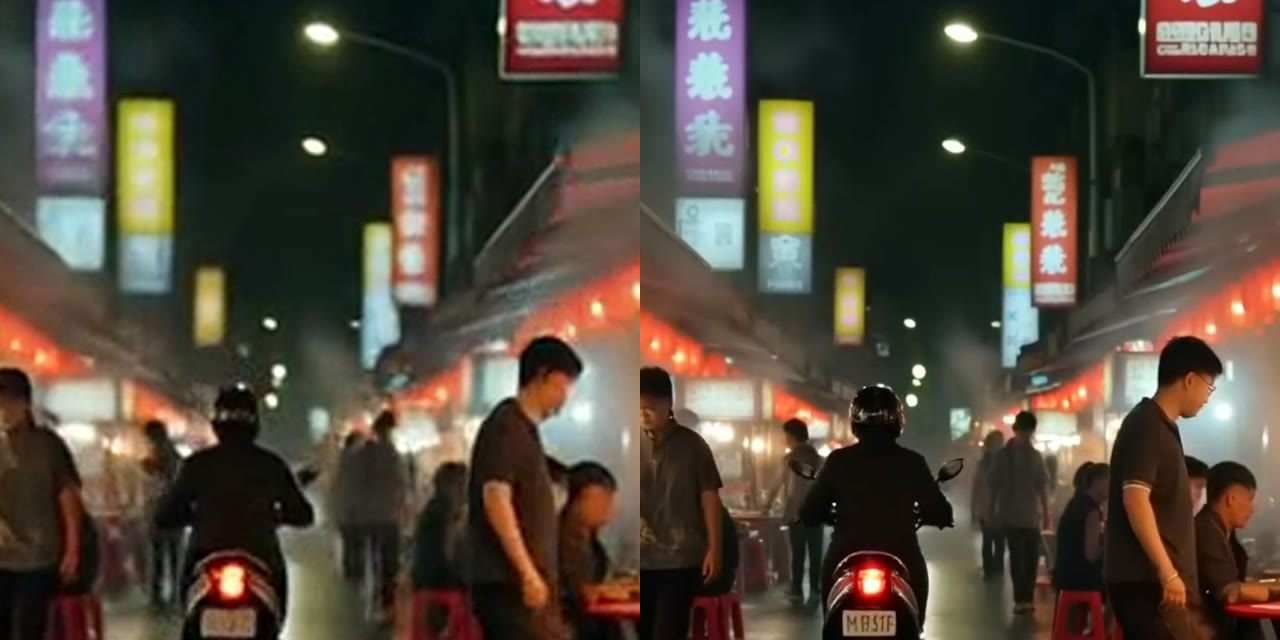
Edges, faces and the lettering on the signs are much sharper. Upscaling adds detail it has to invent: the scooter now has a readable number plate that was only a blur in the original. That is fine for a market scene, but check small text and faces before you use an upscale where those details matter.
Cut a person out of a harbor scene without a green screen
The original is a 16:9 clip of a woman in a yellow rain jacket on a harbor pier, pushing her hood back:
LTX 2.5 Alpha Gen, 1280 × 720, matte plus transparent cutout. It took 237 seconds. First, the alpha matte (white is kept, black is removed):
And the transparent cutout, shown here on a checkerboard so you can see what is see-through:
The boats, the pier and the gulls in the sky are all gone, and the matte follows her hands and the hood as it comes down. Her short hair gets a soft edge rather than a hard outline, which composites more naturally. The cutout file is ProRes 4444 with a real alpha channel, which browsers cannot play, so on Flixly you download it and drop it into Premiere Pro, Final Cut Pro, DaVinci Resolve or After Effects. This 5 second, 720p cutout was 94 MB; expect large files at 4K.
How to use the LTX 2.5 tools on Flixly
- Open Video Tools and choose the tool: Reframe Video, SDR to HDR, the Video Upscaler or Video Background Removal.
- In the Upscaler, pick LTX 2.5 Upscale; in Background Removal, pick LTX 2.5 Alpha Gen. Reframe and SDR to HDR use LTX 2.5 directly.
- Upload an MP4, MOV or WebM clip of up to 15 seconds.
- Choose the settings: aspect ratio, resolution and placement for Reframe, or the target for Upscale.
- Check the estimate under the button, then start. Results take a few minutes.
- Download the result. Alpha Gen gives you two files: Matte and Transparent cutout (.mov).
How to get the best results
- Start from your best copy. Every tool works from what it is given; a clip that has been compressed several times gives a softer result.
- Trim before you upload. You pay per second of your clip, so cut it to the part you need.
- Reframe with the subject in mind. Use Centered for most shots, and move the original to the top or bottom when the important part of the picture is near one edge.
- Keep your audio. SDR to HDR and Alpha Gen return silent video, so put the original sound back in your editor.
- Check invented detail. Upscale and Reframe both generate new pixels; look over faces, text and logos before you publish.
Which tool should you use?
| You want to | Use |
|---|---|
| Post a landscape clip as a Reel, Short or TikTok without cropping it | LTX 2.5 Reframe |
| Make a clip stand out on HDR phones and TVs, or grade it in HDR | LTX 2.5 SDR to HDR |
| Deliver in 4K or 8K, or sharpen a soft clip | LTX 2.5 Upscale |
| Put a person or object on a new background, or add titles behind them | LTX 2.5 Alpha Gen |
For other ways to upscale video on Flixly, see Kandinsky 6.0 VSR and Gemini Omni Flash v1.2 Upscale.
Frequently Asked Questions
What are the LTX 2.5 video tools?▾
They are four post-production tools that Lightricks built on its LTX 2.5 video model, and all four are available on Flixly: Reframe (change the aspect ratio by generating the missing picture), SDR to HDR (turn a normal clip into 10-bit HLG HDR video), Upscale (to 1080p, 4K or 8K) and Alpha Gen (an alpha matte and a transparent cutout without a green screen).
How do I turn a horizontal video into a vertical one without cropping?▾
Open Reframe Video on Flixly, upload the clip and choose 9:16 vertical. LTX 2.5 Reframe keeps your whole original frame and generates new picture above and below it, at 720p or 1080p, and keeps your audio. You can also choose 1:1, 4:5, 5:4 or 16:9, and place the original at the center, top, bottom, left or right.
Can AI convert SDR video to HDR?▾
Yes. Flixly's SDR to HDR tool uses LTX 2.5 to rebuild the highlight range an SDR video compressed away and returns a 10-bit HEVC video in BT.2020 with the HLG curve, at your clip's resolution. Lightricks notes that the model reconstructs highlights rather than recovering detail the camera never recorded. The HDR file has no audio.
How long can my clip be for LTX 2.5 Upscale, and can it go to 8K?▾
LTX 2.5 Upscale on Flixly takes clips up to 15 seconds and upscales them to 1080p, 4K or 8K, keeping the clip's shape and its audio. Because 8K frames are so large, 8K is limited to about 10 seconds at 24 frames per second. Upscaling adds detail the model has to invent, so check small text and faces.
Does LTX 2.5 Alpha Gen need a green screen?▾
No. LTX 2.5 Alpha Gen works from ordinary footage, with no green screen, mask or prompt. On Flixly it returns two files: a black-and-white alpha matte as an MP4 and a transparent cutout as a ProRes 4444 .mov, which you open in Premiere Pro, Final Cut Pro, DaVinci Resolve or After Effects. The result has no audio.
How much do the LTX 2.5 tools cost on Flixly?▾
Each LTX 2.5 tool is priced per second of your clip. Reframe depends on the output resolution, Upscale on the target, and SDR to HDR and Alpha Gen on your clip's resolution. Flixly shows the estimate before you start, and the final charge is worked out from the clip's exact length.