MiniMax H3 Image Is Live on Flixly: 4K Images and Edits, With Examples
MiniMax H3 Image is live on Flixly in two versions, Standard and Highspeed. Create images at 2K or 4K in eight shapes, or edit and combine up to 16 of your own images with plain instructions. See ten real results with their prompts, settings and times, plus what prompt expansion does.
TL;DR
MiniMax H3 Image, MiniMax's image model built on H3, is live on Flixly in Standard and Highspeed versions. It creates images from a prompt at 2K or 4K in eight aspect ratios, and edits or combines up to 16 uploaded images that you refer to as Image 1, Image 2 and so on. Prompt expansion turns short ideas into detailed scenes and can be switched off. Flixly shows the exact price before you generate.
MiniMax H3 Image is live on Flixly: create images at 2K or 4K from a prompt, or edit and combine up to 16 of your own images with plain instructions. It comes in two versions, Standard and Highspeed, in the same model picker. Open MiniMax H3 Image or H3 Image Highspeed in the Image Generator, pick a shape and a resolution, and Flixly shows the credit price before you generate.
What is MiniMax H3 Image?
MiniMax H3 Image is the image model from MiniMax, the team behind the H3 and Hailuo video models. MiniMax's launch announcement describes it as an open-weight image model built on H3 that handles text-to-image, reference-based generation and image editing in one model, and claims state-of-the-art prompt adherence among open-weight models. It renders natively at high resolution: about 4 megapixels at 2K and up to 16 megapixels at 4K.
It ships in two versions:
- MiniMax H3 Image (Standard) is the main model and the one to start with.
- MiniMax H3 Image Highspeed is MiniMax's speed-tuned version, with the same controls and limits.
Both read your prompt the way a designer reads a brief. By default a short idea is first expanded into a full description of the scene, and you can turn that off to use your words exactly as written.
What can you control on Flixly?
| Create from a prompt | Edit your images | |
|---|---|---|
| Models | MiniMax H3 Image, MiniMax H3 Image Highspeed | The same two models, with images attached |
| Resolution | 2K (about 4 MP) or 4K (4096 px on the long side) | 2K or 4K |
| Aspect ratio | 1:1, 4:3, 3:4, 3:2, 2:3, 16:9, 9:16, 21:9 | The same eight, or Auto to keep your first image's shape |
| Images in | None | 1 to 16, referred to as Image 1, Image 2 and so on |
| Prompt expansion | On by default, can be turned off | Always on |
| Format | PNG, JPEG or WebP | PNG, JPEG or WebP |
Prices depend on the version, the resolution and, for edits, how many images you send. The exact price is shown before you generate, and you pay what was shown.
Real examples
Every image below was made on Flixly with MiniMax H3 Image, with the prompt and settings shown. Each is the first result we got, resized for the web and otherwise unedited. The times run from submitting the request to the finished image.
A street photo with a sign that reads right
MiniMax H3 Image, 16:9, 2K (2720 × 1536). It took 16 seconds.
A small ramen shop on a rainy Tokyo side street at night, seen from across the street. A red paper lantern above the door reads "NOODLE HOUSE" in neat brush lettering, warm light spills onto wet cobblestones, a cyclist with a clear umbrella rides past, steam rises from the open kitchen window. Cinematic photo, 35mm, shallow depth of field.
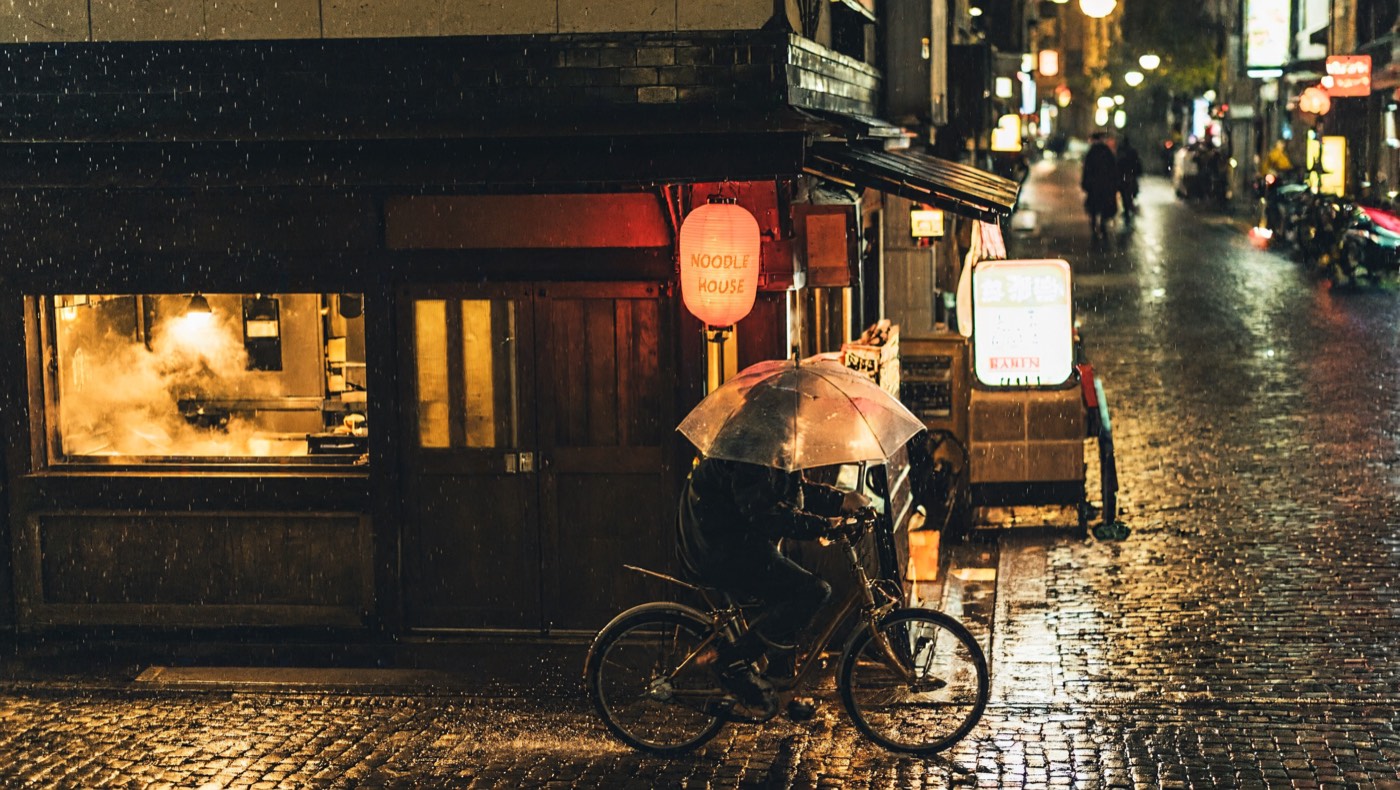
The lantern reads NOODLE HOUSE exactly, and the rain, steam and reflections on the cobblestones hold together as one believable photo.
Edit: same street, snowy morning
MiniMax H3 Image, Auto shape, 2K, with the photo above as Image 1. It took 29 seconds.
Turn Image 1 into a snowy winter morning: fresh snow on the lantern, the roof and the street, soft grey daylight instead of night. Keep the shop, the "NOODLE HOUSE" lantern text, the cyclist and the camera angle the same.
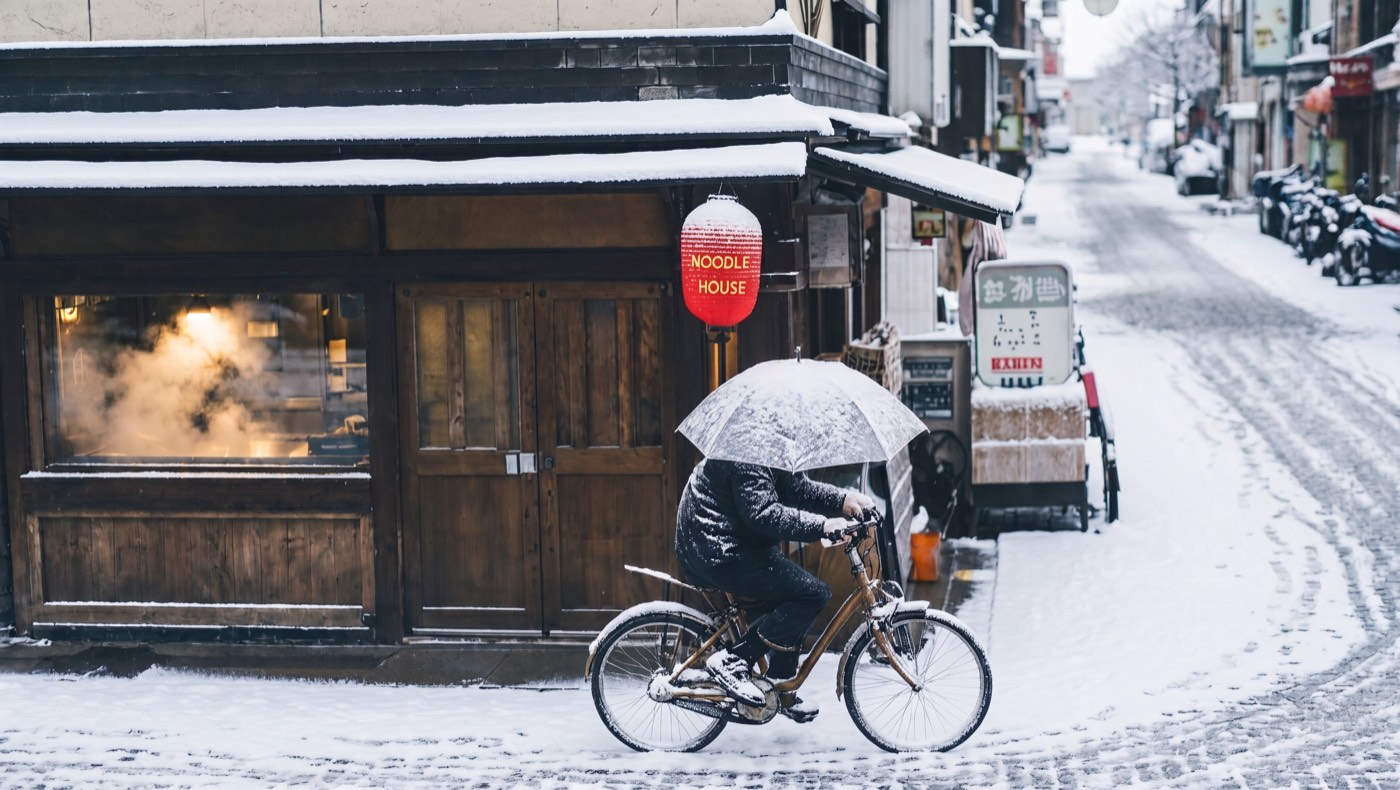
The time of day and the weather changed; the shop front, the lantern text, the cyclist and the framing did not. Auto kept the original 16:9 shape.
Highspeed edit at 4K: the same photo as a watercolor
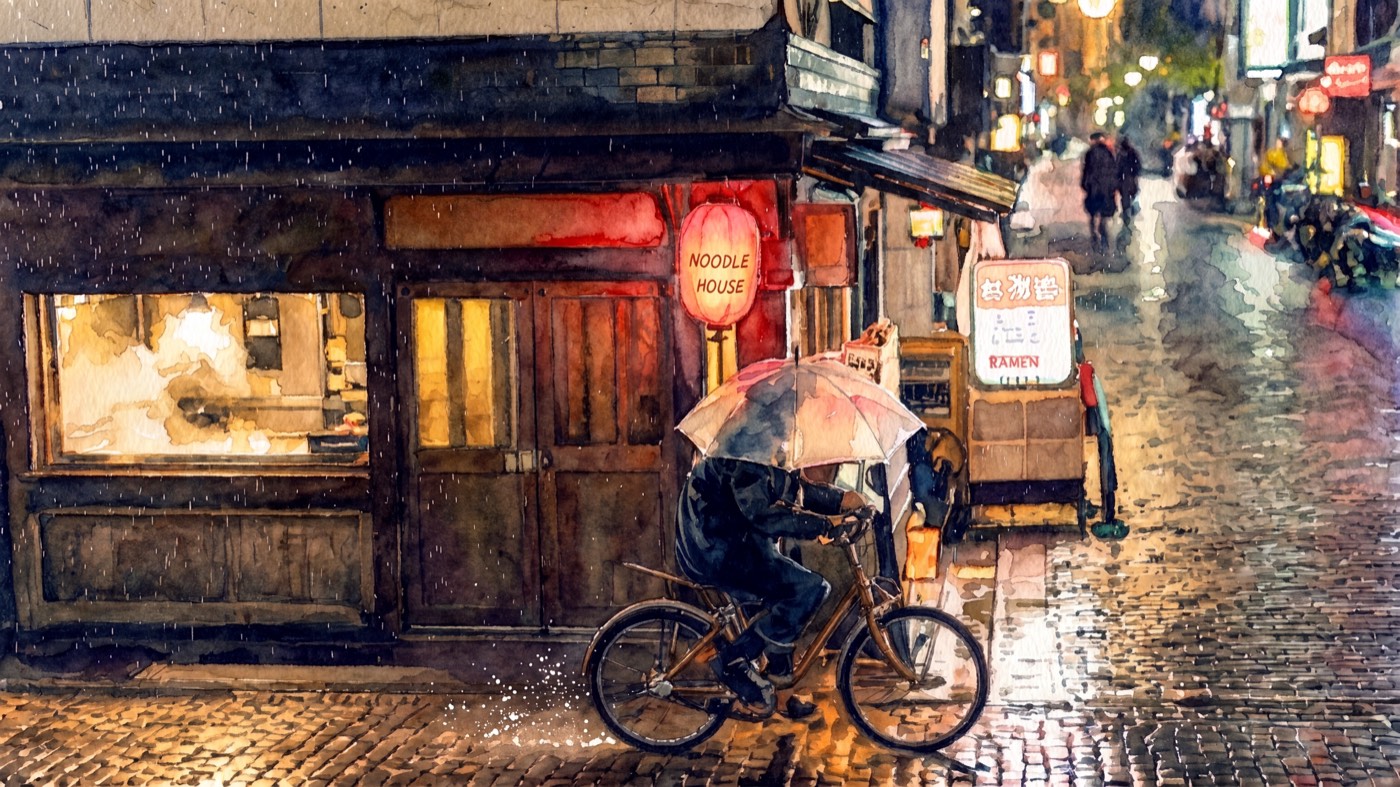
MiniMax H3 Image Highspeed, 16:9, 4K (4096 × 2304), with the first photo as Image 1. It took 42 seconds.
Repaint Image 1 as a loose watercolor illustration on textured paper, with soft color bleeds and visible brush strokes. Keep the composition and the "NOODLE HOUSE" lantern text.
A 4K poster with exact lettering
MiniMax H3 Image, 2:3, 4K (2720 × 4096). It took 25 seconds.
A vintage travel poster for Kyoto in autumn. A red pagoda among maple trees in flat screen-print colors, a small train crossing a bridge below. Bold title at the top reads "KYOTO" and a line at the bottom reads "Autumn Express · Since 1964". Clean retro typography, paper grain texture.
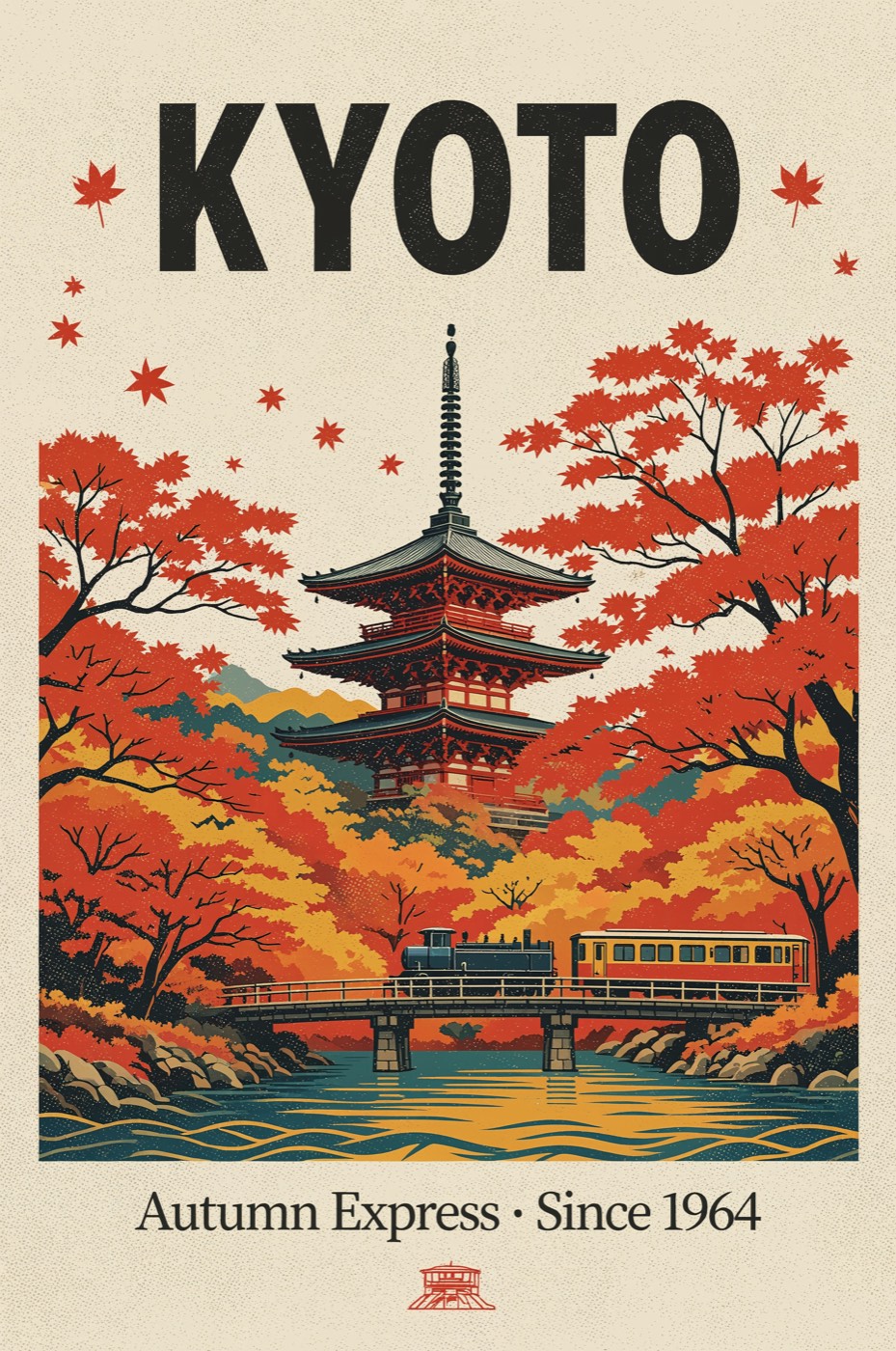
Both lines of text are spelled right, middle dot included, and the flat screen-print colors stay consistent across the whole 11-megapixel page.
Highspeed edit: change the season and one line of text
MiniMax H3 Image Highspeed, Auto shape, 2K, with the poster above as Image 1. It took 38 seconds.
Change the season in Image 1 to winter: snow on the pagoda roofs and the trees, bare branches, a pale blue sky. Change the bottom line to read "Winter Express · Since 1964". Keep the title, layout and screen-print style.
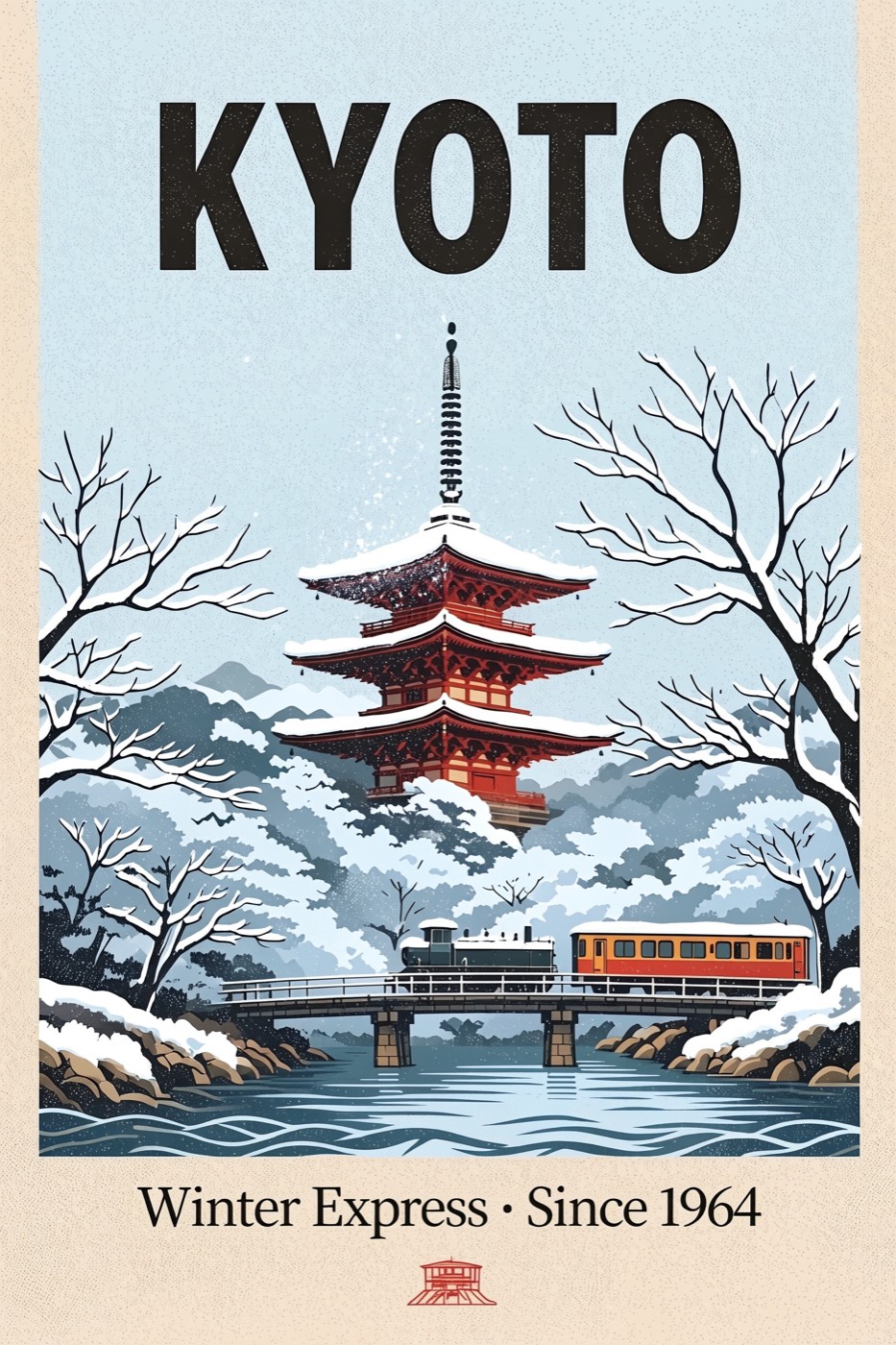
Only the season and the one word we asked for changed. The title, the pagoda, the train and the layout stayed put, which makes it easy to build a seasonal series from one design.
Two images, one scene
First we made a portrait with MiniMax H3 Image (3:4, 2K, 16 seconds) and a product shot with H3 Image Highspeed (1:1, 2K, 14 seconds):
Full-body portrait of a young woman skateboarder with short curly hair, wearing a mustard yellow hoodie and loose black jeans, holding a skateboard under one arm, standing against a plain light grey wall, natural daylight, photorealistic.
Studio product photo of a white and orange high-top sneaker floating at a slight angle over a pale peach background, soft shadow below, crisp stitching and suede texture visible, minimal and clean.
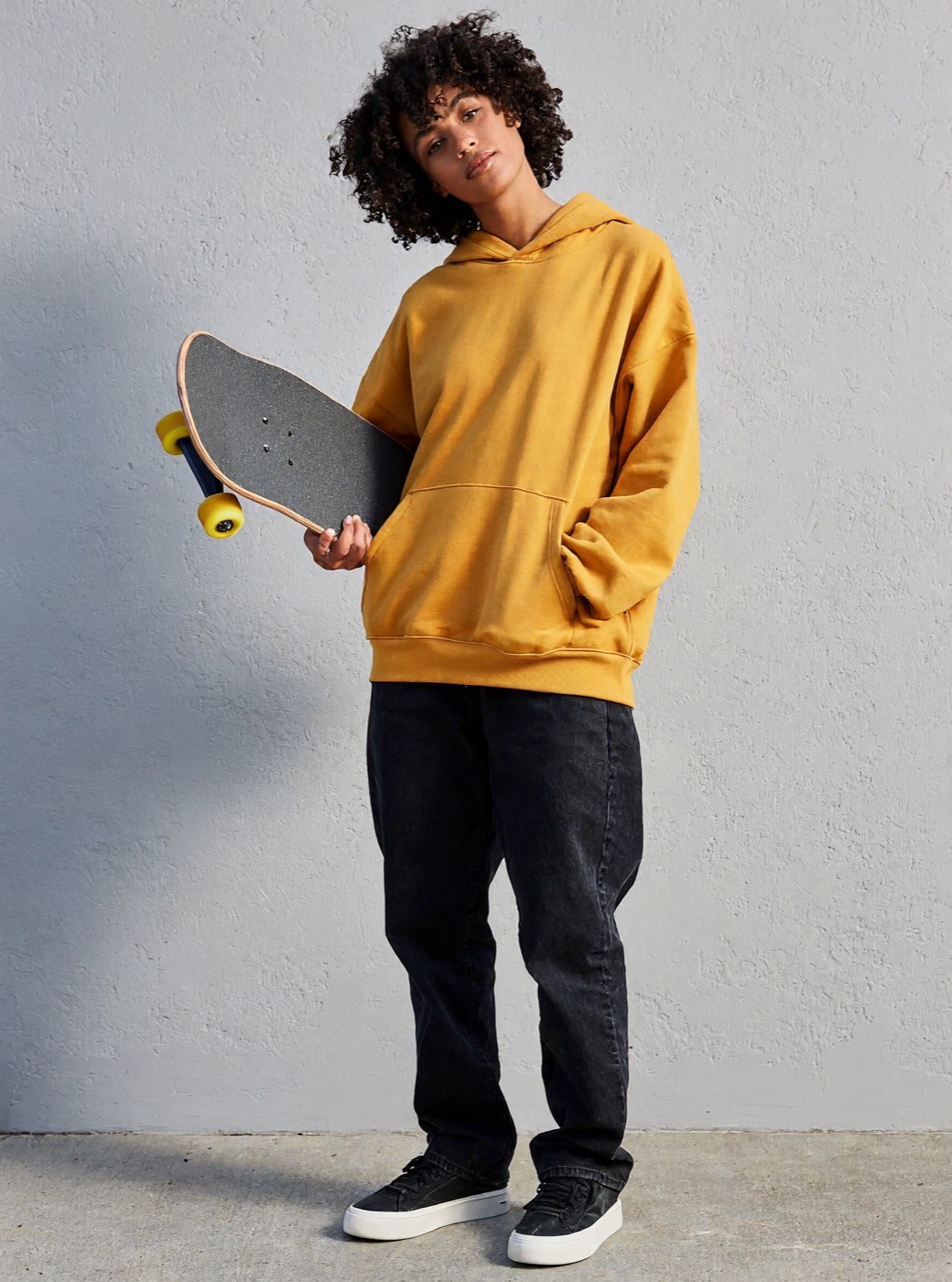
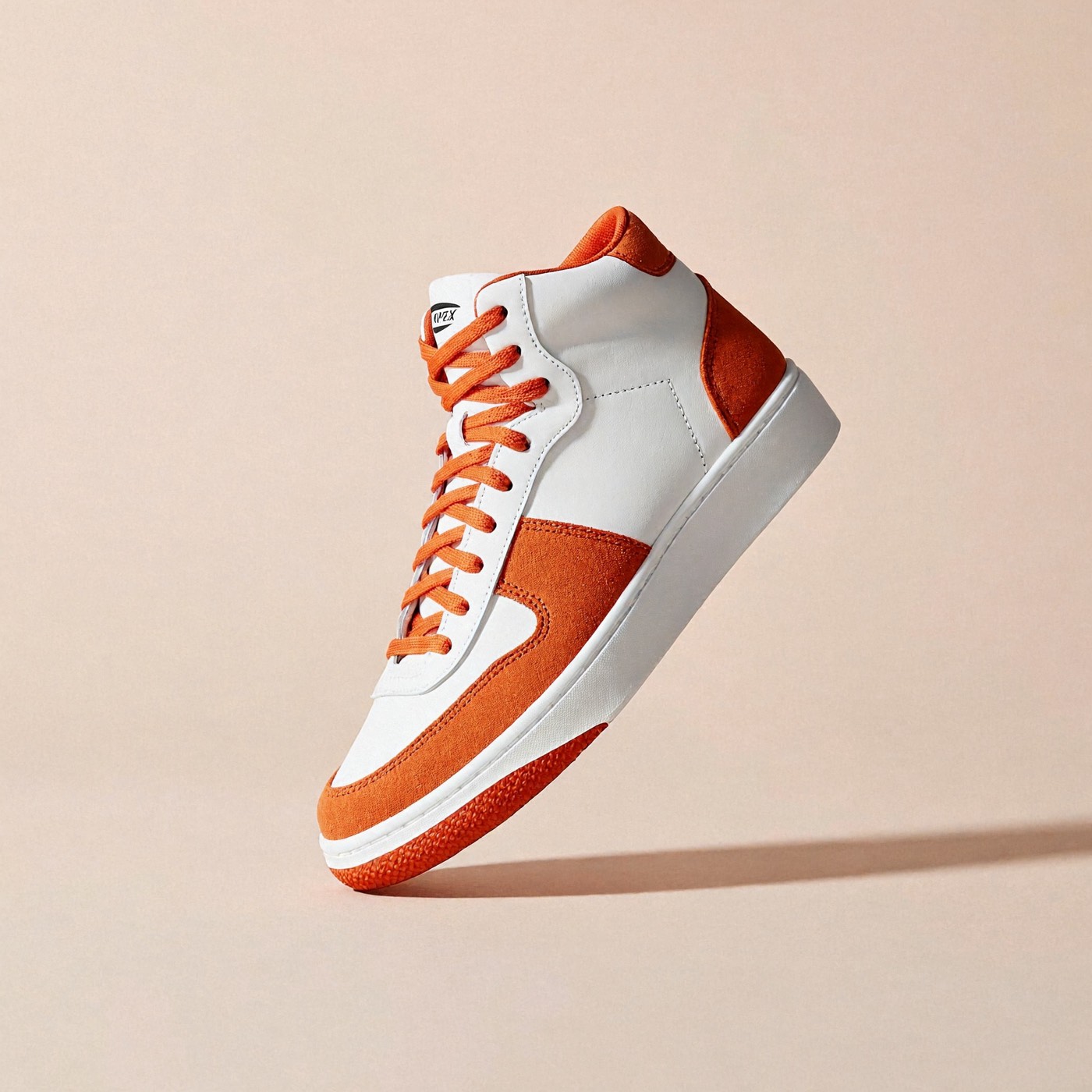
Then one edit with both images attached. MiniMax H3 Image, 16:9, 2K. It took 31 seconds.
The woman from Image 1 wearing the sneakers from Image 2, mid-ollie on her skateboard in a sunny concrete skate park, background slightly motion-blurred, photorealistic action photo.
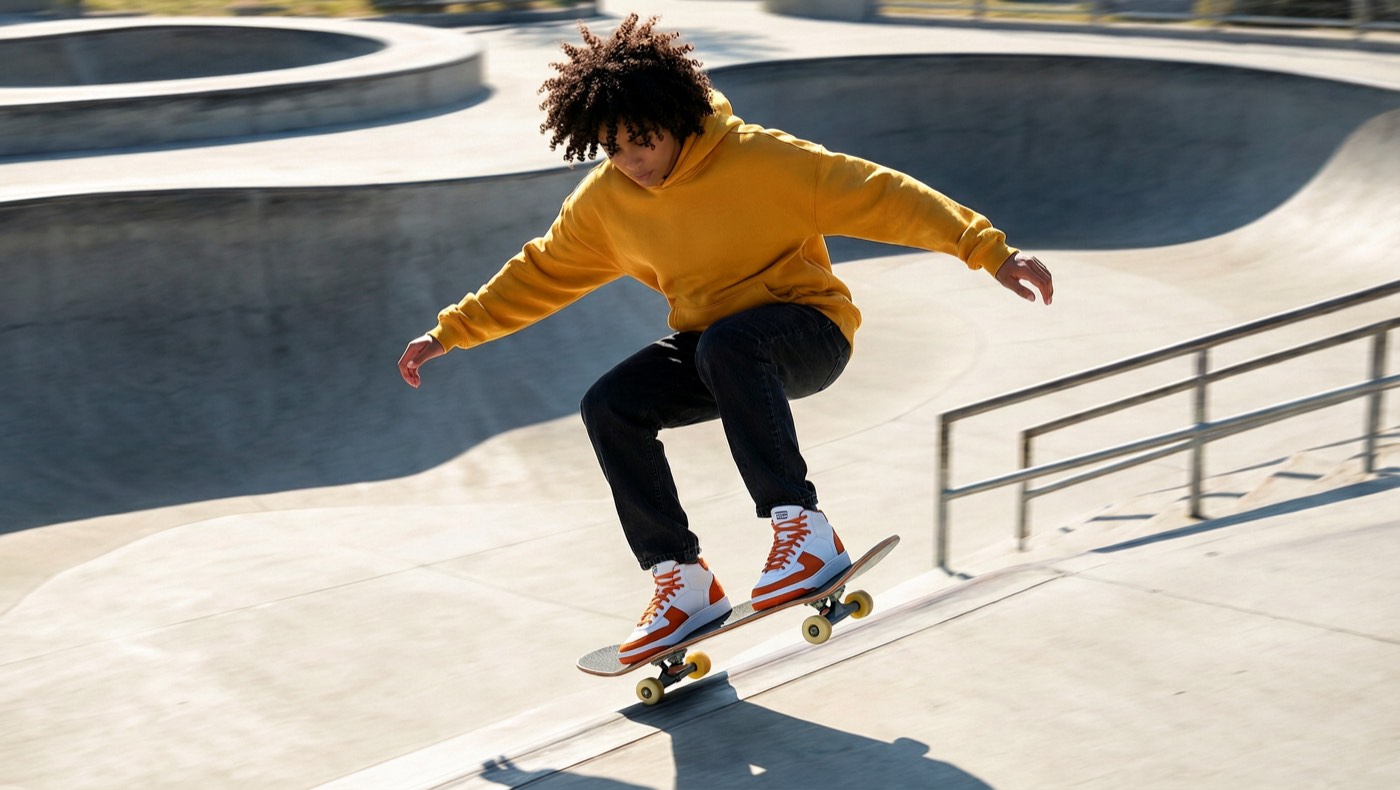
Her hair, hoodie and jeans carry over from Image 1, and the sneakers keep their white and orange panels and orange laces from Image 2. You can attach up to 16 images this way: characters, products, outfits, logos and places, each called by its number in the prompt.
How does prompt expansion change the result?
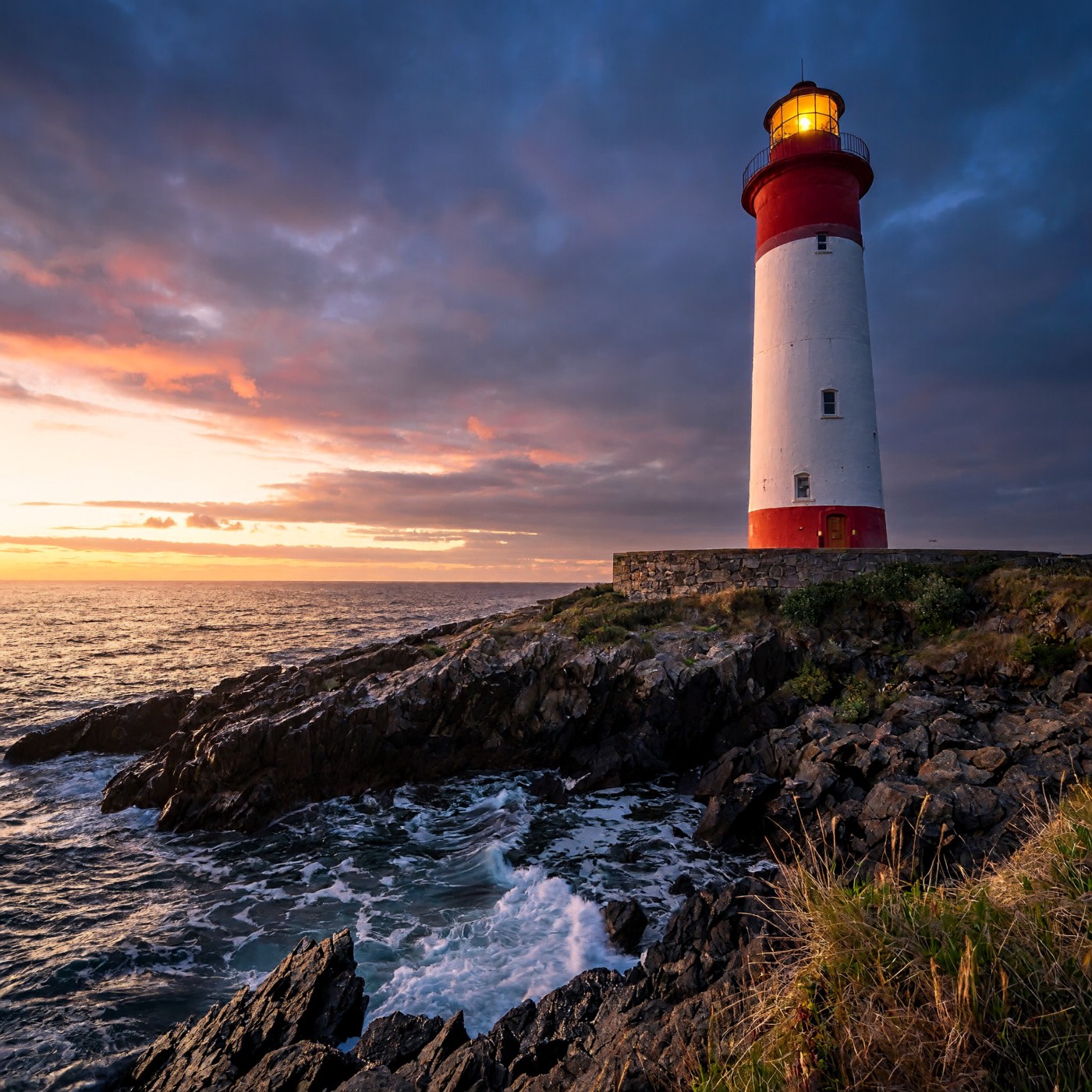
The same four-word prompt, a lighthouse at dusk, on MiniMax H3 Image at 1:1, 2K, once with prompt expansion on (19 seconds) and once with it off (15 seconds):
| Prompt expansion on | Prompt expansion off |
|---|---|
 |
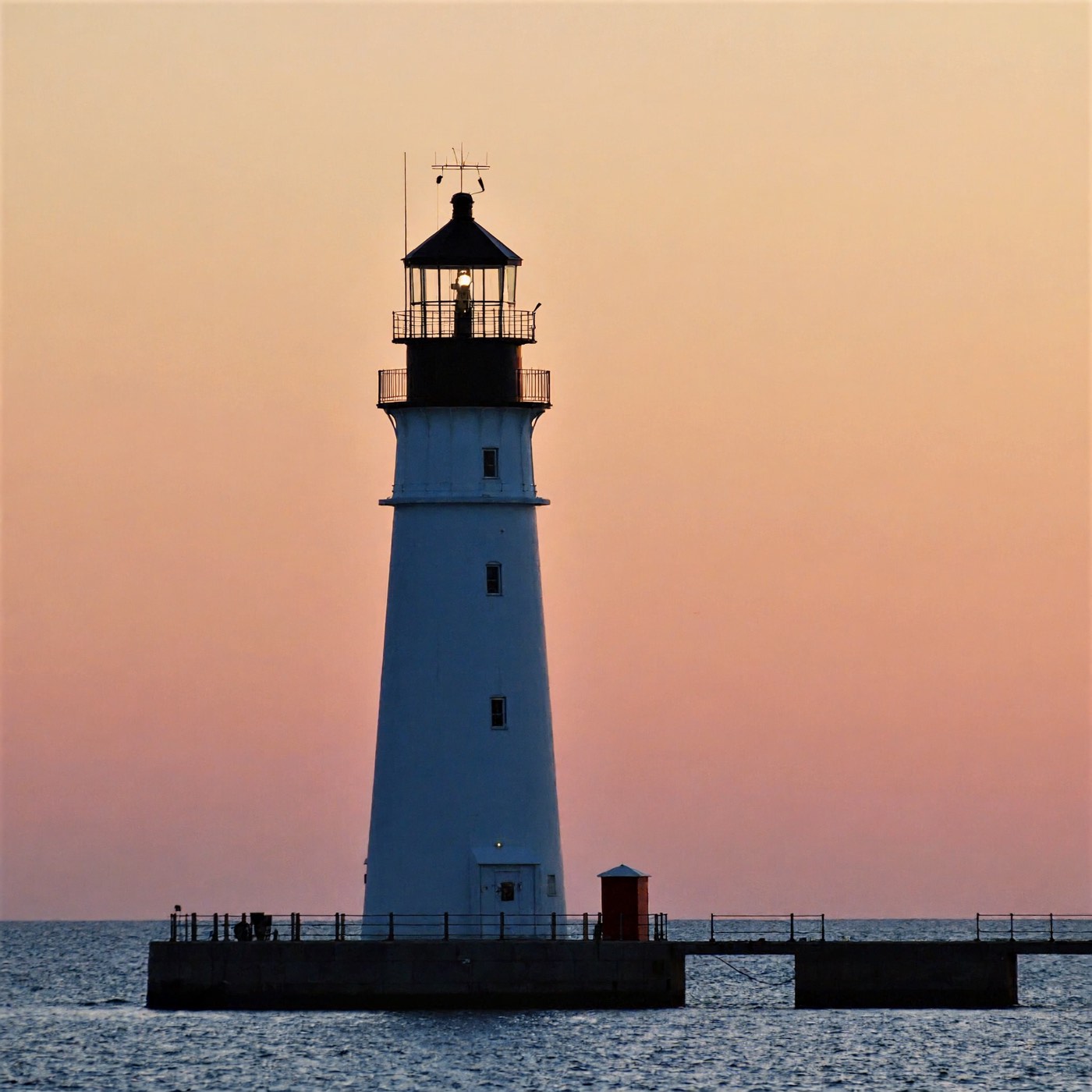 |
With expansion on, the model writes itself a detailed brief first, so a short idea comes back as a finished, dramatic scene. With it off, you get a plainer, more literal picture of exactly what you typed. Leave it on for quick ideas, and turn it off under Advanced when you have written a detailed prompt and want it followed word for word.
How to use MiniMax H3 Image on Flixly
- Open the Image Generator and pick MiniMax H3 Image or MiniMax H3 Image Highspeed in the model picker.
- To create, stay on Text to image. To edit, switch to Image to image and upload one image or up to 16.
- Write your prompt. For edits, refer to your uploads as Image 1, Image 2 and so on, in the order you added them.
- Pick an aspect ratio (or Auto for edits) and 2K or 4K. Prompt expansion and the file format are under the advanced settings.
- Check the price shown on the button and generate.
Standard or Highspeed: which should I use?
- Standard is the place to start for photos, posters, product shots and edits.
- Highspeed is MiniMax's speed-tuned version with the same controls. In our launch examples on Flixly, both versions finished in similar times end to end (14 to 42 seconds, including the time to deliver the file), so compare them on your own prompts.
- 2K suits most work and is the quickest. Choose 4K for prints, posters and anything you will crop.
Prices differ by version, resolution and the number of images in an edit, and the button shows the exact price first.
What is MiniMax H3 Image good for?
- Posters, covers and ads with text. Titles and taglines came out spelled exactly as written in every example above.
- Consistent series. Change the season, the time of day or the style and keep the layout, the people and the lettering.
- Product and character mockups. Put your product on your character, or your logo on your packaging, with up to 16 references.
- Large outputs. 4K renders give you room to crop, print or upscale without starting again.
For video, the same family includes MiniMax H3 Max in the Video Generator, and you can find every image model on the models page.
Frequently Asked Questions
What is MiniMax H3 Image?▾
MiniMax H3 Image is an image model from MiniMax, built on its H3 model. It creates images from a text prompt and edits or combines up to 16 reference images with plain instructions, at native resolutions up to 4K. On Flixly it is available as MiniMax H3 Image (Standard) and MiniMax H3 Image Highspeed.
What is the difference between MiniMax H3 Image and H3 Image Highspeed?▾
Both have the same controls on Flixly: 2K or 4K, eight aspect ratios, edits with up to 16 images, and PNG, JPEG or WebP. MiniMax offers Highspeed as its speed-tuned version. In Flixly's launch examples both finished in similar times end to end, between 14 and 42 seconds, so Standard is a good default and Highspeed is worth comparing on your own prompts.
Can MiniMax H3 Image edit my photos?▾
Yes. In Flixly's Image Generator, switch to Image to image, upload one image or up to 16, and describe the change, referring to them as Image 1, Image 2 and so on. MiniMax H3 Image can change the season or time of day, restyle a photo, rewrite a line of text, or combine people, products and places into one scene. Auto keeps your first image's shape.
What resolution does MiniMax H3 Image support on Flixly?▾
MiniMax H3 Image on Flixly renders at 2K, about 4 megapixels, or 4K, 4096 pixels on the long side, in 1:1, 4:3, 3:4, 3:2, 2:3, 16:9, 9:16 and 21:9. A 4K square is 4096 by 4096 pixels, about 16.8 megapixels.
What does prompt expansion do in MiniMax H3 Image?▾
Prompt expansion rewrites a short prompt into a detailed description of the whole scene before MiniMax H3 Image renders it, so a few words come back as a finished image. It is on by default for text-to-image on Flixly and can be turned off in the advanced settings to follow your prompt word for word. Edits always use it.
Can MiniMax H3 Image write text in images?▾
Yes. In Flixly's launch examples MiniMax H3 Image spelled every requested word correctly, including a lantern sign, a poster title and a tagline with a middle dot, and an edit changed one word of a tagline while leaving the rest of the poster as it was.