Krea 3 on Flixly: Fast AI Image Editing With Up to 8 References
Krea's new image model, Krea 3, is on Flixly. Move a subject to a new setting while their face, hair and clothes stay the same, combine up to 8 reference images with one instruction, or create images from text at 1K or 2K.
TL;DR
Krea 3 is Krea's new image model for fast, high-quality editing, now live on Flixly. Upload a photo to change the setting while your subject stays consistent, or combine up to 8 reference images with plain text instructions. It also creates images from text at 1K or 2K, in Quality or Fast mode. In our tests a 1K image took about 8 seconds and a 1K edit 14 to 17 seconds.
Krea 3 is Krea's new image model, built for fast, high-quality image editing, and it is now on Flixly. Upload a photo and move your subject to a new setting while their face, hair and clothes stay the same, or combine up to 8 reference images with one plain-English instruction. It also creates images from text at 1K or 2K. In our tests a 1K image took about 8 seconds from clicking Generate to the finished picture. Edit an image with Krea 3 or create one from text.
See Krea 3 in action
Every image below was made on Flixly with Krea 3, using the prompt and settings shown under it. Each one is the first result we got. Nothing was retouched apart from resizing for the web.
Same subject, new setting
We made one portrait of a ceramic artist, then asked Krea 3 to move her to three very different places. Her face, curly red hair, freckles, apron and blue vase carried over every time, while the light, weather and background changed around her.

Image-to-image, one reference, 3:4, 1K. The flower market prompt:
Keep the woman from <image-1> exactly the same: same face, curly red hair, freckles, mustard-yellow apron and the speckled blue vase. Move her to a busy open-air flower market in Paris on a sunny morning, buckets of tulips and peonies around her, a striped awning above.
For the other two we only swapped the last sentence: "outside a wooden mountain cabin in falling snow at dusk" and "a rainy Tokyo side street at night, neon signs and reflections on the wet pavement". Each edit took 14 to 17 seconds.
Three references, one image
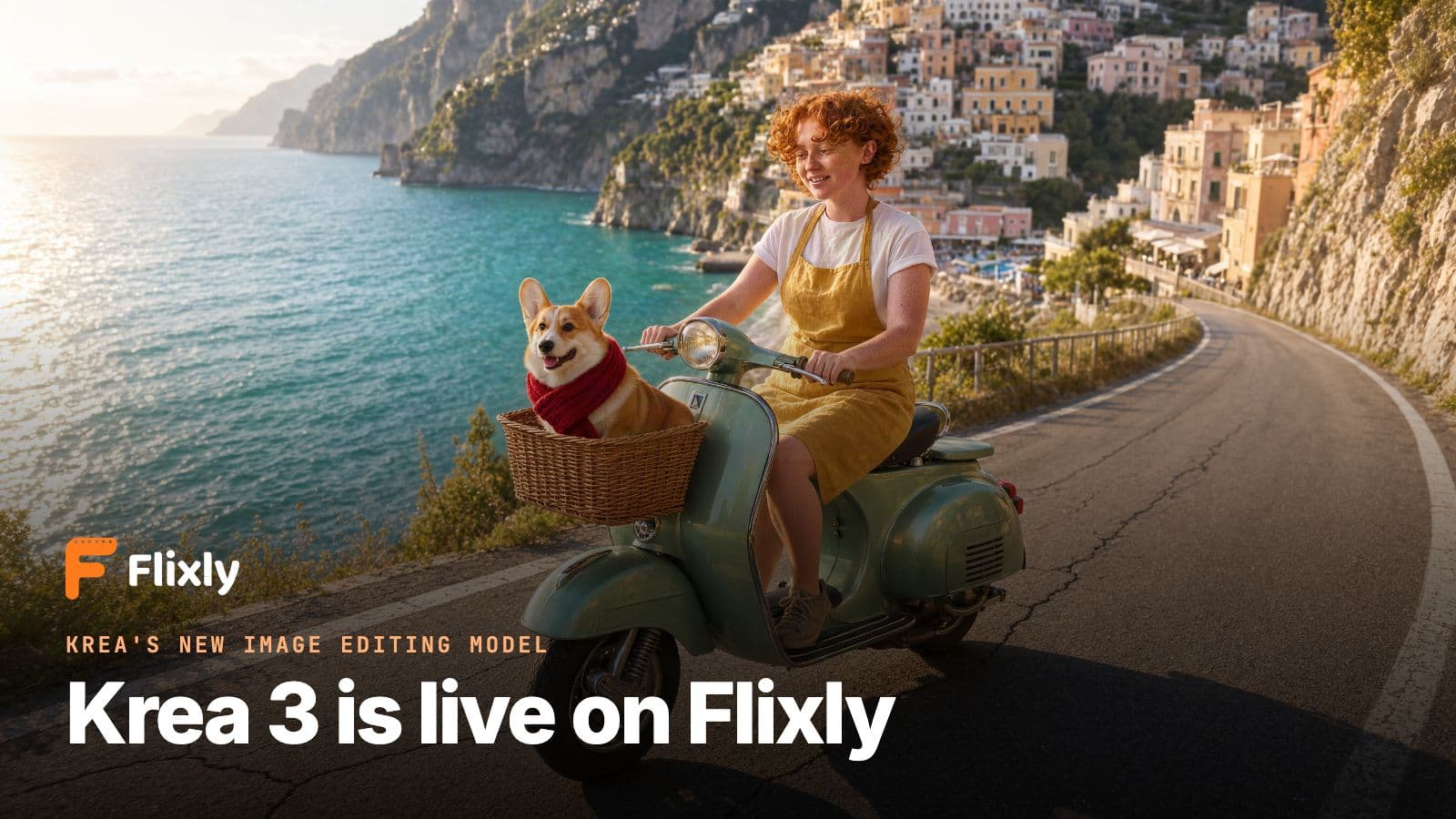
Krea 3 can take several images and put them together. Here the references were the artist, a corgi in a red scarf and a vintage scooter. One instruction turned them into a single travel photo, and each one kept its look: the corgi still wears its scarf, and the scooter keeps its mint paint, chrome and wicker basket.

Image-to-image, three references, 16:9, 2K:
The woman from <image-1> rides the mint-green scooter from <image-3> along a sunny coastal road on the Amalfi Coast, with the corgi from <image-2> sitting in the front basket wearing its red scarf. Keep her face, curly red hair, freckles and mustard-yellow apron. Turquoise sea and colorful cliffside houses behind them, golden afternoon light, travel photo.
The numbers in <image-1>, <image-2> and <image-3> follow the order you upload the pictures.
Product photos in a new scene
A product shot on a plain white background is a common starting point for ads and shop listings. Krea 3 placed the scooter in an Italian piazza and kept the product itself unchanged.

Image-to-image, one reference, 4:3, 1K:
Place the scooter from <image-1> in a sunlit Italian piazza in the late afternoon, parked on old cobblestones in front of a cafe with small round tables, long soft shadows. Keep the scooter exactly the same: mint-green paint, chrome details and wicker basket. Magazine advertising photo.
Text to image
Krea 3 is not only an editor. It also creates images from a prompt, including short lines of text.

Text-to-image, 3:4, 1K:
A minimalist risograph-style poster for a neighborhood flower shop. Large headline text that reads "MORNING BLOOM" at the top, smaller text below that reads "FRESH FLOWERS DAILY". A bold illustration of a single orange tulip in the middle, cream paper background, two-color print in orange and deep green, visible grain.
Both lines came out spelled exactly as written.

Text-to-image, 16:9, 2K (2720 × 1536 pixels):
Aerial photograph of turquoise glacial lakes between dark volcanic ridges in Iceland at golden hour, braided rivers catching the light, low clouds drifting over the peaks, ultra-detailed landscape photography
Quality mode vs Fast mode
Krea 3 has two modes. We ran the same bakery prompt in each.

Text-to-image, 1:1, 1K, Quality (left) and Fast (right):
A cozy bakery window display at sunrise, golden croissants and berry tarts on marble stands, steam rising from a cup of coffee, warm light through the glass, shallow depth of field, food photography
Both images were ready in 7 to 9 seconds on Flixly. Quality gave a richer, more cinematic shot, so we would use it for finals. Fast is there for quick drafts, and both cost the same.
What is Krea 3?
Krea 3 is an image model from Krea, the company behind the Krea creative tools. It is designed for image editing: changing the scene around a subject while keeping that subject consistent, and combining several reference images with a short text instruction. On Flixly one model covers both editing and text-to-image.
What stood out in our tests:
- Subjects stay consistent. One person kept the same face, hair and clothes across four different scenes.
- Multi-image editing that follows instructions. With three references, every element landed where the prompt put it.
- Speed. About 8 seconds for a 1K text-to-image and 14 to 17 seconds for a 1K edit, start to finish.
- Clean text. Short headlines came out spelled correctly.
Krea 3 at a glance
| Spec | Krea 3 on Flixly |
|---|---|
| Creator | Krea |
| Modes | Text-to-image and image-to-image (edit and combine) |
| Reference images | Up to 8 per edit |
| Resolution | 1K (about 1 megapixel) or 2K (about 4 megapixels) |
| Aspect ratio | Auto, 1:1, 4:3, 3:4, 3:2, 2:3, 16:9 and 9:16 |
| Quality settings | Quality or Fast, plus optional negative prompt and prompt reasoning |
| Output format | PNG or JPEG |
| Typical speed | About 8 seconds for 1K from text, 14 to 17 seconds for a 1K edit, in our tests |
| Where to use | Image Generator |
| Model page | Krea 3 |
How to edit a photo with Krea 3
- Open the Image Generator in edit mode and pick Krea 3.
- Upload the image you want to change. To combine pictures, add more, up to 8 in total.
- Say what should change and what must stay the same, for example "keep her face, hair and clothes exactly the same".
- Refer to each picture by its order:
<image-1>is the first upload,<image-2>the second, and so on. - Pick an aspect ratio (Auto lets Krea 3 choose) and a resolution, check the estimate and generate.
How to create an image from text with Krea 3
- Open the Image Generator and pick Krea 3.
- Keep Text to image selected and describe the subject, setting, light and style. Put any words that should appear in quotes.
- Choose an aspect ratio and 1K or 2K.
- Choose Quality for finals or Fast for drafts, then generate.
Tips for better results
- List what to keep. "Same face, curly red hair, freckles, mustard-yellow apron" works better than "keep her the same".
- Give every reference a role. "The woman from
<image-1>rides the scooter from<image-3>" tells Krea 3 exactly how the pieces fit. - Describe the light and the camera. "Golden afternoon light, travel photo" or "50mm photo, soft window light" shapes the whole image.
- Edit the edit. Run another edit on a result to keep refining it step by step.
- Start at 1K. Find the composition quickly, then make the final at 2K with a fixed aspect ratio.
How much does Krea 3 cost?
Krea 3 is one of the lower-cost image models on Flixly. The price depends on the resolution and, when editing, on how many reference images you add. Quality and Fast cost the same. Flixly shows the estimate before you generate.
Frequently Asked Questions
What is Krea 3?▾
Krea 3 is an image model from Krea, designed for image editing. It changes the scene around a subject while keeping that subject consistent, and it combines several reference images following a short text instruction. On Flixly it also creates images from text.
Can Krea 3 keep the same person or product across images?▾
Yes. In our tests one portrait was moved to a flower market, a snowy cabin and a neon street, and the face, hair, freckles, clothes and the vase she held stayed the same each time. Naming exactly what to keep in your prompt helps.
How many reference images can I use with Krea 3?▾
Up to 8 per edit on Flixly. Refer to them in your prompt by upload order: <image-1> is the first picture you add, <image-2> the second, and so on.
How fast is Krea 3?▾
In our tests on Flixly a 1K image from text took about 8 seconds from start to finish, and a 1K edit with one reference took 14 to 17 seconds. A 2K image that combined three references took about 43 seconds.
What is the difference between Quality and Fast mode?▾
Quality aims for the best result and is the one to use for final images. Fast is meant for quick drafts. Both cost the same on Flixly, and the negative prompt only applies in Quality mode.
What resolutions and aspect ratios does Krea 3 support?▾
1K (about 1 megapixel) or 2K (about 4 megapixels), in 1:1, 4:3, 3:4, 3:2, 2:3, 16:9 or 9:16. Auto lets Krea 3 pick the shape and renders at about 1 megapixel. Images download as PNG or JPEG.
How much does Krea 3 cost on Flixly?▾
Krea 3 is one of the lower-cost image models on Flixly. The price depends on the resolution and, for edits, on the number of reference images. Quality and Fast cost the same, and Flixly shows the estimate before you generate.