Seedream 5.5 Is Live on Flixly: Real Examples of ByteDance's New Model
Seedream 5.5, ByteDance's newest image model, is live on Flixly. Create images at 1K, 1.5K or 2K, edit and combine up to 10 of your own images, keep a scene stable over several rounds of edits, and export transparent PNGs. See ten real results with their prompts, settings and times.
TL;DR
Seedream 5.5 is ByteDance's newest Seedream image model, released on November 9, 2026, and it is live on Flixly. It creates images from a prompt at 1K, 1.5K or 2K, edits and combines up to 10 reference images, keeps untouched parts of a picture stable across repeated edits, and can return PNGs with a transparent background. Flixly shows the exact price before you generate.
Seedream 5.5 is live on Flixly: create images at up to 2K from a prompt, edit and combine up to 10 of your own images, and export PNGs with a transparent background. Open Seedream 5.5 in the Image Generator, pick a shape, a resolution and a background, and Flixly shows the price before you generate. Every example below is a real first result made on Flixly, with its prompt, settings and time.
What is Seedream 5.5?
Seedream 5.5 is the newest image model from ByteDance's Seed team, announced on November 9, 2026 in Introducing Seedream 5.5. ByteDance highlights three upgrades over Seedream 5.0:
- More stable editing. Parts of the image you did not ask to change stay put, even across many rounds of edits. ByteDance demonstrates 100 successive edits on one image.
- Native transparency. The model can generate images with a real alpha channel, so a sticker, a logo or a cut-out person comes back without a background to remove.
- More realism and better text. More natural lighting, materials and skin, and cleaner complex and small text. ByteDance reports a severe text corruption rate of 0.4% and a minor one of 1.7%.
In ByteDance's own evaluation across six production use cases (e-commerce, marketing, film and TV, gaming, office work and fashion design), Seedream 5.5 scored higher than Seedream 5.0 Pro in all six. ByteDance says a Pro version of the 5.5 series will follow.
What can you control on Flixly?
| Create from a prompt | Edit your images | |
|---|---|---|
| Resolution | 1K (about 1 MP), 1.5K (about 2.4 MP) or 2K (about 4 MP) | 2K, about 4 MP |
| Aspect ratio | 1:1, 4:3, 3:4, 3:2, 2:3, 16:9, 9:16 | Auto (keeps your first image's shape), the same seven, or 21:9 |
| Images in | None | 1 to 10, referred to as Image 1, Image 2 and so on |
| Background | Auto, Opaque or Transparent | Auto, Opaque or Transparent |
| Format | PNG or JPEG (transparent images are always PNG) | PNG |
The price depends on the resolution and, for edits, on how many images you send. Flixly shows the exact price before you generate, and you pay what was shown.
Real examples
Every image below was made on Flixly with Seedream 5.5, with the prompt and settings shown. Each is the first result we got, resized for the web and otherwise unedited. Transparent images are shown on a checkerboard so you can see what is see-through. Times run from submitting the request to the finished image.
A night market with a six-line menu board
Seedream 5.5, 16:9, 2K (2816 × 1584). It took 31 seconds.
A night market food stall in Taipei, photographed at eye level. A hand-painted menu board above the counter lists six dishes in neat English lettering: "BEEF NOODLE SOUP", "OYSTER OMELETTE", "PEPPER BUN", "BUBBLE TEA", "SCALLION PANCAKE", "MANGO SHAVED ICE". Steam rises from a wok, warm bulbs hang overhead, and a vendor in a striped apron smiles at the camera. Realistic photo, 35mm, natural skin texture.
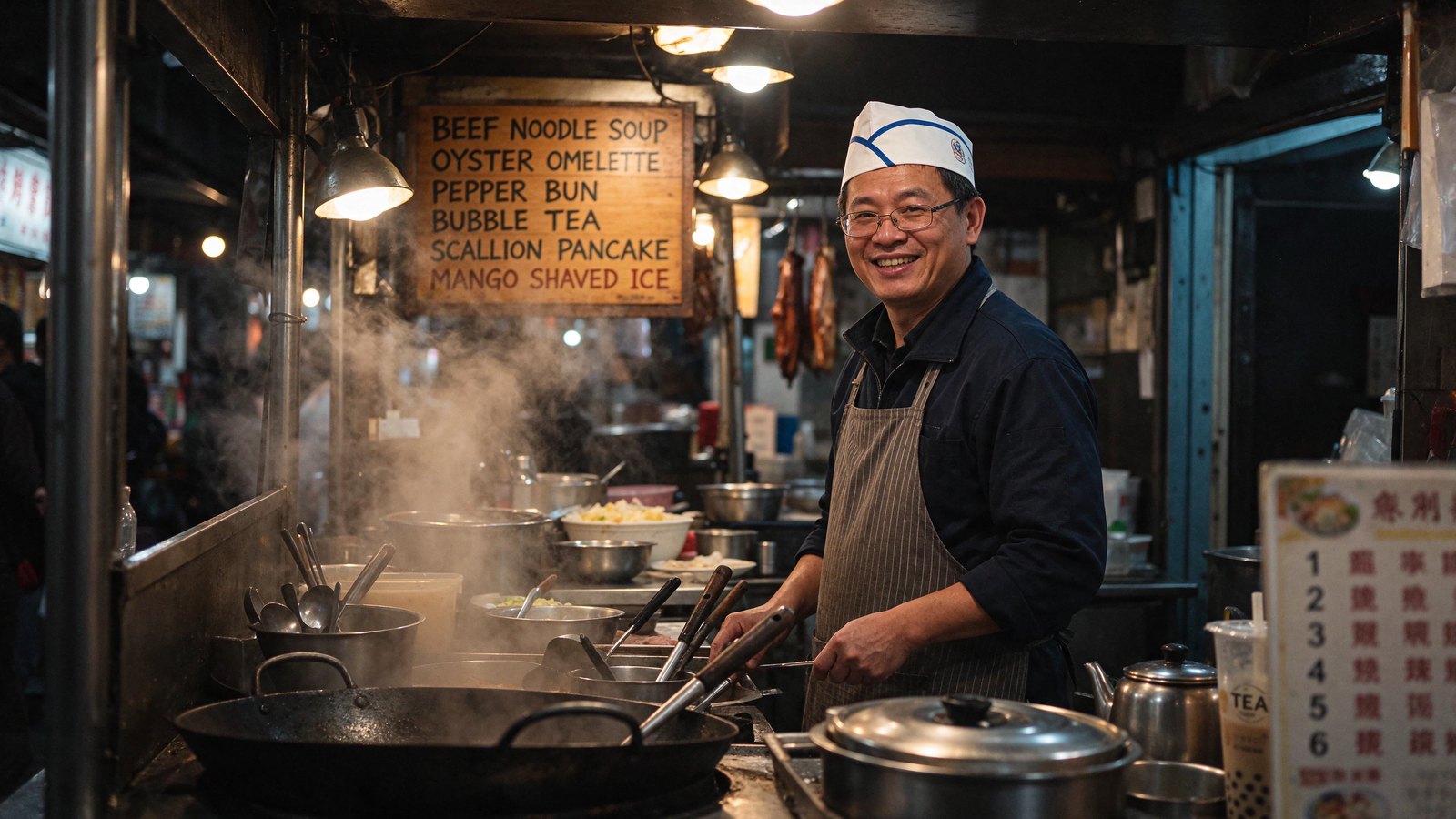
All six dishes on the board are spelled exactly as asked, and the steam, bulbs and skin read as a real photo. One thing to know: a small sign at the right edge, which the prompt did not ask for, came out as unreadable characters.
Three edits in a row: the scene stays put
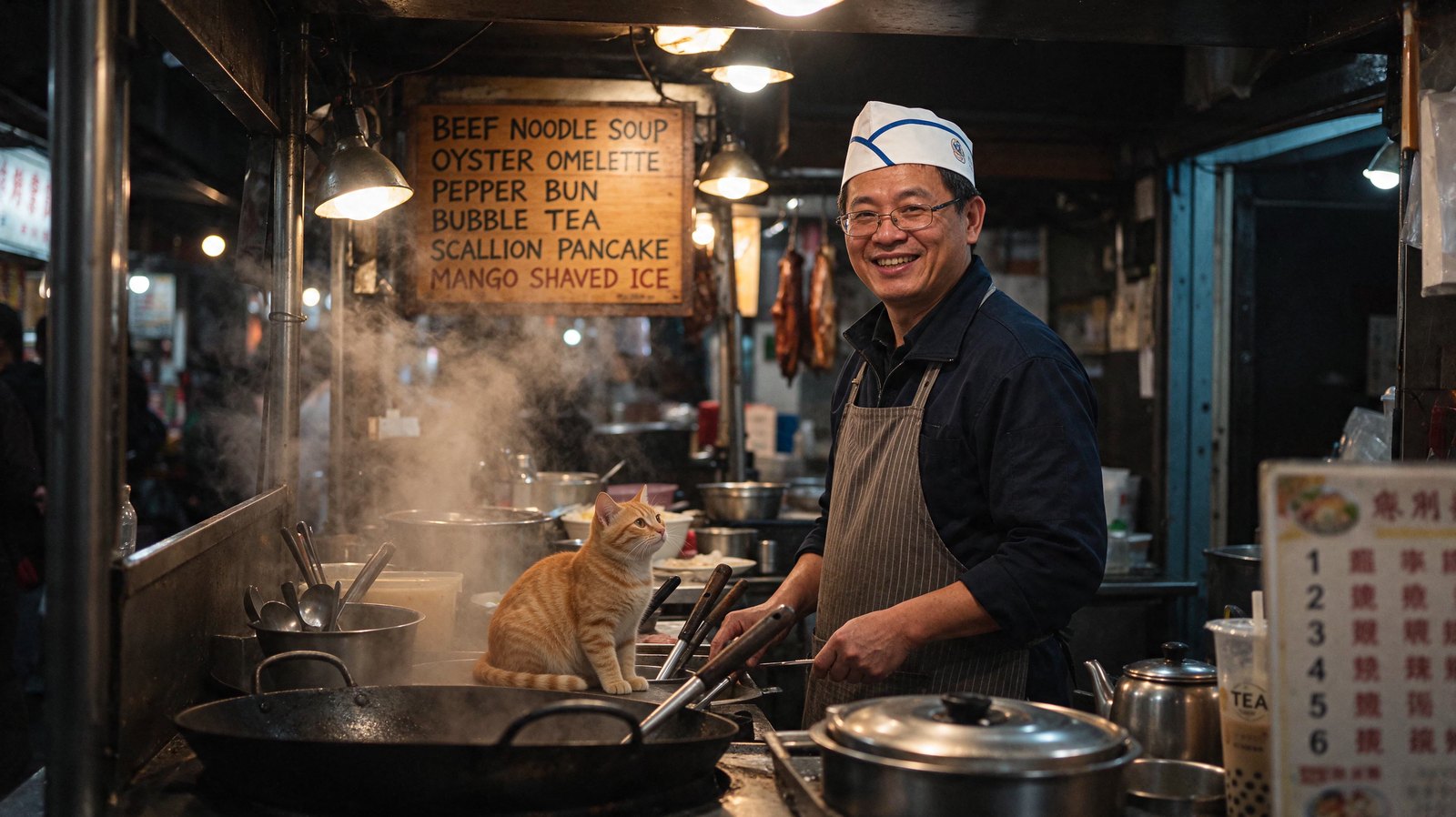
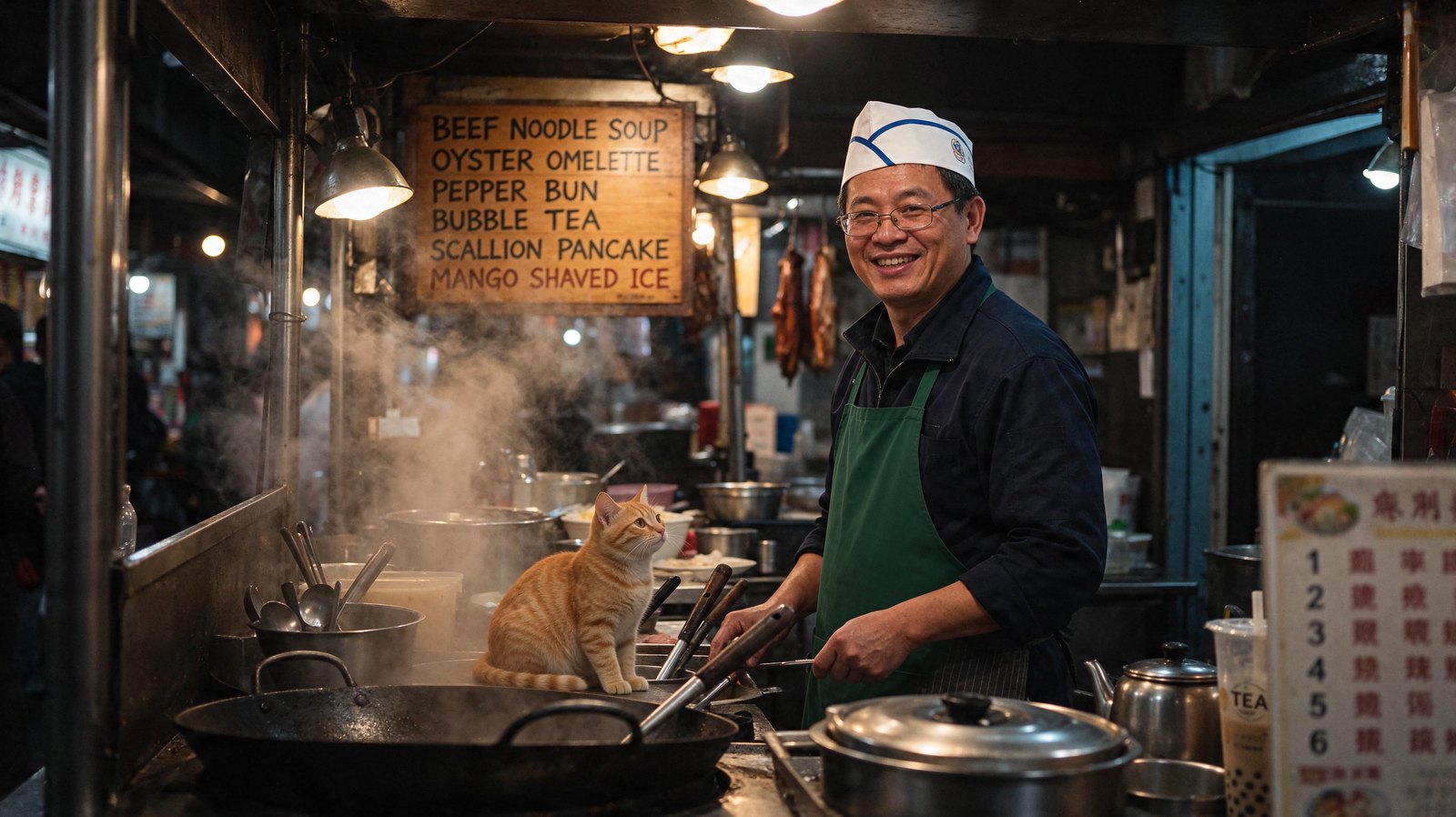
Each edit below starts from the image before it. Seedream 5.5, Auto shape, 2K (2736 × 1536), one image in.
Round 1: add a cat. It took 25 seconds.
Add a small orange tabby cat sitting on the counter next to the wok, looking up at the vendor. Keep everything else exactly the same.
Round 2: change the apron. It took 25 seconds.
Change the vendor's striped apron to a plain deep green apron. Keep everything else exactly the same, including the cat and the menu board.
Round 3: rewrite one line of the menu. It took 23 seconds.
Rewrite only the last line of the menu board so it reads "MANGO SNOW ICE" in the same hand-painted lettering. Keep everything else exactly the same.
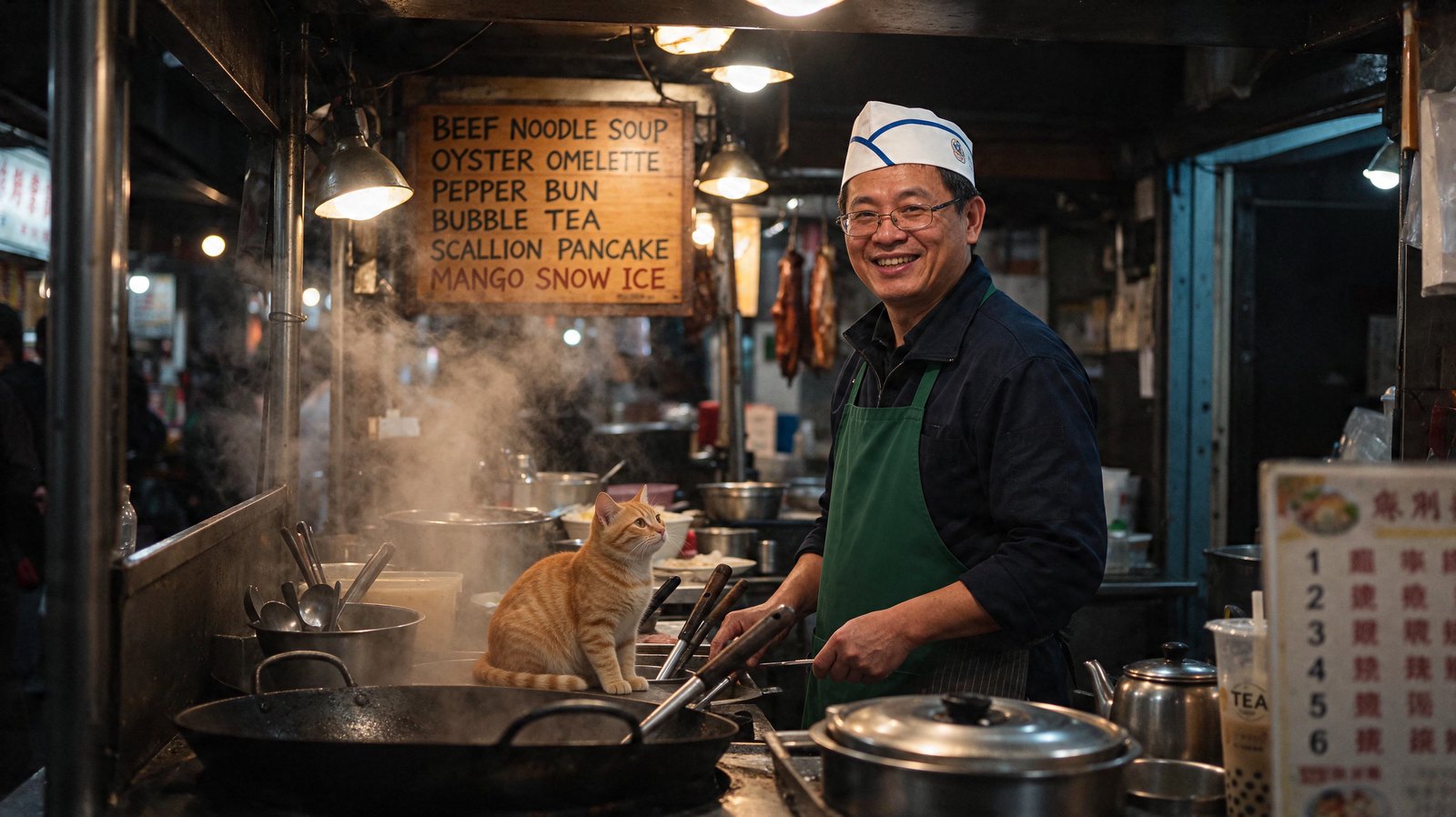
After three rounds the vendor, the cat, the lights and the other five menu lines are still where they were. Only the thing each prompt named changed. This is the multi-round stability ByteDance describes, on a small scale.
A transparent sticker from a prompt
Seedream 5.5, 1:1, 2K (2048 × 2048), Background set to Transparent, PNG. It took 28 seconds.
A glossy enamel pin of a sleepy red panda curled around a small paper lantern, with a polished gold outline and tiny star details. The pin on its own, nothing behind it.
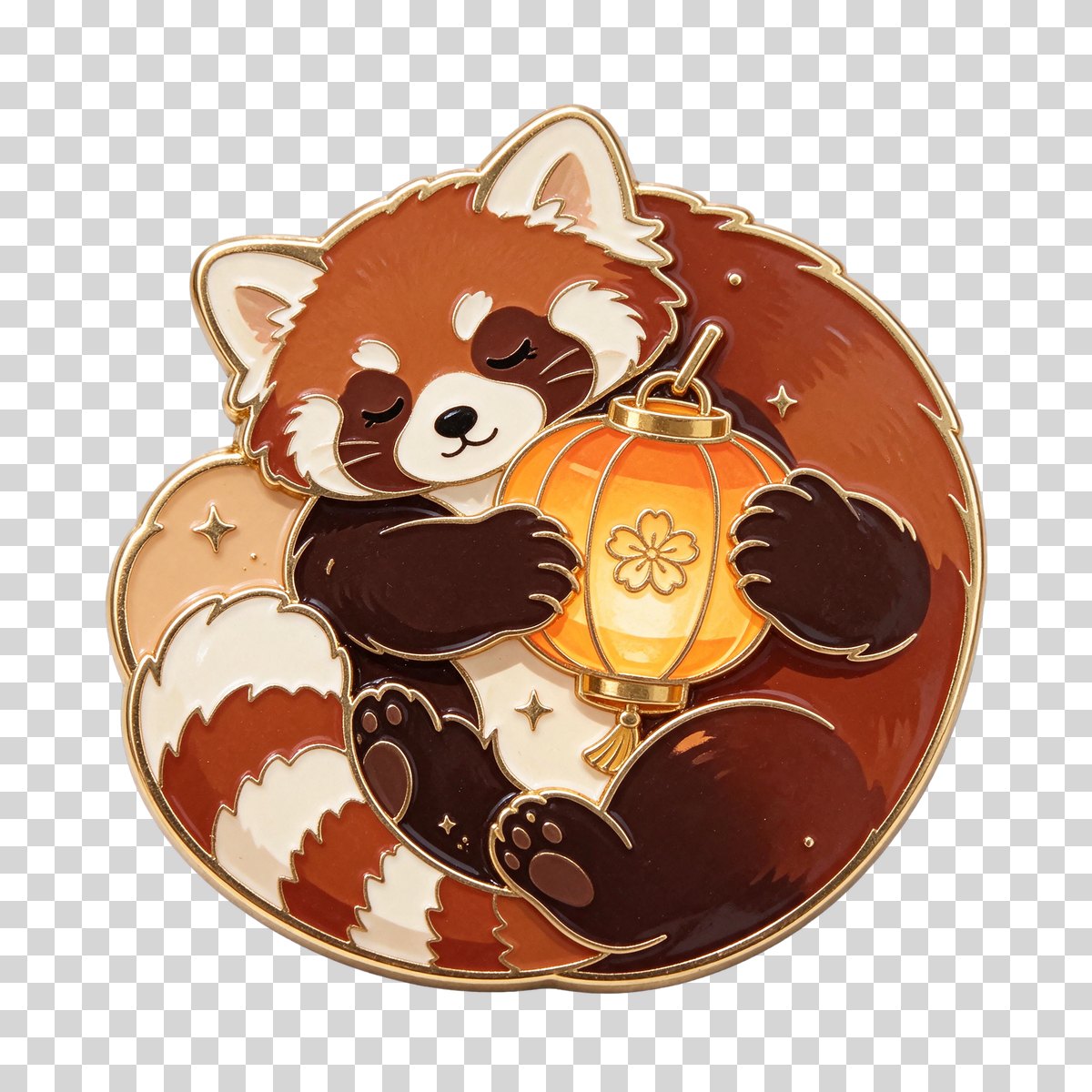
The PNG has a real alpha channel: half the frame is fully see-through, and the gold edge is clean enough to drop onto any background.
A realistic portrait at 1.5K
Seedream 5.5, 3:4, 1.5K (1344 × 1792). It took 14 seconds.
A close-up portrait of a 70-year-old fisherman on a wooden pier at golden hour. Weathered skin with fine wrinkles and sun spots, salt-and-pepper stubble, a knitted navy beanie, a yellow oilskin jacket with water droplets. Soft warm side light, shallow depth of field, a harbor softly blurred behind him. Realistic photo, 85mm.
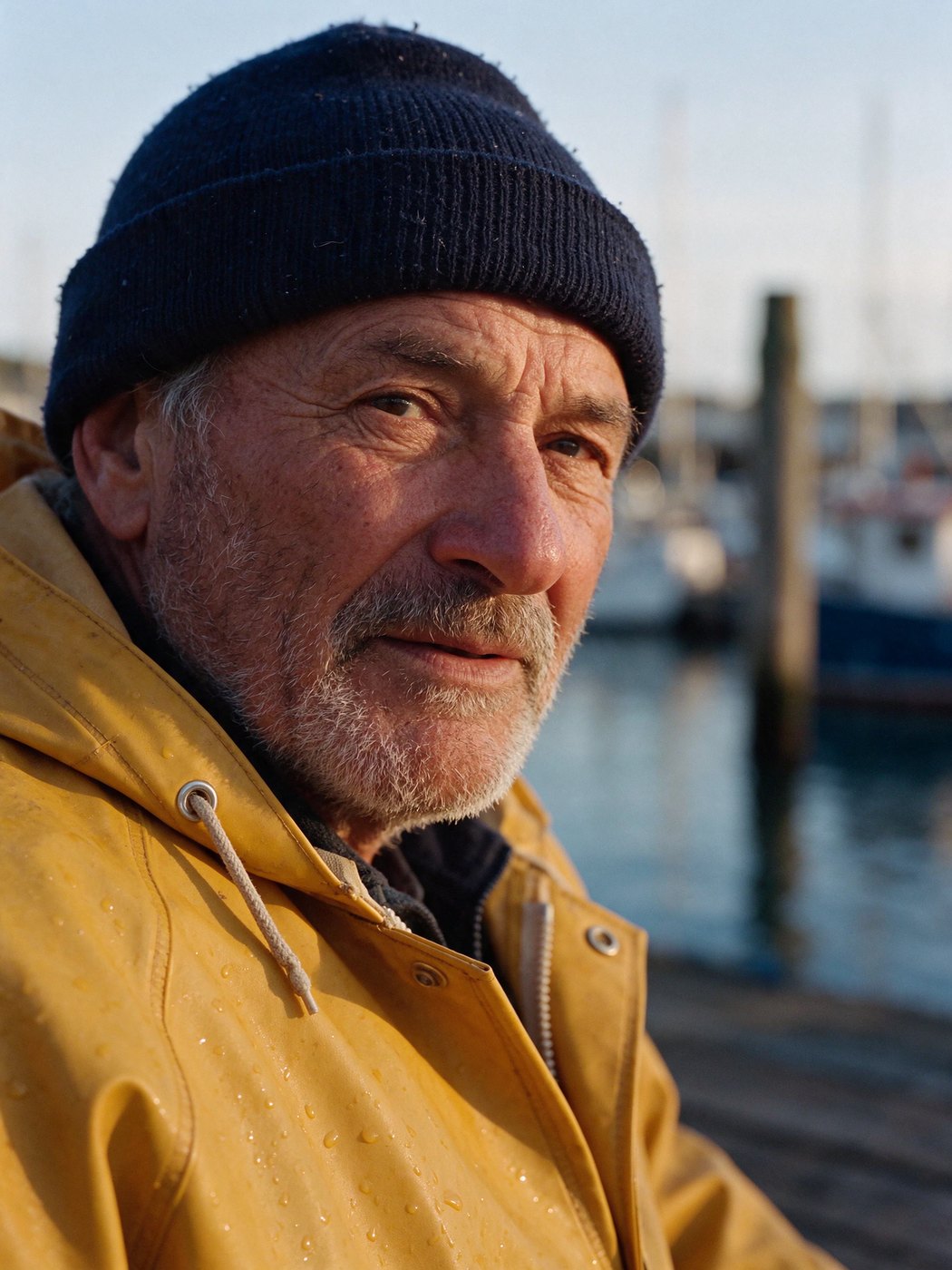
The skin has texture rather than a plastic sheen, and the light falls naturally across the face and the wet jacket.
Edit: cut a person out of a photo
Seedream 5.5, Auto shape, 2K (1776 × 2368), Background set to Transparent, with the portrait above as Image 1. It took 20 seconds.
Cut out the fisherman from Image 1, head and shoulders with his beanie and jacket, on a fully transparent background. Keep his face, skin texture and the water droplets exactly as they are.
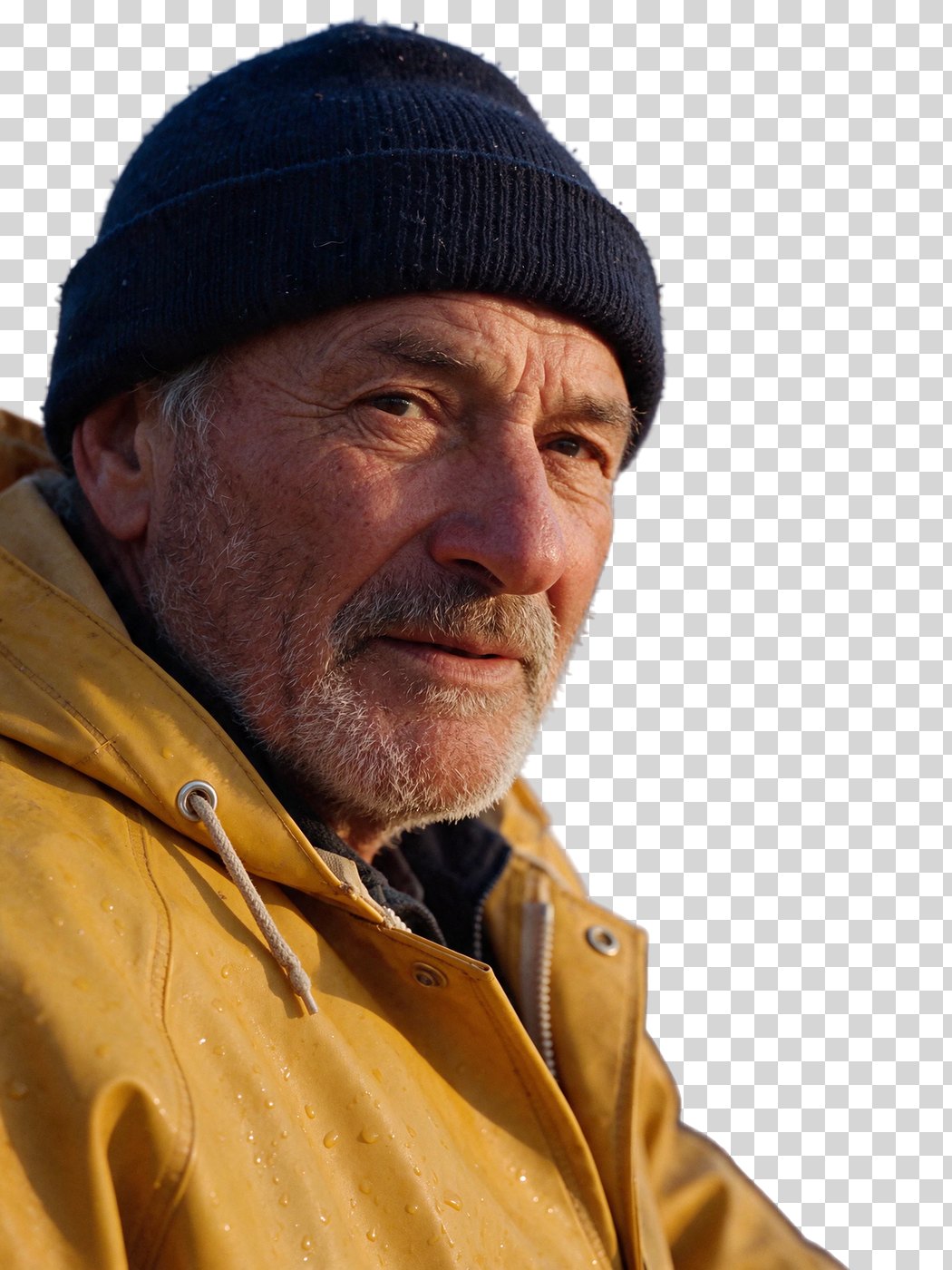
The harbor is gone and the face, stubble and droplets are unchanged, as one PNG with transparency.
A poster with three lines of type at 1K
Seedream 5.5, 2:3, 1K (832 × 1248), JPEG. It took 27 seconds.
A minimalist screen-printed concert poster. A deep navy sky with green and violet northern lights over a small domed observatory on a snowy hill. Large title at the top reads "NORTHERN LIGHTS". Below it, smaller: "LIVE AT THE OBSERVATORY". At the bottom: "ONE NIGHT ONLY · NOVEMBER 28". Clean geometric typography, paper grain.
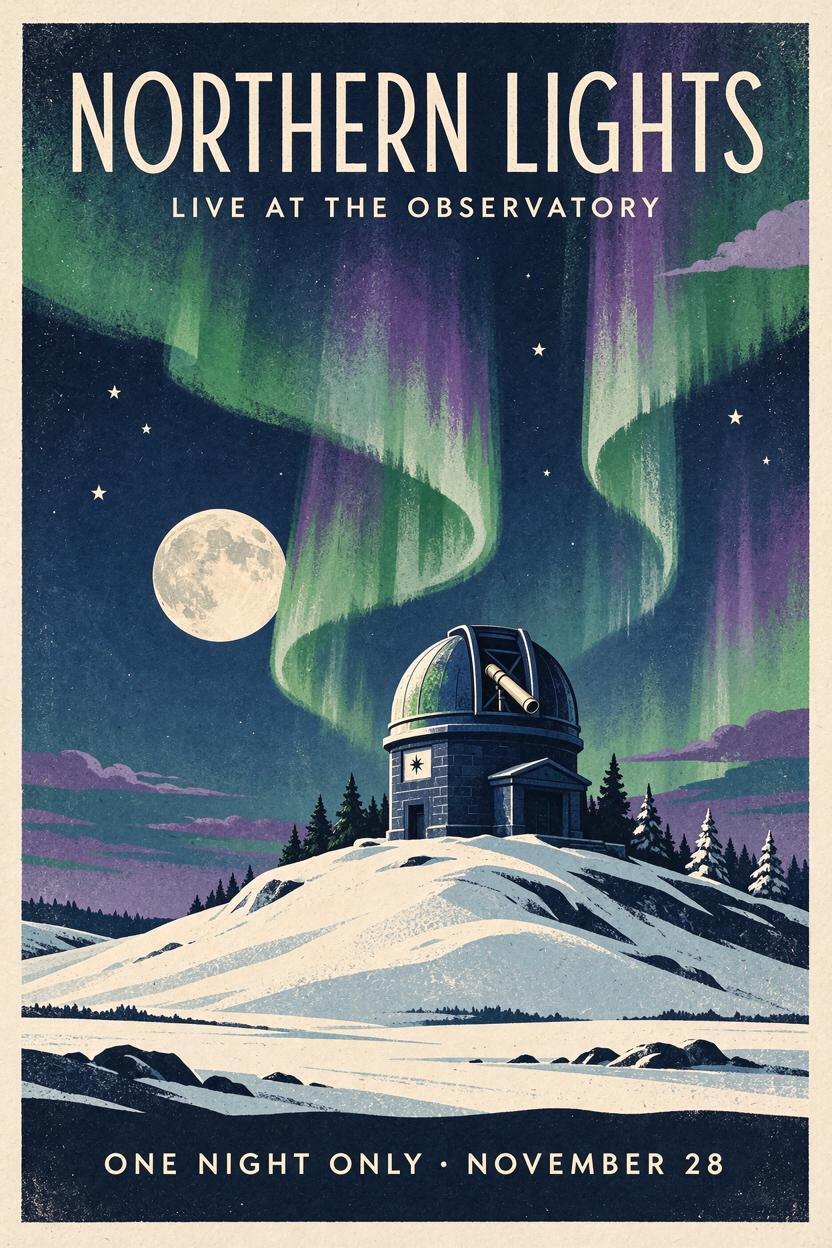
All three lines are spelled correctly, including the middle dot, at the smallest and fastest size.
Combine three images into one scene
Seedream 5.5, 16:9, 2K (2816 × 1584), with the portrait, the night market and the enamel pin as Images 1 to 3. It took 29 seconds.
The fisherman from Image 1 now runs the food stall in Image 2, smiling behind the counter in his yellow jacket, with the red panda enamel pin from Image 3 on his chest. Keep the menu board and its six dishes exactly as they are.
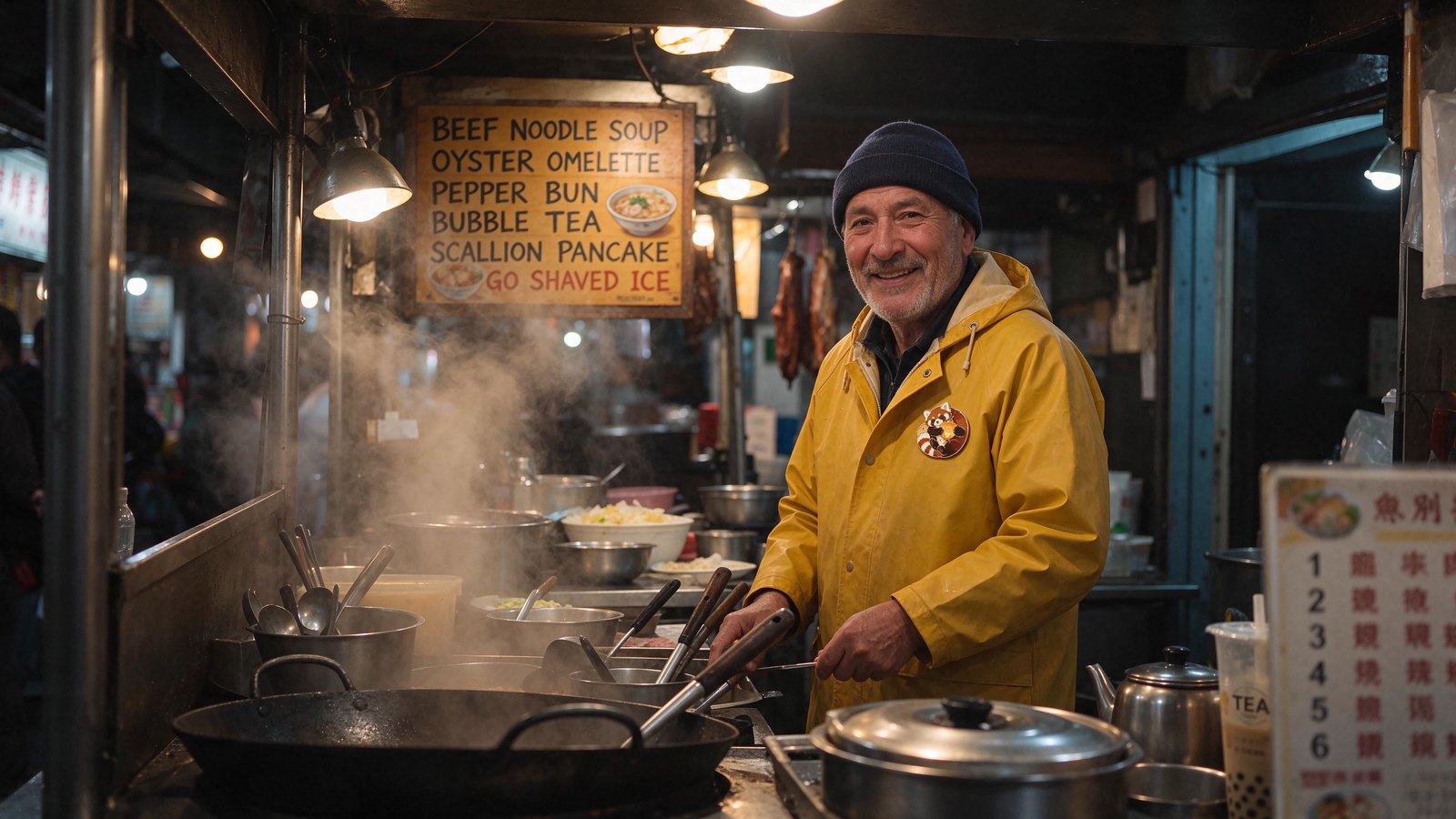
The man, his jacket and the pin all carried over into the market's light. The menu board was not kept perfectly: a small dish icon now covers the start of the last line. When text has to stay exact, editing in separate rounds, as above, held up better.
Ten images into one illustration
Seedream 5.5, 16:9, 2K (2816 × 1584), with ten earlier Flixly images as Images 1 to 10. It took 44 seconds.
Make one cohesive storybook illustration that brings together a recognizable element from each of the ten images: the dragon, the stag, the lighthouse, the city street, the cutaway building, the bicycle, the character, the winter poster's pagoda, the rider and the ramen shop. Warm painterly style, everything in one evening scene.
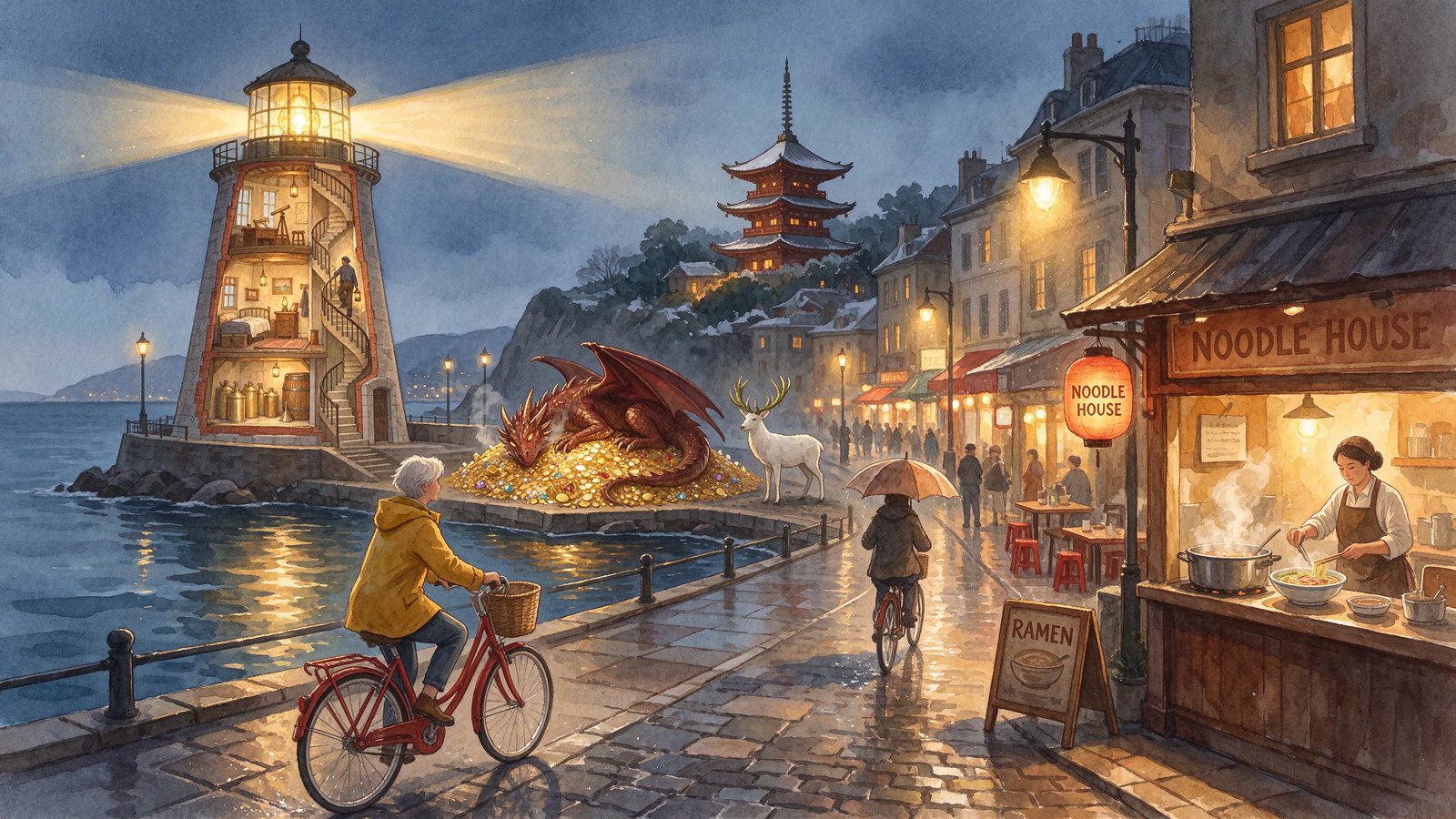
Ten references is the most Seedream 5.5 takes in one request, and every element made it into a single coherent scene.
How to use Seedream 5.5 on Flixly
- Open the Image Generator and choose Seedream 5.5 in the model picker.
- To create from text, stay on Text to image. To edit, switch to Image to image and upload one image or up to 10.
- Pick an aspect ratio and, when creating from text, a resolution: 1K for quick drafts, 1.5K or 2K for final images.
- For a sticker, a logo or a cut-out, set Background to Transparent. Flixly switches the format to PNG for you.
- Describe what you want. For edits, name the images (Image 1, Image 2…) and say what should stay the same.
- Check the price under the button, then generate.
How to get the best results from Seedream 5.5
- Put the exact words in quotes. Menu items, titles and slogans in quotation marks came out spelled correctly in every example above.
- Edit one thing at a time. Three single-change rounds kept the market scene stable; a big combined edit changed a small detail of the menu.
- Say what to keep. "Keep everything else exactly the same" is worth adding to every edit.
- Ask for "nothing behind it" along with a transparent background when you want a clean product or sticker cut-out.
Which Seedream should you use?
| Model | Best for |
|---|---|
| Seedream 5.5 | The newest model: stable multi-round edits, transparent PNGs, realistic photos and text |
| Seedream 5.0 Pro | The previous top model, still available |
| Seedream 5.0 Flash | Fast, low-cost drafts |
Want to compare it with other image models? See GPT Image 2.6 vs the best image models and the MiniMax H3 Image launch post.
Frequently Asked Questions
What is Seedream 5.5?▾
Seedream 5.5 is an image generation and editing model from ByteDance's Seed team, announced on November 9, 2026. ByteDance highlights three upgrades: more stable multi-round editing, native transparent (RGBA) images, and more realistic lighting, skin and text. On Flixly, Seedream 5.5 creates images at 1K, 1.5K or 2K and edits up to 10 reference images.
Can Seedream 5.5 make images with a transparent background?▾
Yes. In Flixly's Image Generator, pick Seedream 5.5 and set Background to Transparent, and the result is a PNG with a real alpha channel, ready to drop onto a slide, a product page or a sticker sheet. It works when creating from a prompt and when editing a photo, for example to cut a person out of a picture.
How many images can Seedream 5.5 edit or combine at once?▾
Seedream 5.5 on Flixly takes one to 10 images per edit. Refer to them in your prompt as Image 1, Image 2 and so on to place a person in a new scene, put a product on a model, or merge several pictures into one illustration. Flixly's launch example combined all 10 in one image.
What resolutions and aspect ratios does Seedream 5.5 support on Flixly?▾
Seedream 5.5 on Flixly renders at 1K (about 1 megapixel), 1.5K (about 2.4 megapixels) or 2K (about 4 megapixels), for example 2816 by 1584 pixels at 16:9. Aspect ratios are 1:1, 4:3, 3:4, 3:2, 2:3, 16:9 and 9:16, and edits can use Auto to keep the first image's shape.
How is Seedream 5.5 different from Seedream 5.0?▾
ByteDance says Seedream 5.5 keeps the parts of an image you did not ask to change stable across many rounds of editing, generates transparent images natively, and renders lighting, skin and small text more realistically than Seedream 5.0 Pro. In its own evaluations it scored higher than Seedream 5.0 Pro in all six production use cases it tested.
Is Seedream 5.5 good at text in images?▾
In Flixly's launch examples Seedream 5.5 spelled a six-line menu board and a three-line poster correctly, and rewrote one line of the menu in the same lettering. ByteDance reports a severe text corruption rate of 0.4% for Seedream 5.5. Small background signs in a busy scene can still come out as unreadable shapes.