
LTX 2.5 Fast and Pro Are Live on Flixly: Video and Sound in One Pass
Lightricks' LTX 2.5 is live on Flixly in two tiers. LTX 2.5 Fast makes 6 to 20 seconds of video with dialogue, sound effects and ambience at up to 1440p, from text, a start image or your own audio. LTX 2.5 Pro adds sharper faces, textures and on-screen text. See real results with their settings.
TL;DR
LTX 2.5, Lightricks' newest video model, is live on Flixly. It renders video and its sound together: quoted lines are spoken, and the effects and ambience you describe are in the soundtrack. LTX 2.5 Fast runs 6 to 20 seconds at 720p, 1080p or 1440p and can follow your own voice or music track. LTX 2.5 Pro makes 6 to 10 seconds at up to 1080p with sharper faces and text.
LTX 2.5 Fast and LTX 2.5 Pro are live on Flixly: Lightricks' video model makes the picture and its sound in one pass, with dialogue, sound effects and ambience. LTX 2.5 Fast runs from 6 to 20 seconds at up to 1440p and can also follow your own voice or music track. LTX 2.5 Pro adds a detail pass for sharper faces, textures and on-screen text, in 6, 8 or 10 seconds at up to 1080p. Both are in the AI Video Generator.
What is LTX 2.5?
LTX 2.5 is Lightricks' newest video model. It generates video and audio together, so a line written in quotes is spoken in the clip, in its original language, alongside the sound effects and ambience you describe. Lightricks built it for connected multi-shot scenes, sharper faces and legible text. Flixly offers it in two tiers:
| LTX 2.5 Fast | LTX 2.5 Pro | |
|---|---|---|
| Best for | Drafts, longer scenes, 1440p | Close-ups, faces and on-screen text |
| Start from | Text, a start image, or your own audio | Text or a start image |
| Length | 6 to 20 seconds, in 2-second steps | 6, 8 or 10 seconds |
| Resolution | 720p, 1080p or 1440p | 720p or 1080p |
| Frame rate | 24, 25, 48 or 50 fps | 24, 25, 48 or 50 fps |
| Sound | Dialogue, effects and ambience in the same pass | Dialogue, effects and ambience in the same pass |
On LTX 2.5 Fast, clips at 1440p or at 48 or 50 fps run up to 10 seconds. The frame rate does not change the price. Flixly shows the credit amount before you generate, and the LTX 2.5 Fast and LTX 2.5 Pro model pages list the current rates.
Real examples
Every example below was made on Flixly with the model and settings shown. Each one is the first result we got, re-encoded for the web and otherwise unedited. Times run from pressing Generate to the finished video. All clips are 24 fps and play with sound.
Text to video with dialogue
LTX 2.5 Fast at 720p, 6 seconds. It took 26 seconds.
Static medium shot in a cozy bakery at dawn. A baker with flour on her forearms holds a round sourdough loaf, knocks twice on the crust and says warmly, "Hear that hollow knock? That means it's perfect." Sound: two crisp knocks, a crackling wood oven, her clear voice. Golden light, shallow depth of field.
She says the quoted line word for word, and the knocks and the oven are in the same soundtrack. LTX 2.5 Fast put her outdoors beside a domed wood oven rather than inside a bakery, so describe the setting firmly when it matters.
A start image that comes to life
LTX 2.5 Fast at 720p, 6 seconds, from a photo of a waitress in a diner. It took 28 seconds.
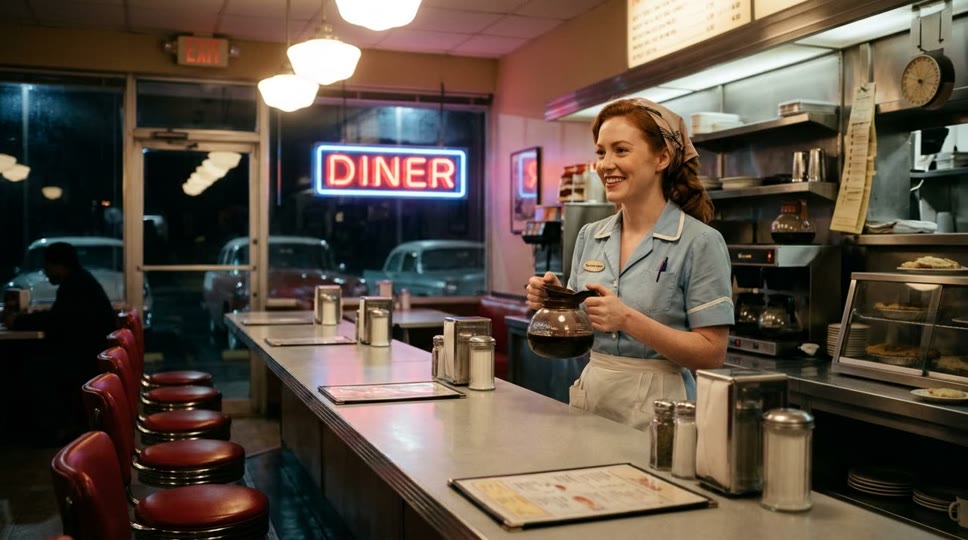
The waitress smiles, sets the coffee cup down on the counter and says brightly, "Fresh pot, just for you." Neon hum, a jukebox playing softly, cups clinking. Slow push-in.
The photo is the first frame, and the video keeps its shape: this one is 1290×720. LTX 2.5 Fast added a customer for her to serve and spoke the line with diner ambience underneath.
Your own audio drives the video
LTX 2.5 Fast at 720p, from the same photo and a 5-second voice track: the opening of a bakery radio ad made with Suno Speech in Text to Speech. The duration was set to 10 seconds. It took 28 seconds.
The waitress looks into the camera and speaks warmly, her lips matching the voice, with small natural nods and a friendly smile. Static medium close-up, soft neon diner light.
The track becomes the soundtrack, and the clip ends with it: 5 seconds, not the 10 chosen. The duration is the most a clip can run, so a shorter track makes a shorter video, and Flixly charges for the shorter length. The track can be speech, singing or music.
LTX 2.5 Fast vs LTX 2.5 Pro, same prompt
Both at 720p, 6 seconds, with the same prompt.
Close-up of a watchmaker's hands assembling a brass pocket watch under a lamp, fine engraved metal and leather texture in sharp detail. A small sign on the bench reads "REPAIRS". He murmurs, "Almost there." Sound: soft ticking, tiny metallic clicks, a quiet workshop.
LTX 2.5 Fast. It took 25 seconds.
LTX 2.5 Pro. It took 42 seconds.
Both murmur "Almost there" over the ticking. The difference is the text: on LTX 2.5 Fast the card on the bench reads "REAPIRS", and the word is right only where it is engraved on a tin; on LTX 2.5 Pro the sign reads "REPAIRS". For close-ups with lettering, labels or faces, LTX 2.5 Pro is worth the extra time.
A multi-shot prompt at 1440p
LTX 2.5 Fast at 1440p, 10 seconds. It took 186 seconds.
Shot 1: Wide shot of a lighthouse keeper in a yellow raincoat climbing the spiral stairs of a stone lighthouse at dusk, rain lashing the windows. Shot 2: Close-up as she reaches the lamp room, wipes the glass and says, "Right on time, old friend." Sound: wind howling, rain on glass, footsteps on iron stairs, the hum of the great lamp switching on.
The output is 2560×1440; it is shown here at 1080p. LTX 2.5 Fast played the two shots as one continuous move up the outside of the tower to the lamp room, which lights up at the end, with wind and rain throughout. She says the line twice. A hard cut between shots is not guaranteed: write each shot as its own short scene, and keep one spoken line per shot.
How to make a video with sound using LTX 2.5 on Flixly
- Open the AI Video Generator with LTX 2.5 Fast selected, or pick LTX 2.5 Pro in the model list.
- On the Text tab, describe the scene, the camera and the sound, and put any spoken line in quotes. Write "Shot 1:", "Shot 2:" for more than one shot.
- To start from a picture, switch to the Image tab and add a start image; the video keeps the image's shape.
- To drive the video with your own audio on LTX 2.5 Fast, switch to the Reference tab, add a voice or music track of at least 2 seconds, and optionally a start image.
- Choose the resolution, duration and, under advanced options, the frame rate. Check the credit amount shown, and generate.
Tips for better LTX 2.5 videos
- Write the sound. End the prompt with a "Sound:" line that lists the effects and ambience you want; LTX 2.5 renders them with the picture.
- Quote the dialogue. Text inside quotes is spoken, in the language it is written in. Keep lines short so they fit the clip.
- Use LTX 2.5 Pro for lettering and faces. Signs, labels and close-up faces come out cleaner on LTX 2.5 Pro.
- Draft on LTX 2.5 Fast at 720p. Check the action and timing cheaply, then render the final take at a higher resolution or on LTX 2.5 Pro.
- Trim your audio. With your own track, the clip is as long as the track up to the duration you choose, so cut silence at the start.
For Lightricks' video editing tools on Flixly, read LTX 2.5 video tools: reframe, HDR, upscale and alpha.
Frequently Asked Questions
What is LTX 2.5?▾
LTX 2.5 is Lightricks' newest video model. It generates video and audio in one pass, so quoted dialogue is spoken in the clip alongside the sound effects and ambience in the prompt. On Flixly, LTX 2.5 comes in two tiers: LTX 2.5 Fast and LTX 2.5 Pro.
What is the difference between LTX 2.5 Fast and LTX 2.5 Pro?▾
LTX 2.5 Fast runs 6 to 20 seconds at 720p, 1080p or 1440p and can follow your own audio track. LTX 2.5 Pro adds a detail pass for sharper faces, textures and on-screen text, in 6, 8 or 10 seconds at 720p or 1080p. In our test with the same prompt, LTX 2.5 Pro spelled a bench sign correctly where LTX 2.5 Fast did not.
Does LTX 2.5 generate sound?▾
Yes. LTX 2.5 always renders sound with the picture: dialogue written in quotes, spoken in its original language, plus the sound effects and ambience you describe. There is no separate audio step, and on Flixly sound is included with every LTX 2.5 Fast and LTX 2.5 Pro clip.
Can LTX 2.5 lip-sync to my own audio?▾
Yes, with LTX 2.5 Fast. On the Reference tab of the Flixly video generator, add a voice or music track of at least 2 seconds and optionally a start image. The track becomes the soundtrack, the motion follows it, and the clip runs as long as the track, up to the duration you choose.
How long and how sharp can an LTX 2.5 video be?▾
LTX 2.5 Fast makes clips of 6 to 20 seconds in 2-second steps at 720p, 1080p or 1440p, with up to 10 seconds at 1440p or at 48 or 50 fps. LTX 2.5 Pro makes 6, 8 or 10 seconds at 720p or 1080p. Both offer 24, 25, 48 or 50 fps.
Do I need a subscription to use LTX 2.5 on Flixly?▾
No. LTX 2.5 Fast and LTX 2.5 Pro run on Flixly credits, which never expire, with no subscription. Flixly shows the credit amount before you generate, and the frame rate does not change it.