
HeyGen Avatar 6 Is Live on Flixly: Make a Photo or Character Talk
HeyGen Avatar 6, HeyGen's newest avatar model, is live on Flixly. Give it a photo or a clip of an animated character plus a voice track, and it makes that character speak with natural gestures, or pick a presenter and a voice to read your script, in 1080p or 2K. Avatar 6 Turbo is included. See real results with their settings.
TL;DR
HeyGen Avatar 6 is live on Flixly in two ways. Upload a photo, or a clip of an animated or illustrated character, plus a voice track of up to 5 minutes, and the character speaks it with matching gestures. Or pick one of six presenters and ten voices and paste a script of up to 3,000 characters. Output is 1080p or 2K, and Avatar 6 Turbo costs about half as much per second.
HeyGen Avatar 6 is live on Flixly: give it a photo or an animated character and a voice track, and the character speaks it with natural gestures. You can also pick a presenter and a voice and paste a script. Videos come out in 1080p or 2K, as long as the speech, up to 5 minutes. Avatar 6 Turbo, the faster tier at about half the price per second, is included. Both are in the AI Video Generator.
What is HeyGen Avatar 6?
HeyGen Avatar 6 is HeyGen's newest avatar model. It takes one image of a character and a voice track and makes a video where the character speaks the track, with lip sync, facial expressions and gestures that follow what is being said. HeyGen built it for presenter videos, explainers and talking characters. Flixly offers it in three ways:
| Start from | What you give it | What you get |
|---|---|---|
| A photo | A photo of a person or a character, and a voice track | The person in the photo speaks your track, in their own scene |
| A character clip | A short clip of an animated or illustrated character, and a voice track | The character speaks your track and keeps moving in its scene |
| A script | One of six presenters, one of ten voices, and up to 3,000 characters of text | A presenter video in 16:9 that reads your script |
The video is always as long as the speech. A voice track can run up to 5 minutes, and Flixly charges for the seconds of video you get back.
HeyGen Avatar 6 vs Avatar 6 Turbo
| HeyGen Avatar 6 | Avatar 6 Turbo | |
|---|---|---|
| Best for | Final takes | Drafts and high volume |
| Inputs | Photo, character clip or script | Photo, character clip or script |
| Resolution | 1080p or 2K | 1080p or 2K |
| Length | As long as the speech, up to 5 minutes | As long as the speech, up to 5 minutes |
| Price per second | Higher | About half of HeyGen Avatar 6 |
Flixly shows the credit amount before you generate. The HeyGen Avatar 6 and Avatar 6 Turbo model pages list the current rates.
Real examples
Every example below was made on Flixly with the model and settings shown. Each one is the first result we got, re-encoded for the web and otherwise unedited. Times run from pressing Generate to the finished video.
The first two examples use the same voice track: a 7-second line made with HeyGen Voice Turbo in Text to Speech, using the voice Meredith. It took 14 seconds.
Hi! I'm a brand new talking avatar on Flixly. One photo and one voice track is all it takes.
A photo that talks
HeyGen Avatar 6 at 1080p, from a photo of a waitress in a diner and the voice track above. It took 82 seconds.
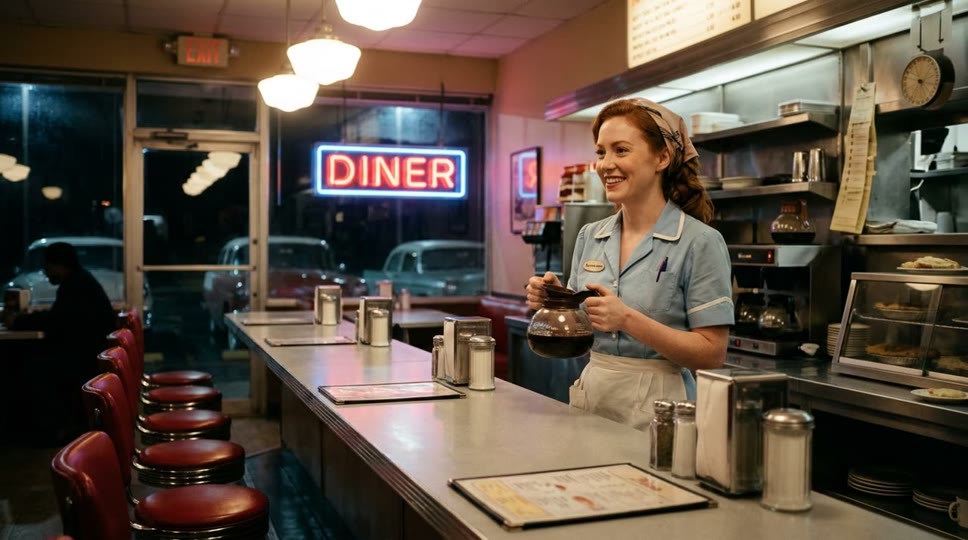
Warm smile, she looks at the camera and gestures with one hand while speaking
The text box is optional here: on the Reference tab it directs the movement, not the words. The waitress speaks the whole line, and her hand gestures and head movement follow the rhythm of the voice. The rest of the diner stays as it was in the photo.
An animated character that talks
Avatar 6 Turbo at 2K, from a 10-second clip of an anime swordswoman in a bamboo forest and the same voice track, with no motion prompt. It took 148 seconds.

With a clip, HeyGen Avatar 6 keeps the character's own scene and style and adds the speech. The 2K output is 2880×1620; it is shown here at 1080p. A clip must show an animated or illustrated character: HeyGen refuses clips of real people, so for a person use a photo.
A presenter that reads your script
The same script, presenter and voice on both tiers: Caroline Business Standing Front, the voice Jenny, 1080p, 16:9.
Welcome to our spring product update. In the next minute, I'll walk you through three new features, starting with the one our customers asked for most.
HeyGen Avatar 6: 8.4 seconds of video. It took 80 seconds.
Avatar 6 Turbo: 8.4 seconds of video. It took 131 seconds.
Both tiers read the script word for word, at the same pace, and both videos are 8.4 seconds long. The difference is the body language. On HeyGen Avatar 6 the presenter opens her hands as she starts and raises a hand mid-sentence. On Avatar 6 Turbo she keeps her hands mostly clasped. Turbo is a good way to check a script; HeyGen Avatar 6 gives the more expressive final take. On launch day, Turbo was not faster to finish.
The six presenters
Flixly offers the six HeyGen presenters that support HeyGen Avatar 6. Each still below is from a short Avatar 6 Turbo test render of that presenter saying "Hi there."
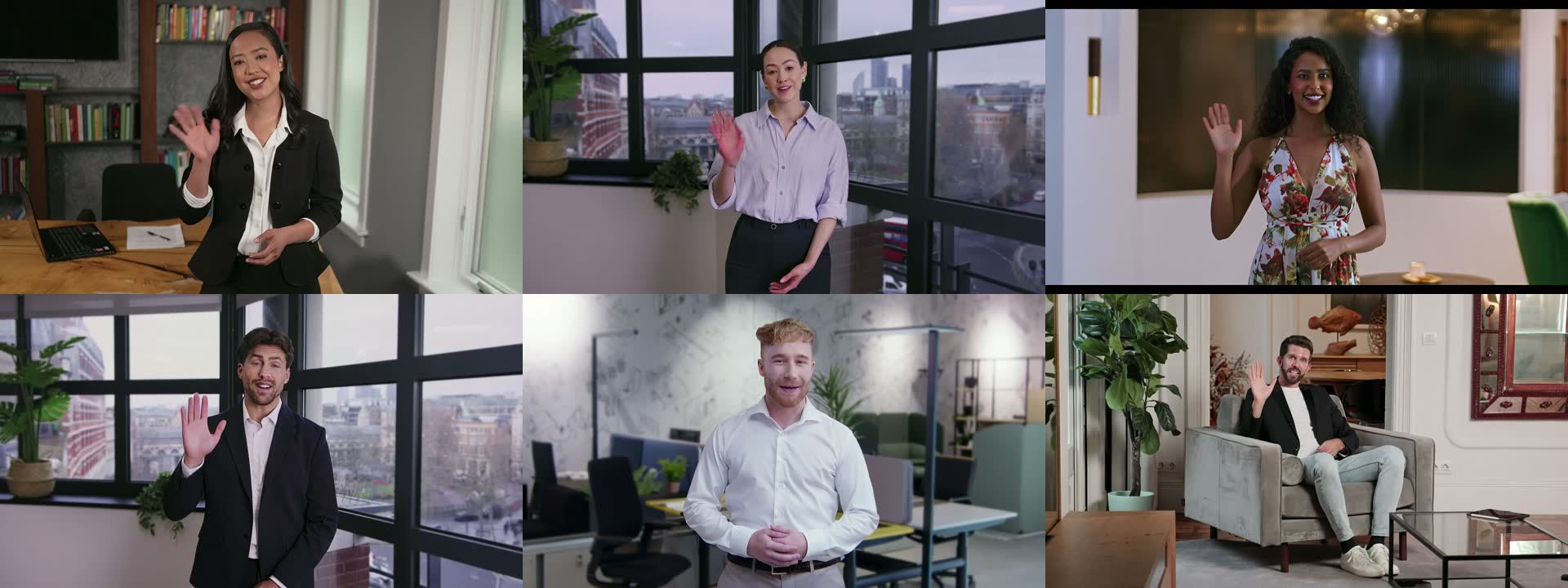
Top row: Abigail Office Front, Caroline Business Standing Front, Kavya Indoor Front. Bottom row: Brandon Business Standing Front, Noah Office Front, Raul Business Sofa Front. The presenters are filmed in 16:9, so presenter videos are made in 16:9.
How to make a talking avatar with HeyGen Avatar 6 on Flixly
- Open the AI Video Generator with HeyGen Avatar 6 selected, or pick Avatar 6 Turbo in the model list.
- To make your own character talk, stay on the Reference tab: add a photo or a clip of an animated character, then add a voice track of up to 5 minutes. To make one in Text to Speech, write the line, pick a voice and download the audio.
- Optionally, describe the movement in the text box, such as "warm smile, gestures with one hand".
- To use a presenter instead, switch to the Text tab, pick a presenter and a voice, and paste your script.
- Choose 1080p or 2K, check the credit amount shown, and generate.
Tips for better HeyGen Avatar 6 videos
- Start with a clear face. A front-facing photo where the face is well lit and not covered gives the cleanest lip sync.
- Record clean audio. Speech without music or background noise gives the best mouth movement, and the video is exactly as long as the track, so trim silence at the start and end.
- Draft on Turbo. Avatar 6 Turbo costs about half as much per second, which is enough to check timing and delivery before a final take on HeyGen Avatar 6.
- Write for the ear. In a script, short sentences and spelled-out numbers read more naturally than long sentences and figures.
- Only animate people who agreed to it. Use photos of yourself or of people who have given you permission.
For HeyGen's earlier video and voice models on Flixly, read HeyGen Video and HeyGen Voice are live on Flixly.
Frequently Asked Questions
What is HeyGen Avatar 6?▾
HeyGen Avatar 6 is HeyGen's newest avatar video model. It turns one image of a character and a voice track into a talking video with lip sync, facial expressions and gestures that follow the speech. On Flixly it runs from a photo, a clip of an animated character, or a stock presenter reading your script, in 1080p or 2K.
What is the difference between HeyGen Avatar 6 and Avatar 6 Turbo?▾
Both are HeyGen Avatar 6 and take the same inputs on Flixly. Avatar 6 Turbo costs about half as much per second and suits drafts and high volume. In our test with the same script, presenter and voice, both read the full script at the same pace, and HeyGen Avatar 6 gestured more, so it is the one to use for a final take.
How long can a HeyGen Avatar 6 video be?▾
On Flixly, a HeyGen Avatar 6 video is as long as the speech: up to 5 minutes from a voice track, or up to 3,000 characters of script, about three minutes of speech. Flixly charges for the seconds of video you get back, and any difference from the amount held at the start is returned to your balance.
Can HeyGen Avatar 6 animate a video of a real person?▾
No. A reference clip for HeyGen Avatar 6 must show an animated or illustrated character; HeyGen refuses clips of real people. To make a real person talk, upload a photo instead, and only of someone who has agreed to it.
Which presenters and voices can I use with a script?▾
Flixly offers six HeyGen presenters that support HeyGen Avatar 6 (Abigail, Caroline, Kavya, Brandon, Noah and Raul) and ten HeyGen voices. Presenter videos are made in 16:9, the format the presenters are filmed in.
Do I need a HeyGen subscription to use HeyGen Avatar 6 on Flixly?▾
No. HeyGen Avatar 6 runs on Flixly credits, which never expire, with no subscription. Flixly shows the credit amount before you generate, and to make the voice track itself you can use HeyGen Voice, ElevenLabs or any other text-to-speech model on Flixly.