Seedance 2.5 Flash Is Live on Flixly: Faster 30-Second AI Video
Seedance 2.5 Flash, ByteDance's faster version of Seedance 2.5, is live on Flixly. Make up to 30 seconds of video at 480p or 720p with synchronized audio from a prompt, a start and end frame, or up to 10 images, 5 videos and 5 audio clips, for about a third less per second. See four real results with their prompts.
TL;DR
Seedance 2.5 Flash is live on Flixly. It is ByteDance's faster, lighter Seedance 2.5: up to 30 seconds per clip at 480p or 720p, with dialogue, music and sound generated in the same pass. Start from text, a start frame, a start and end frame, or up to 10 images, 5 videos and 5 audio clips. It costs about a third less per second than Seedance 2.5; switch to Seedance 2.5 for 1080p.
Seedance 2.5 Flash is live on Flixly. It is ByteDance's faster version of Seedance 2.5: up to 30 seconds of video in one generation, at 480p or 720p, with dialogue, music and sound generated with the picture, for about a third less per second than Seedance 2.5. Start from a prompt, a start frame, a start and end frame, or up to 10 images, 5 videos and 5 audio clips in the AI Video Generator. Use it to try ideas quickly, then keep the ones that work.
What is Seedance 2.5 Flash?
Seedance 2.5 Flash is the accelerated version of Seedance 2.5, ByteDance's newest video model. ByteDance describes it as a way to test visual concepts 2x faster at 480p and 720p, while Seedance 2.5 is built for polished 1080p final renders. Flash keeps what makes Seedance 2.5 useful: long single takes of up to 30 seconds, synchronized audio, and references you name in the prompt. On Flixly, both models are in the same model picker, so you can draft with Flash and switch to Seedance 2.5 for the final take.
Seedance 2.5 Flash vs Seedance 2.5
| Seedance 2.5 Flash | Seedance 2.5 | |
|---|---|---|
| Best for | Drafts, quick variations, social clips | Final shots and 1080p |
| Length | 4 to 30 seconds | 4 to 30 seconds |
| Resolution | 480p or 720p | 480p, 720p or 1080p |
| Start from | Text, a start frame, a start and end frame, or references | Text, a start frame, or references |
| References | Up to 10 images, 5 videos and 5 audio clips | Up to 10 images, 10 videos and 10 audio clips |
| Audio | Generated with the video | Generated with the video |
| Price per second | About a third less than Seedance 2.5 | Higher; 1080p costs the most |
Flixly shows the exact credit price before you generate. The Seedance 2.5 Flash model page lists the current rates, and turning audio off does not change them.
Real examples
Every example below was made on Flixly with Seedance 2.5 Flash, using the prompt and settings shown. Each one is the first result we got, re-encoded for the web and otherwise unedited. The times are from pressing Generate to the finished video; on launch day every example took between one and two minutes.
Text to video: a line of dialogue at dawn
5 seconds at 720p, 16:9. It took 84 seconds.
A fisherman at dawn hauls a net onto a wooden pier, gulls circling overhead. He looks at the camera and says: "Good catch today." Waves, wind and creaking wood.
The fisherman speaks the line from the prompt, word for word. The waves and the wind are on the same soundtrack, made in the same pass as the picture.
Text to video: a 15-second vertical take
15 seconds at 480p, 9:16. It took 99 seconds.
Vertical handheld one-take at a night market. A street food vendor flips skewers on a smoking grill, then looks up at the camera and says: "Fresh off the fire. Who's hungry?" He hands a skewer to a customer, and the camera follows her as she walks away through the crowd under strings of paper lanterns, past a juice stand, until she stops to take a bite. Sizzling grill, crowd chatter, distant music.
One prompt, five beats, no hard cuts: the grill, the vendor's line, the hand-off, the walk under the lanterns, and the first bite. Long takes are where Seedance 2.5 Flash is most useful, since a 15-second vertical clip at 480p is ready to review in under two minutes.
Start and end frame: from the car to the valley
5 seconds at 720p from two frames: a red convertible drifting through a hairpin, and an aerial view of the same road and valley. It took 89 seconds.
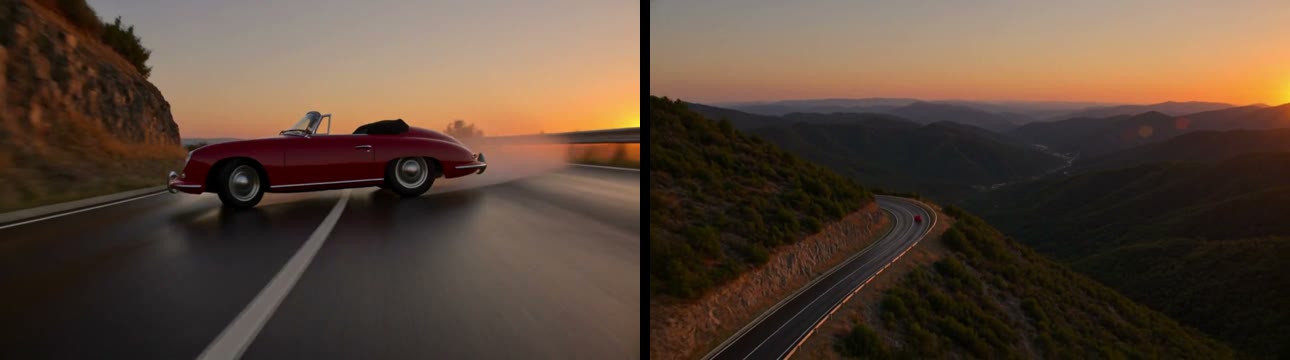
The red convertible powers out of the hairpin and speeds away down the mountain road at sunset, while the camera rises into a smooth drone shot that pulls back until the car is a small red dot on the winding road and the whole valley glows in orange light. Engine roar fading into wind.
The clip opens on the first frame and lands on the second, and Seedance 2.5 Flash filled the five seconds between them with a single camera move: the car pulls away while the shot lifts into the aerial view.
Reference to video: an image and a clip
5 seconds at 480p from two references: a photo of teacups on a shelf with a sleeping cat ([Image1]) and a 6-second clip of a red convertible on a mountain road ([Video1]). It took 91 seconds.

The red car from [Video1] drives along the mountain road at sunset, then the scene cuts to the teacups shelf from [Image1] as a black cat wakes up. Engine sound, then a quiet room.
Seedance 2.5 Flash followed the prompt's order: the car from the clip first, then a cut to the shelf from the photo, with the sticky note and the cups kept as they were. A reference video makes a job cost more than the same clip without one, so Flixly shows the price for it before you generate.
How to use Seedance 2.5 Flash on Flixly
- Open the AI Video Generator with Seedance 2.5 Flash selected.
- Pick an input: text, an image as the start frame, a start and end frame, or references (up to 10 images, 5 videos and 5 audio clips).
- Choose 480p or 720p, an aspect ratio (auto, 21:9, 16:9, 4:3, 1:1, 3:4 or 9:16) and a length from 4 to 30 seconds.
- Write the prompt, including spoken lines in quotation marks and the sounds you want, check the credit price shown, and generate.
- To make a 1080p version of a take you like, keep the prompt and switch the model to Seedance 2.5.
Tips for better Seedance 2.5 Flash videos
- Draft at 480p. It costs less than half of 720p, and it is enough to judge the motion, the timing and the sound.
- Write the take, beat by beat. List what happens in order, as in the night market prompt; Seedance 2.5 Flash keeps that order across a long clip.
- Name your references. Refer to them as [Image1], [Video1] and [Audio1], in the order you added them, and say what to take from each.
- Mind the photo check. ByteDance refuses uploads that may show the likeness of a real person or other private information, which in our tests included photos of people and some photorealistic street and city scenes. A refused job is not charged, and a text prompt is the way around it.
Seedance 2.5 Flash is listed with every other video model on Flixly in the AI Video Generator. For how Seedance 2.5 compares with other models, read Kling 4.0 vs Kling 3.0 vs Seedance 2.5 vs Veo 3.1.
Frequently Asked Questions
What is Seedance 2.5 Flash?▾
Seedance 2.5 Flash is ByteDance's faster version of Seedance 2.5, its newest video model. On Flixly it makes clips from 4 to 30 seconds at 480p or 720p, with dialogue, music and sound effects generated with the picture, from a text prompt, a start frame, a start and end frame, or reference images, videos and audio.
How is Seedance 2.5 Flash different from Seedance 2.5?▾
Seedance 2.5 Flash renders at 480p or 720p and costs about a third less per second than Seedance 2.5 on Flixly. Seedance 2.5 adds 1080p. ByteDance describes Flash as the faster version for testing ideas, so draft with Seedance 2.5 Flash and switch to Seedance 2.5 for a 1080p final take.
Does Seedance 2.5 Flash generate audio?▾
Yes. Seedance 2.5 Flash generates synchronized audio with the video: spoken lines, sound effects, ambience and music. Put dialogue in quotation marks and name the sounds you want. Turning audio off does not change the price on Flixly.
How long can a Seedance 2.5 Flash video be?▾
Seedance 2.5 Flash makes clips from 4 to 30 seconds in a single generation on Flixly. Pick the length with the duration slider before you generate; the price is per second, so short drafts cost less.
What references can I give Seedance 2.5 Flash?▾
In reference mode, Seedance 2.5 Flash takes up to 10 images, 5 videos and 5 audio clips. Videos and audio can each be up to 30 seconds in total, and each clip at least 1.8 seconds. Refer to them in the prompt as [Image1], [Video1], [Audio1] and so on, in the order you added them.
Why was my Seedance 2.5 Flash image or reference refused?▾
ByteDance checks uploaded images and videos before Seedance 2.5 Flash renders, and refuses media that may show the likeness of a real person or other private information. In our tests that included photos of people, some photorealistic street and city scenes, and illustrated animal characters in clothes. A refused job is not charged on Flixly.