
Upscale Video to 4K: Flixly Video Upscale and FlashVSR+ on Flixly
The Video Upscaler has two new engines: Flixly Video Upscale fits any clip into 1080p, 2K or 4K, and FlashVSR+ from OpenImagingLab sharpens a clip 2x, 3x or 4x, with a motion setting for fast action. Both keep your audio. See four real results, with close-ups, settings and times.
TL;DR
Flixly's Video Upscaler now offers Flixly Video Upscale, which fits a clip into 1080p, 2K or 4K without cropping, and FlashVSR+, OpenImagingLab's one-step diffusion model that sharpens video 2x, 3x or 4x up to 4K. Both keep length, frame rate and audio. Flixly Video Upscale takes clips up to 60 seconds, FlashVSR+ up to 30, and Flixly shows the price before you start.
Flixly's Video Upscaler has two new engines: Flixly Video Upscale fits any clip into 1080p, 2K or 4K, and FlashVSR+ from OpenImagingLab sharpens a clip 2x, 3x or 4x, up to 4K. Both keep your clip's length, frame rate and audio, and both take video you already have: a phone clip, an old export or an AI generation. Upload it, pick your settings, and Flixly shows the price before you start. Every example below is a real first result made on Flixly, with its settings and how long it took.
What are Flixly Video Upscale and FlashVSR+?
They are two new ways to upscale video on the Video Upscaler, and they work differently:
| Flixly Video Upscale | FlashVSR+ | |
|---|---|---|
| Made by | Flixly | OpenImagingLab (Shanghai AI Lab, CUHK MMLab, Tsinghua University) |
| You choose | An output size: 1080p, 2K or 4K | A scale: 2x, 3x or 4x |
| Biggest output | 4K (3840 × 2160, or 2160 × 3840 vertical) | Up to 4K's pixel count (3840 × 2160 in total) |
| Clip length | Up to 60 seconds | Up to 30 seconds |
| Extra settings | None | Quality (Fast or Best) and motion handling for fast action |
| Keeps | Shape, length, frame rate and audio | Shape, length, frame rate and audio |
| Price depends on | Clip length and output size | Output size, number of frames and motion handling |
Flixly Video Upscale treats your choice as a box. The clip is fitted into it without cropping, so a 16:9 clip at 4K comes back at exactly 3840 × 2160, a vertical one at 2160 × 3840, and a square one at 2160 × 2160 when you pick 4K. A clip that is already bigger than the box is scaled down to it and cleaned up. It is the quickest way to deliver a clip at a standard size.
FlashVSR+ is OpenImagingLab's one-step diffusion model for video super-resolution. Its authors describe it as an efficient one-step diffusion framework that combines a hybrid attention design with reward-guided training to improve perceptual quality, and that runs 4K without splitting the picture into tiles (paper, project page). It multiplies your clip's width and height by the scale you choose, so a 1280 × 720 clip at 3x becomes 3840 × 2160. Its authors recommend lower temporal compression for videos with large motion; on Flixly that is the Motion handling setting.
What can you control on Flixly?
| Setting | Flixly Video Upscale | FlashVSR+ |
|---|---|---|
| Target | 1080p, 2K (default) or 4K | 2x (default), 3x or 4x |
| Quality | n/a | Fast (default) or Best, the same price |
| Motion handling | n/a | Standard (default), Fast motion (twice the price) or Maximum (four times the price) |
| Files | MP4 or MOV | MP4 or MOV |
Flixly shows the estimate under the button before you start. FlashVSR+ is priced on the frames it outputs, so Flixly reads your clip's frame count to estimate it, and the final charge is worked out from the finished video.
Real examples
Every result below was made on Flixly with the engine and settings shown, from a 5 second, 24 fps clip that Flixly had generated earlier. Each is the first result we got. The videos are compressed for the web and the 4K and 1440p results are shown smaller, so the close-ups after each one compare the same frame at full size: the original simply enlarged, then the upscale. Times run from submitting the clip to the finished result.
Take a 720p street-food clip to 4K with both upscalers
The original is a 1280 × 720 clip of a pho vendor in a conical hat pouring broth at a street stall:
Flixly Video Upscale, target 4K (3840 × 2160). It took 52 seconds.
FlashVSR+, 3x (3840 × 2160), Fast quality, Standard motion handling. It took 37 seconds.
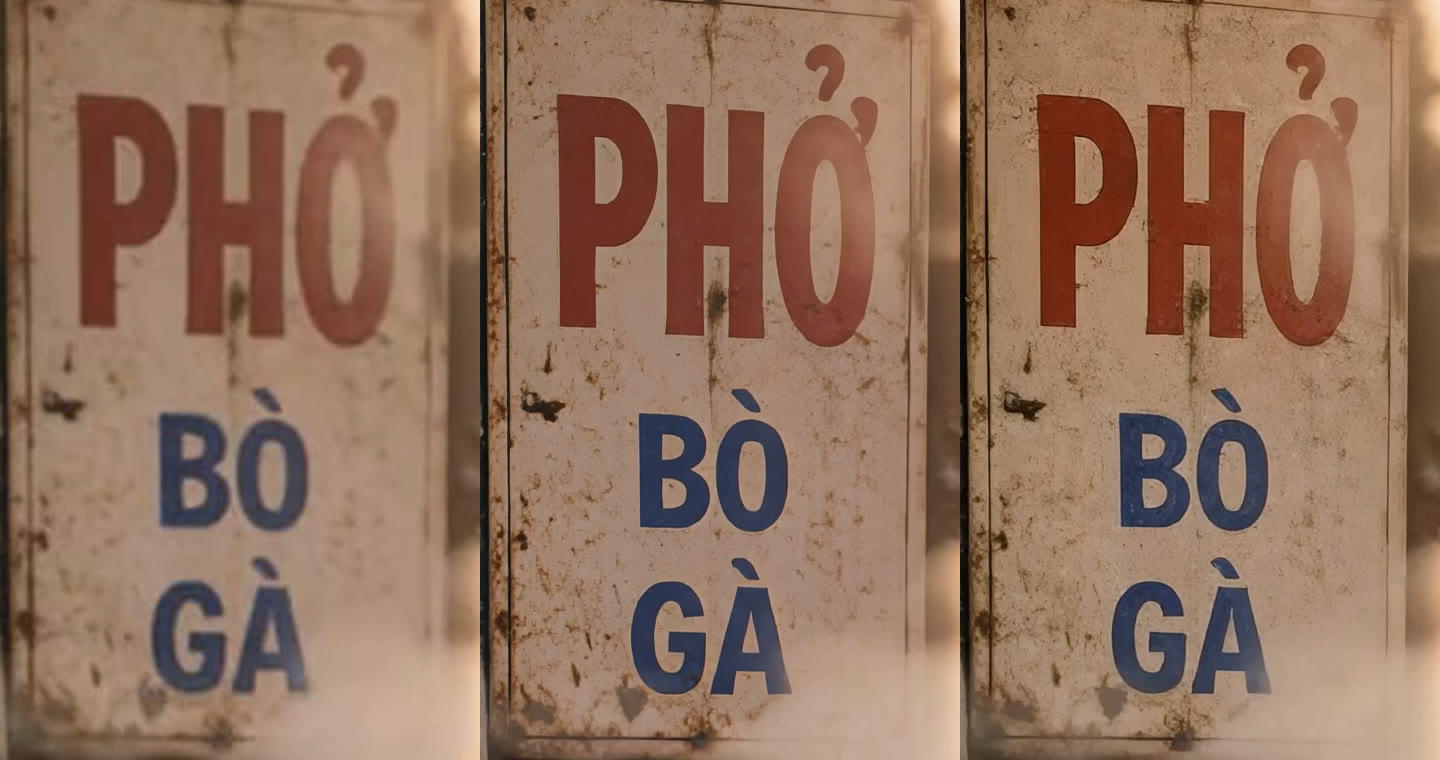
Here is the same frame and the same 640 × 640 pixel area at 4K: the original enlarged, then Flixly Video Upscale, then FlashVSR+.

Both are clear upgrades, with different characters. Flixly Video Upscale adds the most texture: skin, freckles, the weave of the hat and every flower on the blouse, with a little more contrast. FlashVSR+ is cleaner and stays closer to the original's look, with smoother skin. Both keep text as written; the hand-painted sign reads exactly the same, accents included, with its rust and scratches sharpened:
Sharpen a fast drift with FlashVSR+ motion handling
The original is a 1280 × 720 clip of a red vintage convertible drifting through a mountain bend at sunset, with motion blur and tire smoke:
FlashVSR+, 2x (2560 × 1440), Best quality, Fast motion handling. It took 56 seconds.
The same frame and area at 2560 × 1440, the original enlarged on the left:
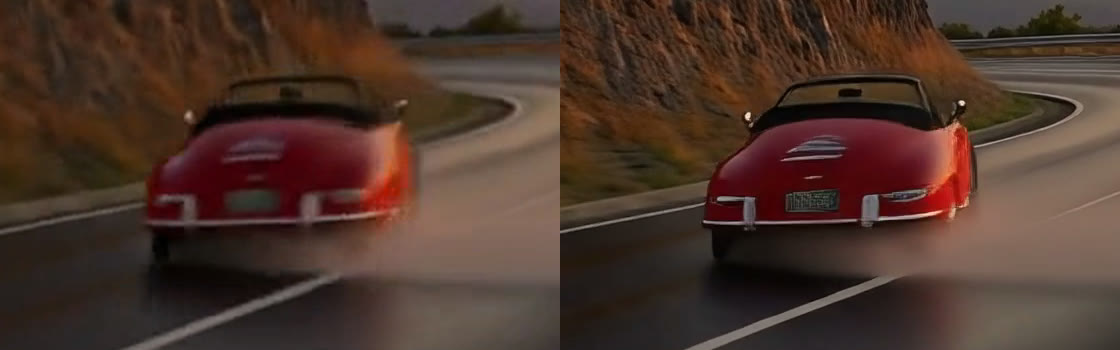
The car went from a red smear to a recognisable roadster, with chrome bumpers, tail lights and a vented rear deck, and the rock face behind it gained texture while the motion stayed smooth from frame to frame. Look at the number plate, though: it now has lettering that was never in the original. Upscalers have to invent fine detail, so check plates, small text and faces before you use a result where they matter.
Upscale a vertical selfie to 2K
The original is a 720 × 1280 selfie of a hiker in a red beanie on a misty summit:
Flixly Video Upscale, target 2K (1440 × 2560, the vertical 2K box). It took 28 seconds.
The same frame and area at 1440 × 2560, the original enlarged on the left:
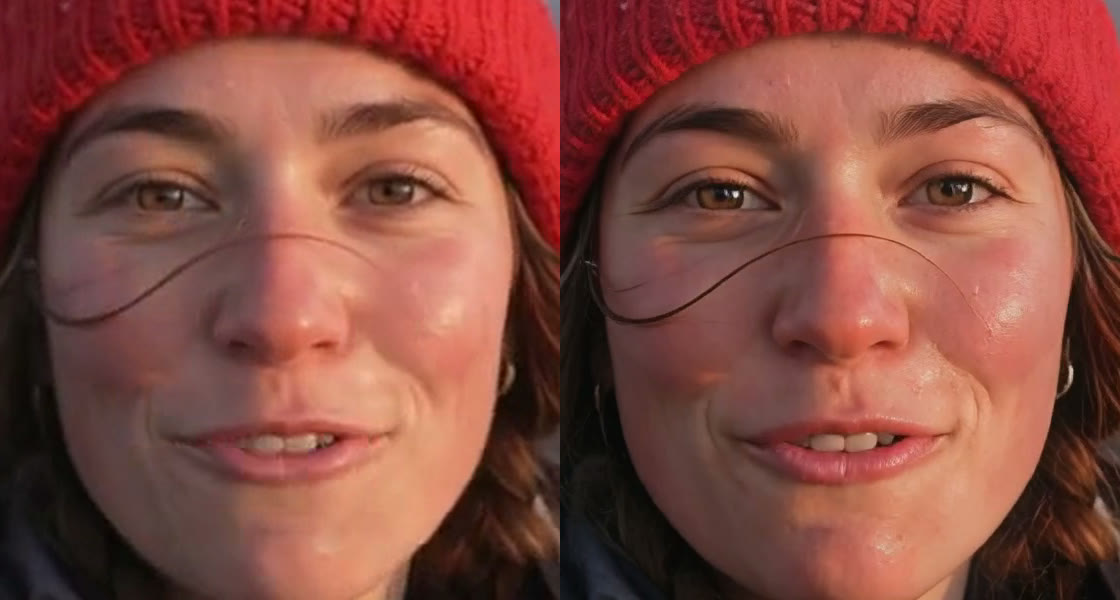
The eyes, the eyelashes, a single strand of hair blowing across her face and the knit of the beanie are all sharp, and her expression is unchanged. The colors come out a touch warmer. Vertical clips keep their shape: the 2K box for a portrait clip is 1440 × 2560, ready for Reels, Shorts and TikTok.
How to upscale a video on Flixly
- Open the Video Upscaler.
- Upload an MP4 or MOV clip.
- Pick Flixly Video Upscale or FlashVSR+.
- Choose the settings: 1080p, 2K or 4K for Flixly Video Upscale; the scale, quality and motion handling for FlashVSR+.
- Check the estimate under the button, then start. Short clips are usually done in under a minute.
- Download the result.
How to get the best results
- Start from your best copy. An upscaler can only work with what it is given; a clip that has been compressed several times comes back softer.
- Trim first. Both engines are priced on your clip's length, so cut it to the part you need.
- Pick the scale that lands on your delivery size. With FlashVSR+, 3x turns 720p into 4K and 2x turns 1080p into 4K. With Flixly Video Upscale, just pick the size.
- Use motion handling only when you need it. Standard suits most clips; try Fast motion for sports, drifts, dance or fast camera moves, where it keeps moving detail steadier.
- Check invented detail. Both engines add detail that was not in the source. Look over faces, number plates and small text before you publish.
Which upscaler should you use?
| You want to | Use |
|---|---|
| Deliver a clip at exactly 1080p, 2K or 4K, including vertical, at the lowest cost per second | Flixly Video Upscale |
| Sharpen a clip by an exact factor, keep the original look, or rescue fast action | FlashVSR+ |
| Go beyond 4K, to 8K | LTX 2.5 Upscale |
| Rebuild detail on footage that is badly degraded | Topaz Starlight, on the same Video Upscaler |
Upscaling a still image instead? See Flixly Upscale for images, which goes up to 8x.
Frequently Asked Questions
How do I upscale a video to 4K with AI?▾
Open the Video Upscaler on Flixly, upload an MP4 or MOV clip and pick Flixly Video Upscale with the 4K target, or FlashVSR+ with the scale that reaches 4K (3x for a 720p clip, 2x for 1080p). Flixly shows the estimate before you start, and short clips are usually done in under a minute.
What is the difference between Flixly Video Upscale and FlashVSR+?▾
Flixly Video Upscale lets you pick an output size, 1080p, 2K or 4K, and fits the clip into it, which makes it the quickest way to deliver a standard size. FlashVSR+, made by OpenImagingLab, multiplies the clip's size by 2, 3 or 4 up to 4K, offers a Best quality mode and extra motion handling, and in our tests stayed closer to the original's look.
What is FlashVSR+?▾
FlashVSR+ is a one-step diffusion model for video super-resolution from OpenImagingLab, by researchers at Shanghai AI Lab, CUHK MMLab and Tsinghua University. Its authors describe a hybrid attention design and reward-guided training that make high-quality 4K upscaling efficient. On Flixly it upscales clips up to 30 seconds by 2x, 3x or 4x.
Does upscaling keep the audio and frame rate?▾
Yes. Both Flixly Video Upscale and FlashVSR+ return a video with the same length, frame count and frame rate as your clip, and they keep its soundtrack. In our examples a 5 second, 24 fps clip came back as 5 seconds and 120 frames at 24 fps, with its audio.
Can I upscale vertical videos for Reels, Shorts and TikTok?▾
Yes. Flixly Video Upscale keeps your clip's shape, so a vertical clip upscaled to 2K comes back at 1440 × 2560 and at 4K at 2160 × 3840. FlashVSR+ also keeps the shape and multiplies both sides by the scale you choose, up to 4K's pixel count.
When should I use FlashVSR+ motion handling?▾
Use FlashVSR+ motion handling for clips with fast action, such as sports, drifts, dance or quick camera moves. Fast motion keeps moving detail steadier and doubles the price; Maximum quadruples it. Standard is right for most clips, and the Fast and Best quality modes cost the same.