
AI Video Dubbing with Lip Sync: VEED Dubbing on Flixly
Dub a video of up to 10 minutes into another language on Flixly. VEED Dubbing translates the speech, re-voices it in each speaker's own voice and syncs their lips. See real Spanish, Portuguese, Japanese, German and French results.
TL;DR
VEED Dubbing and VEED Dubbing Pro are live in the Flixly Video Translator. Upload a video of up to 10 minutes and pick a language: the speech is translated, spoken in each speaker's own voice and lip-synced. Standard covers 86 languages. Pro covers 94 languages plus 14 regional accents, such as Mexican Spanish and Brazilian Portuguese, and lets you choose how closely the voices match.
You can now dub a video into another language on Flixly, and the people in it keep their own voices. VEED Dubbing transcribes the speech in your video, translates it, re-voices it in each speaker's own voice and syncs their lips to the new words. Videos can be up to 10 minutes long. VEED Dubbing covers 86 languages; VEED Dubbing Pro covers 94 languages plus 14 regional accents, such as Mexican Spanish and Brazilian Portuguese, with a closer match to each speaker's voice. Dub a video in the Video Translator.
What is AI video dubbing?
AI video dubbing replaces the spoken language of a video with another language without re-recording anything. It takes three steps, all of them automatic: the speech is transcribed and translated, the translation is spoken in a voice cloned from each original speaker, and the speakers' mouths are re-rendered so their lips match the new words. Unlike subtitles, viewers hear the video in their own language. Unlike a traditional voice-over, the people on screen still sound like themselves, and their lips are in sync.
VEED Dubbing and VEED Dubbing Pro
Both models are by VEED and both run in the Video Translator. Pick one with the switch at the top of the tool.
| VEED Dubbing | VEED Dubbing Pro | |
|---|---|---|
| Languages to dub into | 86 | 94, plus 14 regional accents |
| Regional accents | No | US, UK, Australian and Canadian English, Spain, Mexican, Argentinian and Chilean Spanish, Brazilian and European Portuguese, French and Canadian French, Egyptian Arabic, Traditional Chinese (Taiwan) |
| Voice match | Automatic | Natural, Balanced or Closest to original |
| Lip sync | Yes | Yes |
| Video length | Up to 10 minutes | Up to 10 minutes |
| Best for | Clear speech in a widely spoken language, drafts | Brand videos, a specific accent, keeping each voice as close as possible |
Both detect the spoken language for you. If a video has a strong accent or mixes languages, set the spoken language yourself.
Real examples
Every example below was made on Flixly with the settings shown. Each one is the first result we got, with nothing edited apart from compressing the files for the web. To check the words, we ran every dubbed clip through a speech-recognition model (Whisper) and quote what it heard. From pressing Dub to the finished video, these took between 52 seconds and about two and a half minutes.
One speaker, two languages
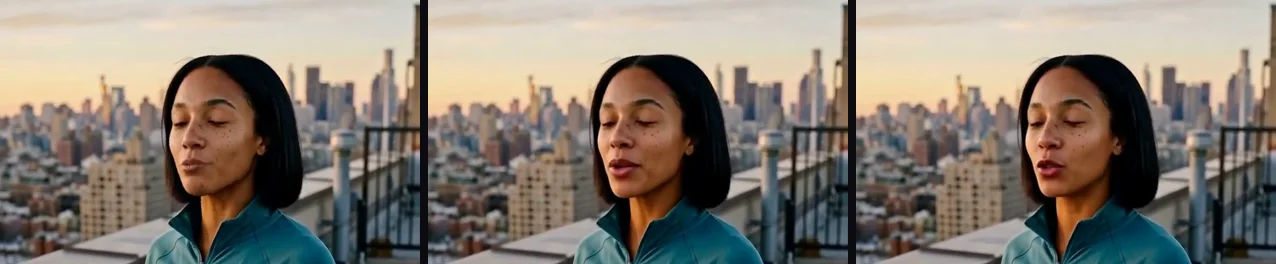
The English source is a 7-second clip of a runner on a rooftop, made earlier on Flixly with HeyGen Video. She says: "I run before the city wakes up. It's the only time the whole skyline feels like mine."
Spanish, with VEED Dubbing. She now says "Corro antes de que la ciudad despierte, es el único momento en que el horizonte es mío." The dub took 156 seconds.
Brazilian Portuguese, with VEED Dubbing Pro. We picked Português (Brasil) and left Voice match on Balanced. She says "Eu corro antes da cidade acordar. É a única hora em que toda essa paisagem parece ser só minha." The dub took 52 seconds.
Both dubs run 6.64 seconds against the source's 6.68, and keep her face, framing and background. Only the mouth moves differently. Here is the same moment, three seconds in, from all three versions:
A product message in Japanese and German
A 10-second clip of a potter in her studio, made on Flixly with HeyGen Video. She says: "Every mug in this studio is thrown by hand. Order yours by Friday, and we will have it ready next week."
Japanese, with VEED Dubbing. "このスタジオのマグカップは、すべて手びねりで作られています。金曜日までにご注文いただければ、来週にはご用意できます。" That is "Every mug in this studio is made by hand. If you order by Friday, we can have it ready next week," in polite shop Japanese. The dub took 75 seconds.
German, with VEED Dubbing Pro. "Jeder Becher hier im Studio ist von Hand getöpfert. Bestell deinen bis Freitag und nächste Woche ist er abholbereit." The translation kept her friendly tone and chose the informal "du". The dub took 54 seconds.
Two speakers, two voices
Dubbing works with more than one person on screen. In this 10-second café scene, also made with HeyGen Video, a man asks "So, are you really moving to Lisbon next month?" and a woman answers "I am. I found a tiny flat right by the river."
French (France), with VEED Dubbing Pro. He asks "Alors, tu déménages vraiment à Lisbonne le mois prochain ?" and she answers "Oui ! J'ai trouvé un tout petit appart au bord du fleuve." Each person keeps their own voice: the man's line has the same median pitch as in English, 142 Hz, and the woman's stays in her higher range, 180 Hz in English and 203 Hz in French. The dub took 89 seconds.
How to dub a video on Flixly
- Open the Video Translator.
- Upload your video: MP4, MOV or WebM, up to 10 minutes long and under 80 MB, with speech in its audio.
- Choose VEED Dubbing or VEED Dubbing Pro.
- Pick the language to dub into. With Pro you can also pick a regional accent, such as Español (México) or Português (Brasil).
- Leave the spoken language on Detect automatically, or set it if your video has a strong accent.
- With Pro, choose how closely the new voices should match the originals: Natural, Balanced or Closest to original.
- Check the credit estimate under the settings, then press Dub video. The finished video is saved to your History.
Tips for a better dub
- Start with clean speech. Dubbing hears what a transcript would hear. Background music and crosstalk lower the quality of the translation and the voices.
- Keep faces visible. Lip sync works best when the speaker's face is in frame and not too small.
- Use Pro for brands and accents. If your audience is in Mexico or Brazil, a regional accent sounds more natural than the neutral one.
- Choose the voice match on purpose. Closest to original keeps more of each speaker's voice and accent. Natural sounds more native in the new language.
- Dub once per language. Each dub makes one new video, so a video in five languages is five dubs from the same upload.
How dubbing is priced
Dubbing is priced by the length of your video, per second, and Pro costs more than the standard model. Flixly reads the length of your upload and shows the estimate before you start. The final charge follows the length of the dubbed video, which is the same as your original. See the VEED Dubbing and VEED Dubbing Pro model pages for details.
Related tools
- Lip Sync puts a new voice track of your own on a video.
- Auto Captions adds subtitles to a video.
- Video Tools has more ways to edit an existing video.
Frequently Asked Questions
What is VEED Dubbing?▾
VEED Dubbing is VEED's AI dubbing model. It transcribes the speech in a video, translates it, speaks the translation in a voice cloned from each original speaker and syncs their lips to the new words. On Flixly it runs in the Video Translator.
What is the difference between VEED Dubbing and VEED Dubbing Pro?▾
Both dub videos of up to 10 minutes with lip sync. VEED Dubbing covers 86 languages. VEED Dubbing Pro covers 94 languages plus 14 regional accents, such as Mexican Spanish, Brazilian Portuguese and Canadian French, and adds a voice match setting: Natural, Balanced or Closest to original.
Does the dubbed video keep the original speakers' voices?▾
Yes. Each speaker is re-voiced in a voice cloned from their own speech. In our French test of a two-person scene, the man's line kept the same median pitch as in English and the woman's stayed in her higher range.
Can I dub a video with more than one speaker?▾
Yes. Each person keeps their own voice and their lips are synced separately. Our café example has a man and a woman talking, dubbed into French.
How long can my video be?▾
Up to 10 minutes, as an MP4, MOV or WebM file under 80 MB. In our tests a 7 to 10 second clip took between about 50 seconds and two and a half minutes to dub.
Do I need to tell it which language is spoken in the video?▾
No. The spoken language is detected automatically. If a video has a strong accent or mixes languages, set the spoken language yourself for a better transcript.
How much does video dubbing cost on Flixly?▾
Dubbing is priced per second of video, and Pro costs more than the standard model. Flixly shows the credit estimate for your video before you start, and the charge follows the length of the dubbed video.