
Idol Max Is Live on Flixly: Turn One Image Into a Game-Ready 3D Model
Idol Max, the image-to-3D model from Sperid Labs, is live on Flixly. Upload one image and get a game-ready GLB with about 30,000 triangles and textures, plus an optional skeleton with walk, run, jump and idle clips. Idol Max Turbo, the faster version, is included. See real results, including what it finds hard.
TL;DR
Idol Max from Sperid Labs is live in Flixly's 3D Generator. Upload one image of an object or character and download a GLB with about 30,000 triangles, textures and a normal map. Characters can come back rigged with walk, run, jump and idle clips, and PBR maps are optional. Idol Max Turbo is faster and costs about half as much, with less accurate colour. Glass and liquids remain hard.
Idol Max is live on Flixly: upload one image of an object or character and get back a game-ready 3D model you can download as a GLB file. Each model has about 30,000 triangles, UV-mapped textures and a normal map, so it drops straight into Blender, Unity, Unreal or a web viewer. Characters can come back rigged, with walk, run, jump and idle animations already inside the file. Idol Max Turbo, the faster and cheaper version, is included. Both are on the Image tab of the 3D Generator.
What is Idol Max?
Idol Max is an image-to-3D model from Sperid Labs. It is built on Idol, which Sperid Labs describes as a model that turns one image into a 3D object made of Gaussians, including the sides the image never showed. Idol Max takes that result and turns it into a mesh you can actually use: a 30,000-triangle game version with textures, and optionally a skeleton.
On Flixly you give it one picture: a product photo, a render or an AI image. What you get back:
| Output | What it is |
|---|---|
| Game-ready model | A GLB with about 30,000 triangles, UVs, a base colour texture and a normal map |
| PBR maps (optional) | Adds metallic and roughness maps to the same model |
| Rigged character (optional) | The same model with a skeleton and skin weights, for characters and creatures |
| Animation clips (optional) | Walk, run, jump and idle, stored in the rigged file |
Idol Max vs Idol Max Turbo
| Idol Max | Idol Max Turbo | |
|---|---|---|
| Best for | Final assets, colour accuracy | Drafts, many objects, quick tests |
| Texture | Repainted from your image | Projected from the 3D reconstruction |
| Speed with no queue | About a minute and a half | About 20 seconds |
| Rig and animation clips | Yes | Yes |
| PBR maps | Yes | Yes |
| Output | GLB, about 30,000 triangles | GLB, about 30,000 triangles |
Turbo costs about half as much as Idol Max. Adding a rig costs a little more on either one; PBR maps and animation clips cost nothing extra. Flixly shows the credit amount before you generate, and the Idol Max and Idol Max Turbo model pages list the current rates.
Real examples
Every example below was made on Flixly with the model and settings shown. Each one is the first result we got. The videos are turntables rendered from the downloaded GLB files; the meshes and textures are unedited. Times run from pressing Generate to the finished model. These were made on launch day, when most of that time was spent waiting in line: in our tests before launch, with no line, Turbo took 23 seconds and Idol Max 81 seconds.
A character, rigged and walking
We made the source image first with Nano Banana 2 in the Image Generator, in 21 seconds:
Full-body stylized game character: a cheerful young explorer with a green jacket, brown backpack, cargo shorts and hiking boots, standing straight in an A-pose with arms slightly away from the body and feet apart, facing the camera. The whole figure is in frame, plain light grey background, soft even studio lighting, clean 3D render style.
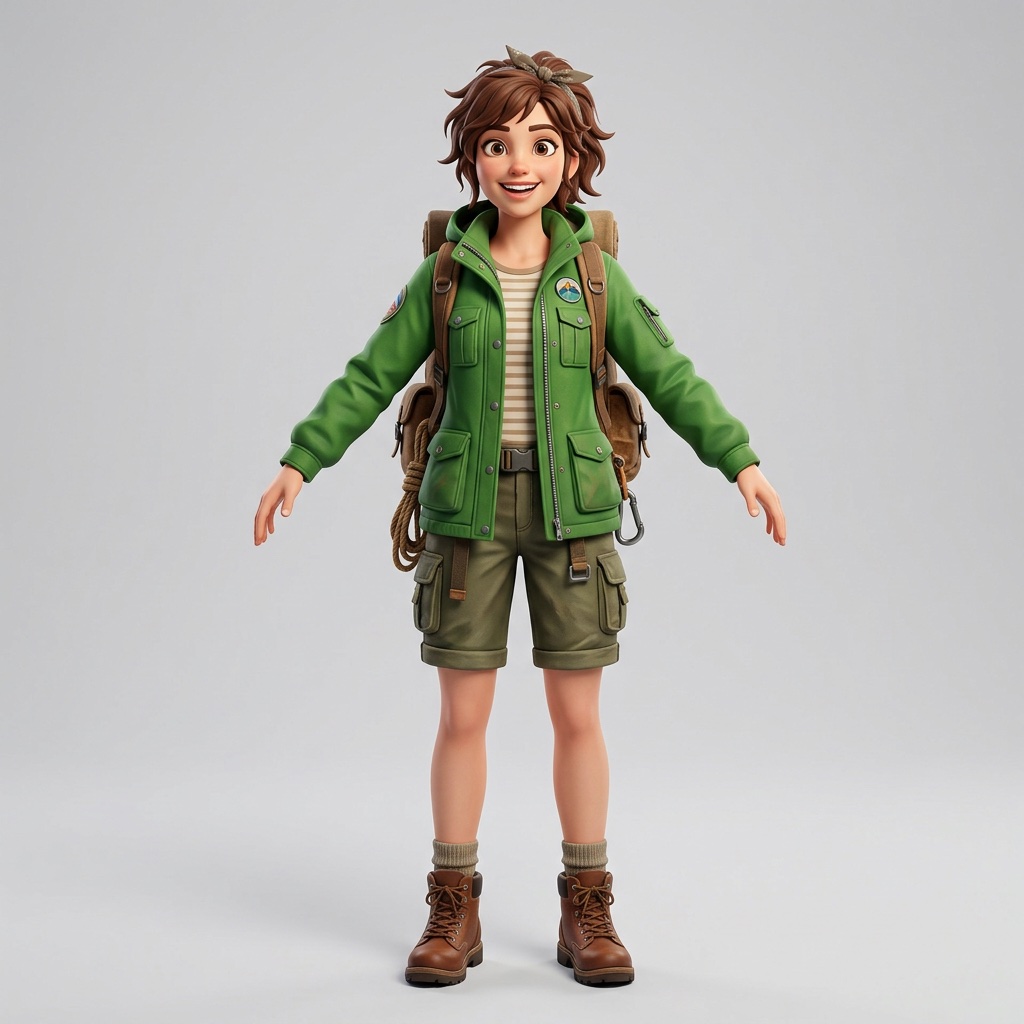
Idol Max, with Rig the character on and Animation clips set to all. It took 490 seconds.
The image only showed the front, so the back of the backpack, its straps and pockets were invented, and they match the front. The file came back with a 28-bone skeleton and all four clips. Here is the run clip from the same file:
An A-pose with the arms away from the body and the feet apart gives the rig the best chance. A sitting or curled-up character can still be rigged, but walk, run and jump need legs the skeleton can find; in our tests a seated cartoon fox only got the idle clip.
The same sneaker on Idol Max and Turbo
One product shot of a high-top sneaker, run once on each model with default settings. Idol Max took 478 seconds and Idol Max Turbo took 441 seconds.
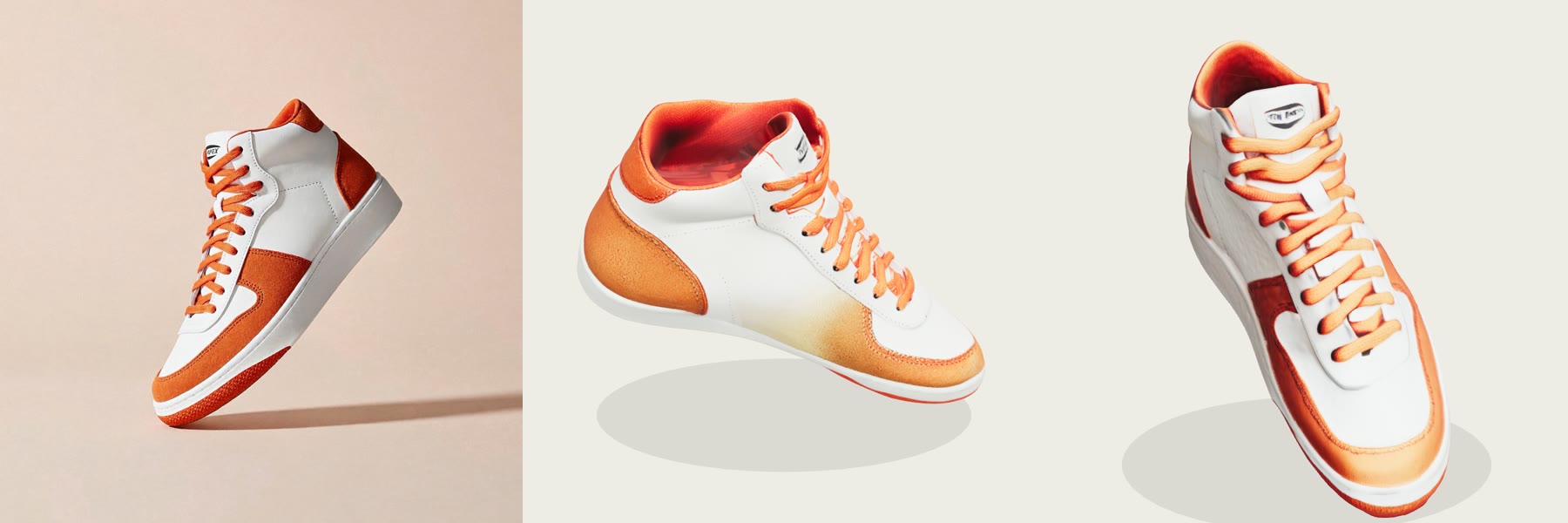
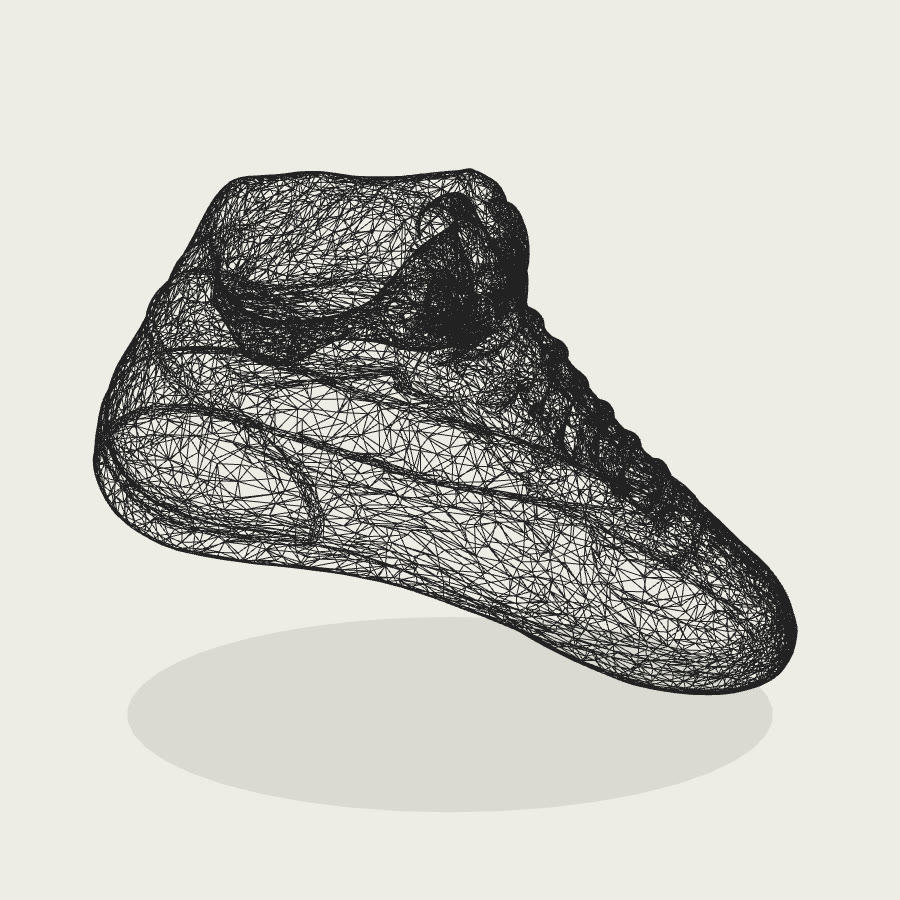
Both models got the shape right, including the inside of the collar and the sole. The difference is the colour: Idol Max repaints the texture from the photo and kept the orange and white, while Turbo's colour drifted towards red and came out patchier. Both keep the tilted angle the shoe had in the photo. Here is the Idol Max mesh as a wireframe, about 30,000 triangles:
What it finds hard: glass
A photo of a perfume bottle standing in water, on Idol Max Turbo with Image type set to real and PBR maps on. It took 554 seconds.
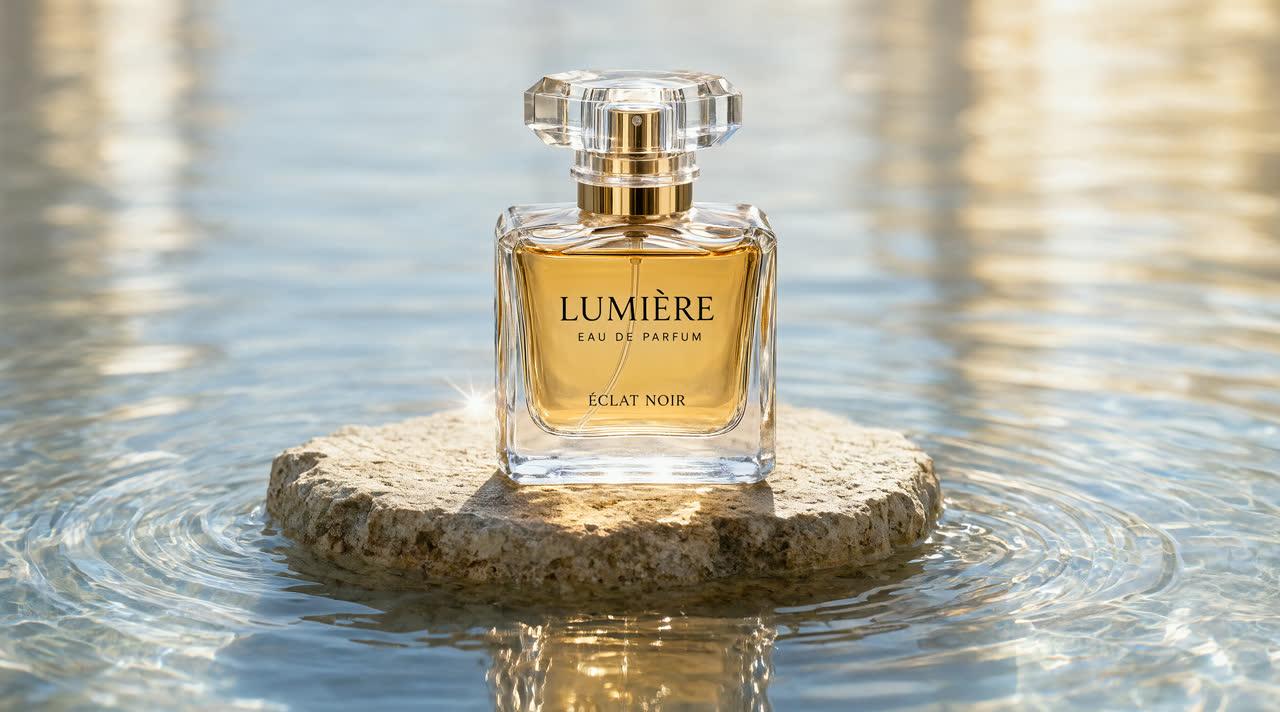
The bottle's outline and gold collar came through, and the PBR maps give the glass its shine, but the cap turned lumpy, the liquid became a cloudy shape and the label is gone. Transparent and reflective objects are hard for any image-to-3D model, because the photo shows what is behind and around the object as much as the object itself. Use solid, matte objects for the best results.
How to turn an image into a 3D model on Flixly
- Open the 3D Generator and stay on the Image tab.
- Add one image of a single object. Idol Max reads one image; the background is removed for you.
- Pick Idol Max or Idol Max Turbo in the model list.
- For a character, turn on Rig the character and pick the animation clips you want.
- Set Image type to real for a photo, or leave it on synthetic for renders, illustrations and AI images. Turn on PBR maps if you need metallic and roughness maps.
- Press Generate 3D model, then drag to orbit the result and download the GLB.
Which images work best?
| Works well | Works less well |
|---|---|
| One object, fully in frame | Several objects, or one cut off at the edge |
| Plain or simple background | Busy scenes where the object blends in |
| Solid, matte materials | Glass, liquids, mirrors and chrome |
| Characters in an A-pose or T-pose, for rigging | Sitting or curled-up characters, for walk and run clips |
| Even light | Hard shadows across the object |
No photo? Make one first in the Image Generator: ask for the object alone, the whole thing in frame, on a plain background. For a model made from a written description instead of an image, use the Text tab of the 3D Generator.
Frequently Asked Questions
What is Idol Max?▾
Idol Max is an image-to-3D model from Sperid Labs, built on its Idol model. It turns one image of an object or character into a 3D model with about 30,000 triangles, UV-mapped textures and a normal map. On Flixly it can also add PBR maps, a skeleton and walk, run, jump and idle animations.
What is the difference between Idol Max and Idol Max Turbo?▾
Both are from Sperid Labs and give the same kind of game-ready GLB with the same options. Idol Max repaints the texture from your image, so its colours are more accurate. Idol Max Turbo projects the colour from the 3D reconstruction instead: it is roughly three to four times faster and costs about half as much, which suits drafts and testing many objects.
What file format does Idol Max export?▾
On Flixly, Idol Max gives you a GLB file, the binary glTF format that Blender, Unity, Unreal Engine, Godot, three.js and most 3D viewers open directly. With rigging on, the same GLB carries the skeleton and the animation clips you picked.
Can Idol Max rig and animate a character?▾
Yes. In Flixly's 3D Generator, turn on Rig the character and Idol Max adds a skeleton and skin weights, and can write walk, run, jump and idle clips into the file. It works best on a character standing in an A-pose or T-pose. Walk, run and jump need legs the skeleton can find, so a sitting character may only get the idle clip.
What images work best with Idol Max?▾
Sperid Labs' Idol Max works best with one solid object fully in frame on a plain background, in even light. Product shots, renders and AI images all work. Glass, liquids, mirrors and chrome are hard, because the image shows what is behind them; in our test a glass perfume bottle lost its label and its liquid.
Do I need a Sperid Labs account to use Idol Max on Flixly?▾
No. Idol Max and Idol Max Turbo run on Flixly credits, which never expire, with no subscription. Flixly shows the credit amount before you generate, and you can download every model you make as a GLB from the 3D Generator.