
Motion to Code: Turn a Prompt, Image or Clip into GSAP or GLSL Code
Motion to Code is live on Flixly. Describe a motion graphic, upload an image or a clip of up to 15 seconds, and get it back as code: one HTML page animated by a GSAP timeline, or a looping GLSL shader ready for Shadertoy. See five real results, the code they produced, and how to open and edit it.
TL;DR
Motion to Code GSAP and GLSL are live in the Flixly Video Generator and Video Effects. A prompt, an image or a video of 1 to 15 seconds becomes code rather than pixels: GSAP returns one HTML page with an editable timeline, GLSL a seamlessly looping fragment shader plus a page that plays it. Both include an MP4 preview rendered from the code. Prompts and images are first animated by MiniMax H3 Max; your own clip is rebuilt directly.
Motion to Code is live on Flixly: describe a motion graphic, upload an image or a short clip, and get it back as code. Motion to Code GSAP returns one self-contained HTML page animated by a GSAP timeline, which opens in any browser and can be edited line by line. Motion to Code GLSL returns a seamlessly looping fragment shader, ready for Shadertoy, plus a page that plays it. Both come with a video preview rendered from the code. When you start from a prompt or an image, MiniMax H3 Max first animates it into a reference clip, and that clip is rebuilt as code. Open Motion to Code in the Video Generator.
What is Motion to Code?
Motion to Code turns motion into code rather than into pixels. A video model gives you a finished MP4 that you can only cut or generate again. Motion to Code gives you the source of the animation: a file in which every move is a line you can read, change and run again. The GSAP version writes a web page, where the words and shapes are SVG elements and a GSAP timeline moves them. The GLSL version writes a fragment shader, a small program the graphics card runs for every pixel of every frame, which is how generative backgrounds and loops on sites such as Shadertoy are made. In both cases the preview video is a render of that code, not the other way round.
What is GSAP?
GSAP, the GreenSock Animation Platform, is the JavaScript animation library behind a large share of animated websites. It animates any property of any element along a timeline. A line such as tl.to(code, { y: 0, duration: 0.3, ease: "power3.out" }, 1.75) moves the element called code to its resting position over 0.3 seconds, starting 1.75 seconds into the animation. A Motion to Code GSAP page is one such timeline, plus the SVG it moves and the fonts it uses, in a single HTML file.
What is a GLSL shader?
GLSL is the shading language of OpenGL and WebGL. A fragment shader is a function that, given the position of a pixel and the current time, returns that pixel's colour. The graphics card runs it for every pixel of every frame, so there are no frames to store and the animation plays at any resolution. Motion to Code GLSL writes its shaders in the Shadertoy convention, with a mainImage function and the iTime and iResolution inputs, so they paste straight into Shadertoy and most shader players.
GSAP or GLSL?
| Motion to Code GSAP | Motion to Code GLSL | |
|---|---|---|
| You get | animation.html: one page with the SVG, the fonts and a GSAP 3 timeline, plus an MP4 preview |
shader.glsl: a Shadertoy-style fragment shader, plus animation.html, a page that plays it with WebGL, plus an MP4 preview |
| Best for | Flat motion design, kinetic typography, logo stings, interface animations, anything with words or shapes | Abstract, generative and atmospheric loops: light, waves, smoke, gradients, grain |
| Loops | The timeline ends on its opening frame and repeats | Seamless by design: the shader is a function of time that wraps at the loop length |
| Edit with | Any text editor; a browser to play it | Any text editor; Shadertoy or the bundled page to play it |
| Starting from | A prompt, an image, or a clip of 1 to 15 seconds | A prompt, an image, or a clip of 1 to 15 seconds |
| Length | 5 to 15 seconds; a clip sets its own length | 5 to 15 seconds; a clip sets its own length |
| Shape | 16:9, 9:16 or 1:1; an image or a clip sets the shape | 16:9, 9:16 or 1:1; an image or a clip sets the shape |
Real examples
Every example below was made on Flixly with the prompt and settings shown. Each one is the first result we got, with nothing edited apart from compressing the previews for the web. From pressing Generate to the finished files, these took between 42 seconds and about five and a half minutes. The previews made from a prompt also carry the soundtrack of the reference clip.
Kinetic typography from a prompt (GSAP)
Six seconds, 16:9, Refine left on. It took 183 seconds.
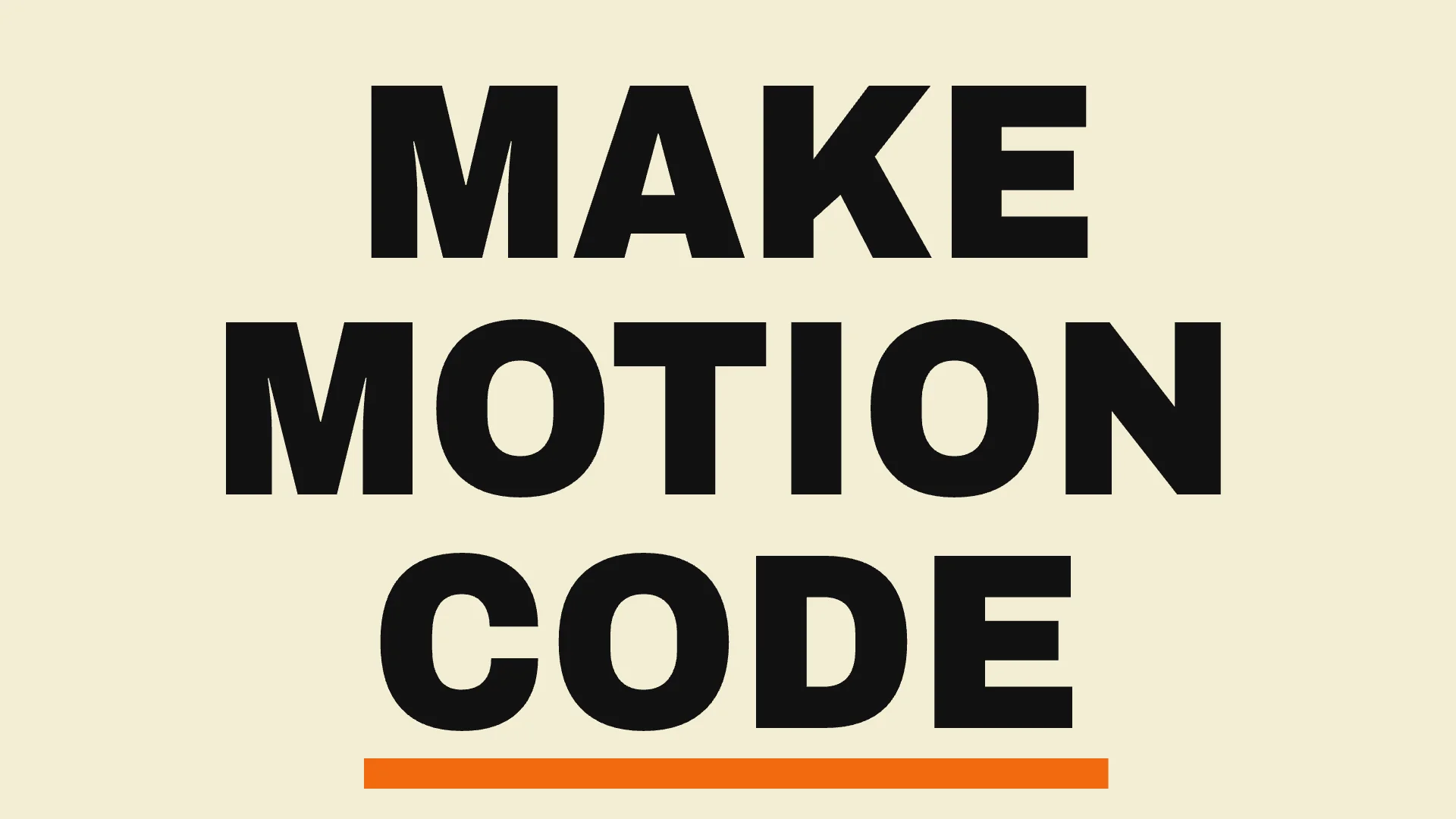
Kinetic typography on a cream background: the words MAKE, MOTION and CODE slam in one after another in heavy black condensed type, each sliding in from a different side with a hard stop, then a thick orange underline draws itself under CODE, everything holds, then the three words wipe out upward in a stagger.
What came back is a 5 KB page of 125 lines. At the top is a shot list, written as a comment, that reads like a storyboard:
SHOT LIST (6.00 s loop, 1920x1080)
0.00-0.08  Empty cream stage (same as the final frame).
0.08-1.00  MAKE slides in from the LEFT, leaning forward, stops hard, skew relaxes.
0.95-1.75  MOTION slides in from the RIGHT, leaning, stops hard, skew relaxes.
1.75-2.05  CODE slams up from the BOTTOM.
2.20-3.30  Orange underline draws left to right, overshoots past CODE, settles back.
Below it are the three words and the underline as SVG text and a rectangle, the font Archivo Black from Google Fonts, GSAP 3 from a public CDN, and one timeline of 20 tweens. Each tween is one line you can read and change:
tl.to(motion, { x:0, duration:0.4, ease:'power3.out' }, 0.95)
  .to(motion, { skewX:0, duration:0.6, ease:'sine.inOut' }, 1.15);
tl.to(code, { y:0, duration:0.3, ease:'power3.out' }, 1.75);
tl.to(ul, { scaleX:1.35, duration:0.55, ease:'power2.inOut' }, 2.2)
  .to(ul, { scaleX:1, duration:0.55, ease:'power3.out' }, 2.75);
Because the result is code, it plays at any size. Here is the same page opened in a browser window of 1920 by 1080 pixels, three seconds in:
A blob that hops across the word LOOP (GSAP)
Six seconds, 16:9. It took 246 seconds.
The word LOOP in heavy condensed white type on black pops in letter by letter, then a small orange blob squashes, hops across and lands.
The page is 8 KB and 199 lines, in the font Anton. The four letters are separate SVG groups, and the blob is two nested groups, one for its position and one for squash and stretch, which is how a character animator would rig it. The shot list times every hop:
1.80-2.42  Blob launches, arcs high above L/O (apex 2.25), drops onto the first O (squash).
2.42-2.75  Rebound and hop onto the second O, which squashes and slowly springs back.
2.75-3.25  Hop up (apex 3.00) and down onto P, which squashes and springs back.
3.25-3.72  Last hop off P down to the floor at the right. Big flat squash (3.72-3.80).
An aurora loop from a prompt (GLSL)
Six seconds, 16:9. It took 128 seconds.
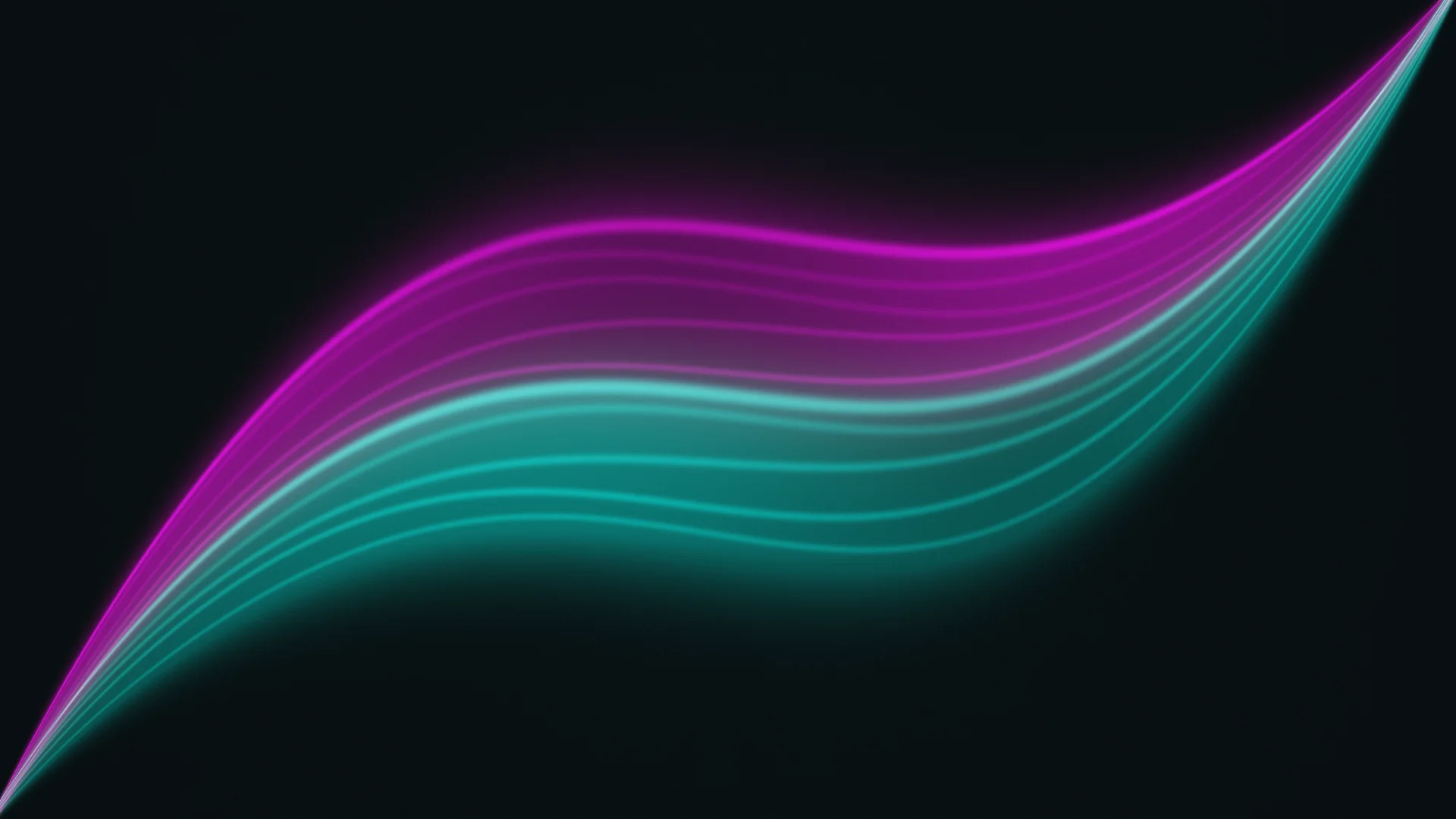
Abstract seamless loop: slow ribbons of teal and magenta light drift across a near-black background like an aurora, soft glow, a gentle breathing pulse, fine film grain, no text, no objects.
The shader is 92 lines and 4 KB. It opens with its own shot list, defines the loop length, and builds the picture from small functions: an ease, a curve for the ribbons' spine, an envelope that pinches them at the corners, a hash for the film grain, and a ribbon function that draws a translucent veil with a bright rim and a soft glow. The time input wraps at the loop length, which is what makes the loop seamless:
#define DURATION 6.0
vec2 uv = (2.0*fragCoord - iResolution.xy) / iResolution.y;
float t = mod(iTime, DURATION);
The preview comes back at 640 by 360 pixels. The shader does not have a resolution at all, so the bundled page draws it at whatever size the window is. Here it is at 1920 by 1080:
Your own clip, rebuilt as a page (GSAP from a video)
You can also start from a video, in which case nothing is generated first: the clip itself is rebuilt as code. We took the first six seconds of a kinetic-typography clip made with Kling 4.0, from our Kling 4.0 post, with five typographic posters cutting from one to the next:
We uploaded it in Video Effects, picked Motion to Code GSAP and left the instruction empty. It took 323 seconds, the longest of our tests, and came back as a 16 KB page of 327 lines with the same five scenes in the same order:
The page uses four Google fonts to match the lettering, and 23 tweens to time the cuts, pops and slides. It is not a trace of the video: the source's warped, glitching letters on FEEL THE MOMENT became clean slides and skews, the kind of simplification you would make yourself when rebuilding a reference in code. Every word is live text, so changing "DREAM BIGGER" to your own line is a one-word edit.
How literal is it? A test clip (GLSL from a video)
We also gave Motion to Code GLSL a deliberately plain clip: a flat orange square on a navy field, not moving, seven seconds long. It took 42 seconds.
The 55-line shader shows how closely it looks at a clip. Its comment measures the two colours, the position of the square and its size, and says why the loop is exact:
// 0.00 - 6.00 s : A single flat orange square (#F77114) on a deep navy field
//                 (#0D1826). Centre at ~75% of frame width, exactly half height,
//                 side = one third of frame height. Locked-off hold that matches
//                 the reference: no translation, rotation or scale.
How to use Motion to Code on Flixly
- Open the Video Generator and pick Motion to Code GSAP or Motion to Code GLSL from the model list. Choose Text to animate a prompt, or Image to animate a picture.
- To rebuild a clip of your own, open Video Effects instead, pick the model, and upload an MP4 or MOV of 1 to 15 seconds. An instruction is optional there: add one to change something, such as the background colour.
- Set the loop length, from 5 to 15 seconds, and the aspect ratio. A clip or an image sets these itself.
- Under Advanced options, leave Refine at 1: the render is compared with the reference and the code is corrected once. 0 is a single pass at the same price.
- Check the credit estimate and press Generate. Results take a few minutes and are saved to your History.
- On the result, download the preview, the HTML page and, for GLSL, the shader.
How to open and edit the files
animation.htmlis a complete page. Save it and open it in any browser: it plays on load and loops. The GSAP pages load GSAP 3 and their fonts from public CDNs, so they need a connection the first time. To edit, open the file in a text editor: the colours are in the stylesheet or aPALETTEconstant, the words are in the SVG text elements, and the timing is in thetl.to(...)lines, where the last number is the start time in seconds. Save and reload the tab.shader.glslis the shader on its own. On Shadertoy, start a new shader, replace its code with the file's contents and compile. It also works in any player that takes Shadertoy-style shaders. The bundled page plays it with WebGL if you would rather not sign up anywhere.- For developers: both pages expose
window.animwithduration,seek(t),play(from)andpause(). Add?external=1to the file's URL to stop autoplay, and the page setsdata-ready="1"on the root element once the first frame is drawn. That is how we rendered the stills in this post, and how you can record either animation at any resolution with a headless browser.
Tips for better results
- Describe words, shapes, colours and timing, not scenes. "LOOP in heavy condensed white type on black" became four letters and a blob. A photoreal scene has no flat shapes to rebuild.
- Keep it flat. Solid colours, simple geometry, one or two fonts. That is what both models are best at.
- Say what the loop does. Name the first and last moments if they matter, such as "ends on the empty opening frame".
- For GLSL, think in fields. Light, waves, smoke, gradients and grain, with no text and no objects.
- Use your own clip when you already have the motion. The result follows it closely, and it costs less per second than animating a prompt first.
- Edit, then regenerate only if you must. Changing a word, a colour or a timing is faster in the file than in a new prompt.
How Motion to Code is priced
Both models are priced per second of animation, with a five-second minimum and a 15-second maximum. Starting from a prompt or an image costs more per second than starting from your own clip, because MiniMax H3 Max first animates the prompt or the image into the reference clip. Refine does not change the price. Flixly shows the credit estimate before you start; the Motion to Code GSAP and Motion to Code GLSL model pages list the current rates.
Related tools
- MiniMax H3 Max is the model that animates your prompt or image into the reference clip; it also makes finished videos on its own.
- Motion Type Studio makes kinetic-typography videos when you want a video rather than code.
- Video Effects has more ways to change an existing clip.
Frequently Asked Questions
What is Motion to Code?▾
Motion to Code is a pair of models on Flixly that turn a prompt, an image or a short video into animation code instead of a finished video. Motion to Code GSAP writes one HTML page animated by a GSAP timeline. Motion to Code GLSL writes a seamlessly looping fragment shader with a page that plays it. Each result also comes with an MP4 preview rendered from the code.
What is the difference between Motion to Code GSAP and GLSL?▾
GSAP is for flat motion design: words, shapes, logos and interface animations become SVG elements moved by a GSAP 3 timeline, in a single HTML file you can edit in a text editor. GLSL is for abstract, generative and atmospheric loops: light, waves, smoke and gradients become a fragment shader that runs on the graphics card at any resolution and pastes into Shadertoy.
What do I download, and how do I open it?▾
Every result has a video preview and animation.html, a page that plays the animation in any browser when you open it from your computer. GLSL results also have shader.glsl, the shader on its own, which you can paste into Shadertoy or any Shadertoy-compatible player. To edit, open the file in a text editor and reload the page.
Can I turn my own video into code?▾
Yes. In Video Effects, pick Motion to Code GSAP or GLSL and upload an MP4 or MOV of 1 to 15 seconds. The clip sets the length and the shape of the result, and an instruction is optional. In our test, a six-second clip of animated typographic posters came back as a page with the same five scenes.
How long can the animation be?▾
From 5 to 15 seconds. Without a video you choose the loop length, 6 seconds by default. With a video, the clip's own length is used. Every animation is written to loop: the GSAP timeline ends on its opening frame, and the GLSL shader wraps at the loop length.
What is MiniMax H3 Max doing here?▾
When you start from a prompt or an image, there is no motion to copy yet, so MiniMax H3 Max first animates your prompt or image into a short reference clip. Motion to Code then rebuilds that clip as code. When you upload your own video, that step is skipped.
How is Motion to Code priced?▾
Both models are priced per second of animation, with a five-second minimum and a 15-second maximum. Starting from a prompt or an image costs more per second than starting from your own clip, because the reference clip has to be made first. Flixly shows the credit estimate before you generate; the model pages list the current rates.